

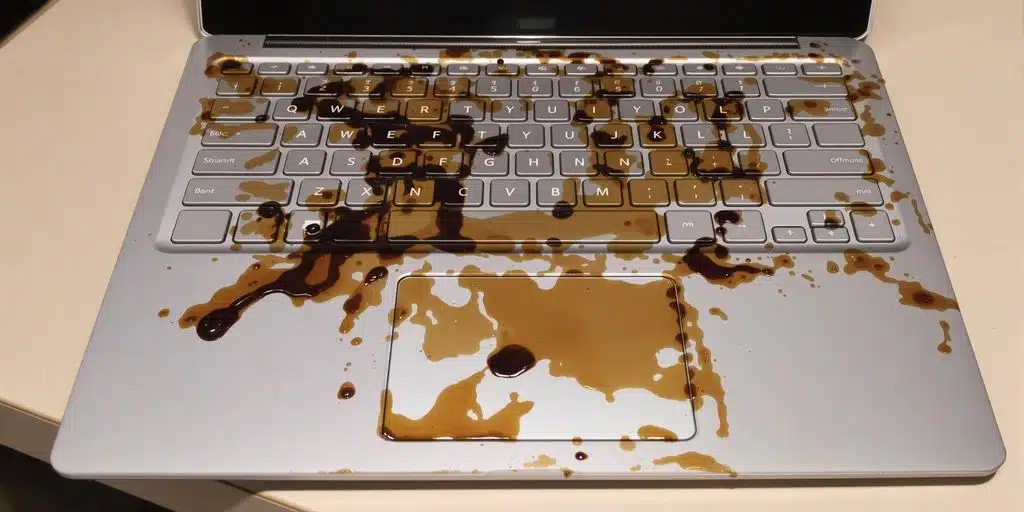
Surface Laptop coffee spill case study documents a Microsoft Surface Laptop that stopped working after coffee exposure. The laptop had no power and no signs of life, and the goal was to restore access to the internal storage so the client’s files could be recovered.
Case Study Summary
- Device: Microsoft Surface Laptop
- Problem: Coffee spill followed by power failure
- Findings: A short circuited 3.3 volt power relay, traced to a small burned copper trace on the motherboard. A previous repair shop had cleaned the visible corrosion but damaged the keyboard flex cable
- Approach: Power relays tested with a multimeter and board schematics, the burned trace removed and replaced, then the power lines bridged with tweezers because the keyboard and power button were dead
- Result: The laptop powered on again and the data was cloned using the customer’s BitLocker key, then returned on a new external drive
Surface Laptop coffee spill case study symptoms
- No power response when pressing the power button
- No charging or status indicators
- No signs of startup
These symptoms are common after liquid exposure, where corrosion can create shorts or open circuits in power delivery pathways.
Logic board corrosion and power failure
During inspection, coffee residue and corrosion were found on the logic board. Liquid exposure can trigger multiple faults at once, so a structured repair process is required to identify which circuits are preventing the device from powering on.
What makes this type of failure difficult
- Corrosion can continue to spread if moisture remains inside the device
- Power circuit faults can block access to the internal storage
- Security features such as BitLocker can add extra steps during data access
Microsoft’s Surface support guidance notes that devices that will not turn on may require additional troubleshooting beyond basic user steps: Surface won’t turn on or start.
Surface Laptop coffee spill case study repair approach
To recover data from a device that will not power on, the priority is restoring stable operation long enough to access the storage safely. In this Surface Laptop coffee spill case study, the process focused on cleaning affected areas, addressing corrosion-related faults, and restoring the power circuits needed for controlled data access.
How data is extracted after power is restored
Once the device can operate reliably, the next step is accessing the internal drive and extracting data to a safe destination. If BitLocker is enabled, recovery may require the correct credentials or recovery key to complete file access.
Service process for Surface laptops and other computers
For computers and laptops (including Microsoft Surface devices), we provide a free assessment and quote. Quotes are typically provided within 1 to 2 business days. Work starts only after approval.
Payam Data Recovery has laboratories in Sydney CBD, Rhodes NSW, Melbourne CBD, and Brisbane CBD. Secure drop-off points are available in Adelaide CBD and Perth CBD. International customers are welcome and we have regular clients in the USA, Europe, the Middle East, and Asia. The easiest way for an international customer to reach us is by email at help@payam.com.au, which works in every time zone.
Frequently asked questions
I spilled coffee on my Surface and it will not turn on. Is the data gone?
Usually not. Liquid stops the machine powering up, it does not erase the storage. In this case the laptop had no power at all and the files were recovered in full.
Another repair shop has already tried. Does that make it harder?
Sometimes. Here the previous shop had cleaned the visible corrosion but damaged the keyboard flex cable while doing it, which had to be worked around before the data could be reached.
How do you find the fault when there is no power at all?
With a multimeter and the board schematics, testing each of the main power relays in turn. On this machine the 3.3 volt relay had short circuited, which led to a small burned copper trace on the motherboard.
The power button does not work either. Can you still start it?
Yes. Once the burned trace was removed and replaced, the power system tested correctly on a DC power supply. The keyboard was still dead, including the power button, so the power lines were bridged manually with tweezers to bring the laptop up.
My Surface storage is soldered to the board. Does that change anything?
It means the storage cannot be removed and read separately, so the board itself has to be brought back to life first. That is why board level electronics work is needed rather than a standard repair.
My drive is encrypted with BitLocker. Can you still recover it?
Yes, with your BitLocker key. That is what was used here before the files and folders were cloned to a new external drive.
Microsoft Support told me they cannot help. What now?
That is how this customer reached us. Microsoft Support could not assist and recommended Payam Data Recovery.
Video transcript
Click to expand full transcript
First, their data recovery engineer started his diagnostic process. When he opened the laptop, he discovered that while the previous shop had cleaned the visible corrosion, they had damaged the keyboard flex cable in the process. Using a multimeter and detailed schematics, he tested all the main power relays. He found the 3.3 volt power relay had short circuited, which led him to a small burned copper trace on the motherboard. With precision, he removed the damaged trace and replaced it with a new one.
After testing with a DC power supply, the power system was working again. But the keyboard still did not work, including the power button. So he used tweezers to manually bridge the power lines, successfully bringing the laptop back to life.
The final step was cloning the data, getting the customer’s BitLocker encryption key, then delivering all files and folders on a brand new external drive.
When the SSD is built into modern laptop motherboards, only data recovery companies like Payam with advanced electronics expertise can help. Smaller shops simply cannot handle these complex cases. This case shows how Payam’s methodical approach and diagnostic skills succeeded where others failed, turning an impossible repair into complete success. If your laptop needs data recovery, contact Payam Data Recovery for a free assessment and quote.
Related case studies
- Dead MacBook Pro data recovery case study
- MacBook Air M2 data recovery case study
- iPhone 11 logic board repair data recovery case study
Payam Data Recovery works with individuals, students, families, small and medium businesses, IT companies, and organisations that need their data recovered safely and professionally. Some customers come to us with a single damaged device containing personal memories, while others rely on us for complex technical recoveries that require specialist tools and experience.
We are based in Australia and have been recovering data since 1998. Our clients also include governments, law enforcement agencies, corporations, and public figures. Every job is handled with 100 percent confidentiality and privacy.
Read more about our Surface Data Recovery Service
Email: help@payam.com.au
Phone: 1300 444 800