

Published 23 July 2025. Updated 17 October 2026.
When your iMac won’t turn on, data recovery becomes critical to save your precious files. If your iMac is completely dead, stuck on the Apple logo, or suffering from hardware failure, our professional iMac won’t turn on data recovery service can help retrieve your important data safely.
✅ First, check iCloud.com to see if your files are available there.
✅ Next, check for backups on Time Machine, Time Capsule, or external hard drives.
✅ No backup? Stop using the iMac immediately to avoid further damage.
Our iMac won’t turn on data recovery specialists can retrieve your data safely using professional tools in our labs across Australia.
Why Choose Our iMac Won’t Turn On Data Recovery Service?
When your iMac won’t turn on, data recovery becomes urgent. Our specialised iMac won’t turn on data recovery service has successfully recovered data from thousands of dead iMacs since 1998. Whether your iMac won’t power up due to logic board failure, SSD corruption, or physical damage, our data recovery engineers use advanced recovery techniques to retrieve your irreplaceable files.
Our iMac won’t turn on data recovery process involves sophisticated hardware repairs and data extraction methods that go far beyond standard troubleshooting. We understand that when your iMac won’t turn on data recovery isn’t just about fixing the computer. It’s about saving years of memories, work documents, and important files.
Common iMac Won’t Turn On Data Recovery Scenarios We Handle
Our iMac won’t turn on data recovery experts regularly handle these challenging situations:
- Completely Dead iMac: No lights, no power, no response. Our iMac won’t turn on data recovery team can still extract your data
- Apple Logo Freeze: iMac stuck on startup screen requires specialised data recovery techniques
- Logic Board Failure: Critical component failures don’t stop our data recovery process
- SSD/Fusion Drive Damage: We recover from both solid-state and hybrid drive failures
- Power Supply Issues: Even when power circuits fail, data often remains recoverable
- Liquid Damage: Water or spill damage requires immediate professional intervention
- Physical Impact: Dropped or damaged iMacs can still yield recoverable data
- Firmware Corruption: Deep system-level failures affecting boot processes
- Encrypted Drive Recovery: FileVault and T2/M1 chip encryption specialist recovery
Complete iMac Won’t Turn On Data Recovery for All Models
Our iMac won’t turn on data recovery service supports every Apple iMac model ever manufactured:
Legacy iMac Models:
- iMac G3 (1998-2003): Translucent coloured models
- iMac G4 (2002-2004): Distinctive lamp design
- iMac G5 (2004-2006): First flat-panel iMacs
Intel iMac Data Recovery:
- Intel iMac (2006-2020), all screen sizes: 17″, 20″, 21.5″, 27″
- iMac with Retina 4K Display (21.5-inch)
- iMac with Retina 5K Display (27-inch)
- iMac Pro (2017-2021): Professional workstation models
Apple Silicon iMac Recovery:
- 24-inch iMac with M1 chip (2021+)
- iMac with M3 chip (2023+)
- Latest M4 and M5 iMac models
Fusion Drive Specialist Recovery: We expertly handle iMacs with Fusion Drives, recovering data from both the SSD and HDD components even when one drive completely fails.
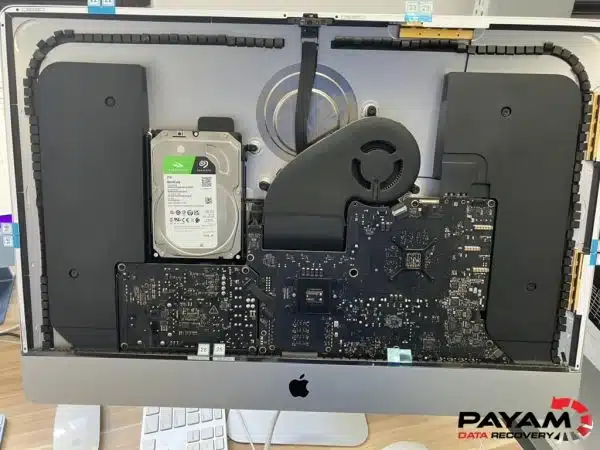 Professional iMac won’t turn on data recovery in our ISO 5 certified laminar flow cabinets
Our Professional iMac Won’t Turn On Data Recovery Process
When you choose our iMac won’t turn on data recovery service, here’s exactly what happens:
- Free Initial Assessment: Our data recovery engineers examine your non-responsive iMac to determine the exact cause of failure and recovery possibilities
- Detailed Diagnostics: We perform comprehensive hardware and software analysis to create a recovery strategy
- Recovery Planning: Based on your iMac’s condition, we develop a customised data extraction approach
- Professional Recovery: Using specialised tools and laminar flow cabinets, we safely extract your data
- Data Verification: We verify file integrity and provide you with a complete recovery preview
- Secure Delivery: Your recovered data is delivered on new storage media with complete file organisation
Submit your iMac recovery job here to begin the process immediately.
iMac Won’t Turn On Data Recovery Available Across Australia
Our iMac won’t turn on data recovery service is available from four full service labs and two secure drop-off offices across Australia:
Sydney CBD
Full service lab, Level 11, 65 York Street
Rhodes NSW
Main data recovery lab, Suite 213, Level 2, 5 Rider Boulevard
Melbourne VIC
Full service lab, Level 11, 456 Lonsdale Street
Brisbane QLD
Full service lab, Level 10, 95 North Quay
Adelaide Secure Drop-off Office
Level 30, 91 King William Street, sent to Rhodes, NSW overnight at no cost
Perth Secure Drop-off Office
Level 28, 140 St Georges Terrace, sent to Rhodes, NSW overnight at no cost
Can’t visit in person? Post your iMac to our main data recovery lab in Rhodes, NSW from anywhere in Australia or overseas. Use a strong cardboard box with plenty of bubble wrap on all sides, and a service with tracking, signature on delivery and insurance.
What Our iMac Won’t Turn On Data Recovery Service Can Retrieve
Our comprehensive iMac won’t turn on data recovery service can retrieve virtually any file type:
Personal Files:
- Family photos and video collections
- Personal documents and financial records
- Email archives and contacts
- Music libraries and iTunes purchases
- Desktop folders and user profiles
Professional Content:
- Final Cut Pro projects and media
- Adobe Creative Suite files
- Business documents and presentations
- Databases and spreadsheets
- Development projects and source code
System Data:
- Complete Time Machine backup files
- Application preferences and settings
- Browser bookmarks and saved passwords
- System logs and diagnostic information
Why Trust Our iMac Won’t Turn On Data Recovery Expertise?
When choosing an iMac won’t turn on data recovery service, experience and credentials matter:
- Experience: Providing data recovery services since 1998
- Listed by Apple: One of three recommended data recovery providers
- 300,000+ devices recovered: Successfully completed data recoveries
- Certified Data Recovery Engineers: Apple Certified (ACMT and ACiT) data recovery engineers and electronics specialists
- Advanced Facilities: Professional laboratories
- Security Compliance: Full confidentiality and data protection
- Clear Pricing: About 90% of our jobs are no fix, no fee. The hardest 10% carry an attempt fee.
Client Success Story
A Google review from one of our Mac customers:
“Process of recovery was simple. Managed to get all data back from my non-working Mac! Would highly recommend the service to anyone in the same situation” - Tamara Abidakar, Google review
Advanced iMac Won’t Turn On Data Recovery Techniques
Our iMac won’t turn on data recovery service uses these techniques:
Hardware Recovery Methods:
- Logic board repair and component-level troubleshooting
- SSD chip-off recovery for completely failed drives
- Fusion Drive separation and individual component recovery
- Power management unit bypass techniques
- Direct memory chip data extraction
Software Recovery Techniques:
- FileVault encrypted drive recovery, with your password
- APFS and HFS+ file system reconstruction
- Boot ROM and firmware recovery procedures
- T2 and Apple silicon iMac recovery, using your login password
- Corrupted partition table reconstruction
Emergency iMac Won’t Turn On Data Recovery Service
Need urgent data recovery? Our emergency iMac won’t turn on data recovery service provides:
- Emergency Service: Our fastest service level, for critical situations
- After Hours: Call 0404 872 926 for urgent jobs outside business hours
- In Person: Drop it at our Sydney, Melbourne or Brisbane CBD office and we’ll start as quickly as possible
- Express Processing: Fast-track your recovery for urgent deadlines
Transparent iMac Won’t Turn On Data Recovery Pricing
Our iMac won’t turn on data recovery service offers transparent, fair pricing:
- Free Assessment: No charge for initial diagnosis and quote
- No Hidden Fees: All costs explained upfront
- See Your Files Before You Pay: You tell us which files matter most. Before you pay for the recovery, we’ll send you a list of your recovered files so you can check them. If any of the files you listed are missing, tell us and we’ll search again.
- Three Service Levels: Economy, Priority and Emergency, each with its own price and turnaround
Preventing Future iMac Data Loss Situations
While our iMac won’t turn on data recovery service can help when disaster strikes, prevention is always better:
- Regular Time Machine backups to external drives
- Cloud storage synchronisation for important files
- Regular system updates and maintenance
- Proper ventilation and temperature control
- Surge protection and UPS battery backup
- Annual professional system health checks
Start Your iMac Won’t Turn On Data Recovery Today
Don’t let a dead iMac mean lost data forever. Our professional iMac won’t turn on data recovery service has the expertise and tools to retrieve your precious files safely.
Get your free assessment now. Your data recovery success story starts here.
Get Your Free iMac Recovery Quote Now
Professional iMac won’t turn on data recovery service available across Australia. Contact us today for immediate assistance. International customers are always welcome, and the easiest way to reach us from overseas is by email at help@payam.com.au.
Visit Apple’s official iMac support page for basic troubleshooting before professional recovery becomes necessary.
See some of our case studies for more examples of our work.
Related reading: iPhone data loss prevention and backup methods, why deleted iPhone data cannot be recovered and Mac hard drive recovery guide.


