

Published 9 July 2025. Updated 17 October 2026.
This MacBook Air M2 dead logic board data recovery case study explains how data was recovered from a 2022 MacBook Air M2 that arrived completely dead and would not power on. The device contained important files with no usable backup available.
Case study summary
Client: Priya, in Brisbane
Device: 2022 MacBook Air M2
Problem: Arrived completely dead and would not power on, with no usable backup of the files inside
Solution: Thermal imaging pointed at the wrong component, so freeze spray and voltage injection were used to isolate a shorted capacitor, which was replaced
Outcome: The MacBook powered on normally and the data was cloned to an external USB drive
Service: MacBook data recovery
Quick answer
In this MacBook Air M2 dead logic board data recovery case study, a 2022 MacBook Air M2 showed abnormally high current draw on a DC power supply. Thermal imaging initially pointed to a MOSFET, but freeze spray revealed a shorted capacitor nearby. After replacing the capacitor, the MacBook powered on and data was cloned to an external USB drive.
MacBook Air M2 dead logic board case study overview
When the MacBook Air M2 was connected to a DC power supply, the current draw was already abnormally high. This strongly suggested a short circuit on the logic board. On Apple Silicon MacBooks, a short circuit can prevent the system from powering on and can block access to the soldered storage until the fault is isolated and repaired. This is why professional fault isolation is central to a MacBook Air M2 dead logic board data recovery case study.
Thermal camera diagnosis and why it can mislead
The logic board was removed and tested using an infrared thermal camera while controlled voltage was injected into a power rail. Almost immediately, a primary MOSFET appeared to overheat on the thermal display. In a MacBook Air M2 dead logic board data recovery case study, this is a common trap: the hottest part is not always the failed part.
Glossary: what is a MOSFET?
A MOSFET (Metal Oxide Semiconductor Field Effect Transistor) is a power switching component used to regulate voltage and current across a logic board. In short circuit cases, a MOSFET can show heat even when it is not the root cause, because it may sit next to the real failed component.
Freeze spray fault isolation: finding the real short
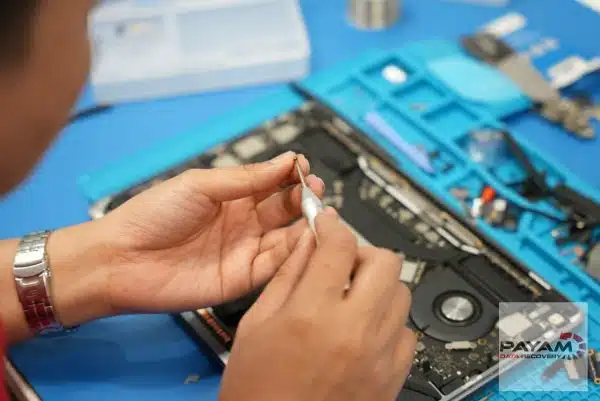
Instead of replacing the MOSFET, the data recovery engineer suspected the heat was secondary. To confirm the true fault, freeze spray was applied to a nearby surface mounted capacitor, and voltage injection was repeated. This technique quickly revealed the real culprit: a tiny capacitor next to the MOSFET was shorted and drawing excessive current.
The MOSFET was heating up mainly due to proximity to the shorted capacitor, not because the MOSFET itself had failed. This kind of decision making is the difference between a safe recovery and extra damage in a MacBook Air M2 dead logic board data recovery case study.
Logic board repair and data recovery process
The shorted capacitor was replaced, restoring normal power behaviour. After the repair, the MacBook Air powered on successfully with no further electrical faults detected.
With the device operational, the SSD was accessed normally through the system and all user data was cloned and backed up to an external drive to ensure a complete and safe recovery. That final cloning step is the core outcome of this MacBook Air M2 dead logic board data recovery case study.
Key technical takeaways
- Thermal imaging can be misleading: the hottest component is not always the failed one.
- Small components can cause total failure: a single shorted capacitor can stop the entire logic board from powering on.
- Apple Silicon repairs require precision: incorrect diagnosis can introduce additional faults on a board with soldered storage.
- Experience reduces risk: proper fault isolation prevents unnecessary component replacement.
MacBook models (2018 to 2025): SSD types and recovery impact
Modern MacBooks use different SSD designs that directly affect data recovery methods. Apple Silicon models have storage soldered to the logic board, so board-level repair is often required before data can be accessed.
| Model and year | SSD type | SSD interface | Notes |
|---|---|---|---|
| MacBook Air 2018 | Removable NVMe | PCIe 3.0 | Simpler recovery |
| MacBook Air 2020 Intel | Removable NVMe | PCIe 3.0 | Direct access possible |
| MacBook Air M1 and M2 | Soldered NVMe | PCIe 3.0 | Logic board repair often required |
| MacBook Air M3 and later | Soldered NVMe | PCIe 4.0 | Advanced repair needed |
Apple warranty and data recovery considerations
Apple states that using a data recovery provider recommended by Apple does not automatically void warranty coverage. However, data recovery itself is not covered under Apple warranty or AppleCare plans.
For official information, see: Apple data recovery and warranty guidance.
Why People Choose Payam Data Recovery
When a MacBook will not start, its data is usually locked to its own chips, so those chips have to be working again before anything can be copied. That is the work we do every day.
- We are a specialist data recovery lab, not a computer repair shop. We have been recovering data since 1998, from over 300,000 devices.
- We are listed on Apple’s data recovery provider page, one of three recommended data recovery providers.
- Board level repair under the microscope by our own data recovery engineers, here in Australia and never outsourced overseas.
- Over 2,000 IT companies and computer shops across Australia send us their customers’ complex cases, and data recovery labs and IT companies in more than 50 countries have sent us their difficult cases over the past ten years.
- Your data stays private. Our data recovery engineers open only a few random, non-sensitive files to check the recovery worked, and we can sign an NDA on request.
- Rated 4.9 from over 2,400 Google reviews.
- See your files before you pay. You tell us which files matter most. Before you pay for the recovery, we’ll send you a list of your recovered files so you can check them. If any of the files you listed are missing, tell us and we’ll search again.
- Pay by Visa, Mastercard, American Express, Apple Pay, Google Pay, Link or PayPal, split the cost with Afterpay, Zip, Klarna or PayPal Pay in 4, or pay by bank deposit (EFT).
We are not the cheapest. We are the best in Australia at this work. We know what to do, how to do it, and we will do our very best for you. Your best chance of getting your data back is with us.
Frequently Asked Questions
My MacBook Air M2 will not power on at all. Is the data still there?
Very likely. A short circuit on the logic board can stop the machine powering on and can block access to the storage, but it does not erase anything. Once the fault is isolated and repaired, the data is usually still intact.
The storage is soldered to the board. Does that make recovery impossible?
No, but it changes the approach. Because the storage cannot be removed and read separately, the board itself has to be brought back to life first. That is why careful fault isolation matters so much on Apple Silicon machines.
A thermal camera showed a part overheating. Why not just replace that part?
Because the hottest component is not always the failed one. Here the thermal camera pointed at a MOSFET, but freeze spray and voltage injection showed the real fault was a tiny shorted capacitor beside it. The MOSFET was heating up mainly because of its proximity to the short.
How do you get the data off once the board is repaired?
Once the shorted capacitor was replaced, the MacBook powered on and the data was cloned to an external USB drive.
What does MacBook data recovery cost, and when do I pay?
Every MacBook starts with a free assessment, then a written quote with Economy, Priority and Emergency service levels. MacBook SSD recoveries like this job are usually no fix, no fee. If a job carries an extra cost, we quote it first, and you choose whether to go ahead. You pay at the end. Before that final payment we send you a complete file list and a video preview so you can check the quality first. Prices include GST. If we recover your data and you pay, return delivery is free, including to New Zealand.
Related case studies
- iMac Fusion Drive SSD not detected case study
- Dead MacBook Pro data recovery case study
- MacBook Pro data recovery case study
- Liquid damaged MacBook data recovery case study
Get professional help
If your MacBook will not turn on, avoid DIY board work and request a professional assessment.
Email: help@payam.com.au
Phone: 1300 444 800
International customers are always welcome. The easiest way to reach us from overseas is by email at help@payam.com.au, which works in every time zone.
Video transcript
Hey, it’s Mike and I’m here at Payam Data Recovery watching a data recovery specialist work on a seemingly dead 2022 MacBook Air M2. When he connected it to his DC power supply, the current was already dangerously high, confirming a short circuit somewhere on the motherboard. After removing the motherboard, he used an infrared thermal camera and injected voltage to see what would heat up.
One of the main MOSFETs lit up on the thermal display, suggesting it was the culprit. But experience trumps equipment. He explained that even though the thermal camera pointed to the MOSFET, it was likely not the root cause. Instead, he used freeze spray on a small capacitor near the MOSFET, then injected voltage again.
The real culprit revealed itself: a tiny capacitor had failed and was causing the short circuit, while the MOSFET was heating up because it was next to it. He replaced the capacitor and the MacBook Air came back to life. With the hardware repair complete, the MacBook was then passed to the team to clone and back up all files to a USB external hard drive to return to the customer. Thanks for watching.


