


Published 9 July 2025. Updated 17 October 2026.
2023 MacBook Pro no power case study showing how a MacBook that suddenly went to a black screen and would not turn back on was diagnosed at component level, repaired, and then the data was cloned to an external USB drive.
Case study summary
Client: Daniel, in Melbourne
Device: 2023 MacBook Pro
Problem: The screen went black and the machine would not turn back on
Solution: Component level diagnosis of a short circuit on the main power rail, using voltage injection and a thermal camera, then board repair
Outcome: The MacBook powered on again and the data was cloned to an external USB drive
Service: MacBook data recovery
2023 MacBook Pro no power case study: the black screen problem
The client was working normally when the MacBook Pro abruptly powered off. There was no response to power, and the files on the internal storage could not be accessed. In this 2023 MacBook Pro no power case study, the next step was a logic board inspection to find the fault safely and avoid causing further damage.
Diagnosing the short circuit on the main power rail
In the workshop, the logic board was removed and connected to a DC power supply. The senior data recovery engineer identified a short circuit on the main power rail. Locating a short circuit on a motherboard can be difficult because the failed component may be small and surrounded by many similar parts.
- Initial diagnosis: dead MacBooks often point to a logic board issue
- Common cause: short circuits on the main power rail
- Risk: repeated power attempts can worsen faults on a damaged board
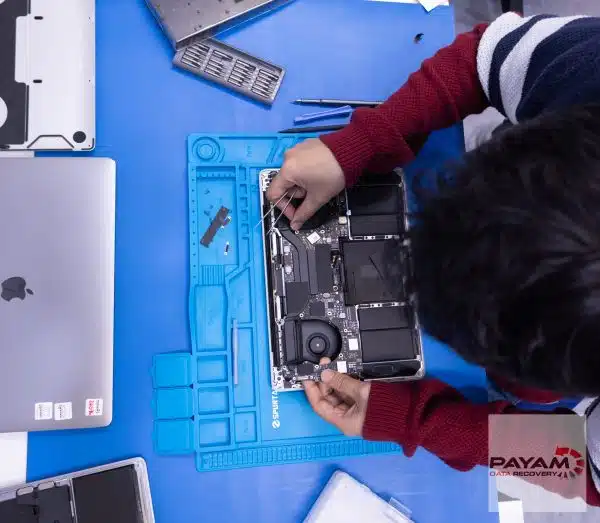
Using voltage injection and a thermal camera
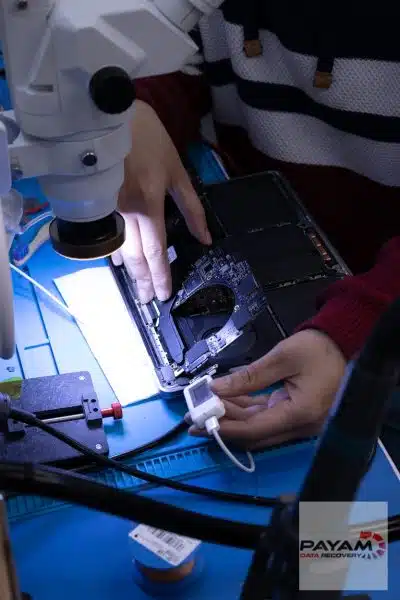
To pinpoint the short, the data recovery engineer used an infrared thermal camera. Instead of applying normal operating voltage, he carefully injected one volt into the main power rail (voltage injection). The thermal camera then revealed a single component heating up more than the others.
The failed part was identified as the speaker amplifier IC. Although small, a fault in this component was enough to pull down the power rail and stop the MacBook from powering on.
Repair outcome and data cloning
After the faulty IC was removed and replaced, the MacBook powered on again. Once it was stable, the device was handed to the team to clone and back up the client’s files to an external USB drive.
Apple data recovery and warranty implications
If you are considering data recovery before manufacturer service, it is worth reading Apple’s guidance on warranty and third-party service. See Apple’s support page here: Apple support guidance.
Why People Choose Payam Data Recovery
When a MacBook will not start, its data is usually locked to its own chips, so those chips have to be working again before anything can be copied. That is the work we do every day.
- We are a specialist data recovery lab, not a computer repair shop. We have been recovering data since 1998, from over 300,000 devices.
- We are listed on Apple’s data recovery provider page, one of three recommended data recovery providers.
- Board level repair under the microscope by our own data recovery engineers, here in Australia and never outsourced overseas.
- Over 2,000 IT companies and computer shops across Australia send us their customers’ complex cases, and data recovery labs and IT companies in more than 50 countries have sent us their difficult cases over the past ten years.
- Your data stays private. Our data recovery engineers open only a few random, non-sensitive files to check the recovery worked, and we can sign an NDA on request.
- Rated 4.9 from over 2,400 Google reviews.
- See your files before you pay. You tell us which files matter most. Before you pay for the recovery, we’ll send you a list of your recovered files so you can check them. If any of the files you listed are missing, tell us and we’ll search again.
- Pay by Visa, Mastercard, American Express, Apple Pay, Google Pay, Link or PayPal, split the cost with Afterpay, Zip, Klarna or PayPal Pay in 4, or pay by bank deposit (EFT).
We are not the cheapest. We are the best in Australia at this work. We know what to do, how to do it, and we will do our very best for you. Your best chance of getting your data back is with us.
Service workflow for MacBook and other computers
- Free assessment and quote: provided within 1 to 2 business days
- Work starts only after approval
Payam Data Recovery works with individuals, students, families, small and medium businesses, IT companies, and organisations that need their data recovered safely and professionally. Some customers come to us with a single damaged device containing personal memories, while others rely on us for complex technical recoveries that require specialist tools and experience.
We are based in Australia and have been recovering data since 1998. Our clients also include governments, law enforcement agencies, corporations, and public figures. Every job is handled with 100 percent confidentiality and privacy.
Locations and delivery options
- Labs in Sydney CBD, Rhodes NSW, Melbourne CBD, and Brisbane CBD
- Secure drop-off offices in Adelaide CBD and Perth CBD
- International customers welcome, including regular clients in the USA, Europe, the Middle East, and Asia. The easiest way for an international customer to reach us is by email at help@payam.com.au, which works in every time zone.
Frequently asked questions
My MacBook went to a black screen and will not turn back on. Is the data gone?
Usually not. This 2023 MacBook Pro shut down suddenly and would not respond to power at all, and the files were cloned off intact once the board was repaired.
How do you find a short circuit on a logic board?
The board is removed and run from a bench power supply, then the fault is narrowed down with voltage injection and a thermal camera. Injecting a controlled voltage makes the shorted component heat up, and the camera shows which one it is.
Why not just replace the whole logic board?
Because on a modern MacBook the storage is soldered to that board. Replace it and you replace the data with it. The original board has to be repaired.
Do I get the MacBook back working, or just the files?
In this case the machine powered on again and the data was cloned to an external USB drive, so both. The priority is always the data first.
What does MacBook data recovery cost, and when do I pay?
Every MacBook starts with a free assessment, then a written quote with Economy, Priority and Emergency service levels. Most MacBook SSD recoveries are no fix, no fee. If a job carries an extra cost, we quote it first, and you choose whether to go ahead. You pay at the end. Before that final payment we send you a complete file list and a video preview so you can check the quality first.
Related case studies
- Old iMac with a dead motherboard: files saved from the hard drive inside
- MacBook Air M2 short circuit data recovery case study
- Liquid damaged MacBook data recovery case study
- Dead MacBook Pro data recovery case study
Get a free assessment
Read more about our MacBook Data Recovery Service
Email: help@payam.com.au
Phone: 1300 444 800
Video transcript
Picture this. You’re working on your MacBook when suddenly the screen goes black and it won’t turn back on. That heart sinking feeling hits you as you realise you should have made a backup and now you think you’ve lost all your work files and photos. Hey, it’s Mike and I’m here at Payam Data Recovery getting a behind-the-scenes look at how these experts do their work. Today I’m watching a senior data recovery engineer work on a 2023 MacBook Pro that had completely died. No power, no response. I watched as he removed the motherboard and connected it to a DC power supply. Within moments, he discovered a short circuit on the main power rail. But as he explained, finding a short on a motherboard is like finding a needle in a haystack. This is where you could really see his expertise. He brought out what he called his secret weapon, an infrared thermal camera. He carefully injected one volt into the main power rail instead of the normal voltage. This technique is called voltage injection and only experienced technicians know how to use it safely. As he monitored through the thermal camera, I watched the screen light up with heat signatures. One component was glowing brighter than the rest. The speaker amplifier IC had failed, creating the short circuit that had killed the laptop. Within minutes, he removed the faulty chip and replaced it. The MacBook worked again. The MacBook was then passed to the team to clone and back up all the files to an external USB drive for the owner. Thanks for watching.


