

A MacBook Air that worked perfectly one evening would not switch on the next morning. In this MacBook Air A1369 SSD data recovery case study, we took out the 128GB Samsung SSD, found its memory chips wearing out, rebuilt the drive’s translator on a PC-3000 and copied most of Daniel’s files to a new drive.
Case study summary
Client: Daniel from Perth, Western Australia
Device: Apple MacBook Air A1369 with its original 128GB Samsung SSD, model MZ-CPA1280, a removable Apple blade SSD
Problem: Working perfectly one day. The next morning he went to turn it on and nothing happened
What we found: Connected to the PC-3000, the SSD sat in a busy state and would not answer. The cause was NAND degradation: the memory chips that store the data had started to wear out and fail
What we did: Took the SSD out of the MacBook, reached its service area through two short points on the board, uploaded a loader and rebuilt the translator, then copied the data to a lab target drive
Result: Most of Daniel’s data came back into view and was copied off, checked to confirm it opens, and returned on the spare drive he supplied. The SSD itself will never work again
Turnaround: About one week on Economy service. Priority and Emergency service are faster
Cost: Confirmed in the free written quote before any chargeable work; any attempt fee is part of the total and stated before you approve
Apple: Payam Data Recovery is listed by Apple as a recommended data recovery provider
Service: MacBook data recovery
Sound familiar?
- Your MacBook Air worked fine last night and this morning nothing happens when you press the power button.
- There was no drop, no spill and no warning.
- The laptop is old, but the files on it matter.
- You want the files back, even if the MacBook never works again.
Same problem? Call 1300 444 800 or request a free assessment.
A MacBook Air That Died Overnight
Daniel’s MacBook Air gave no warning. Everything had been working perfectly. The next morning he went to turn it on and nothing happened at all.
The MacBook came to our lab in Sydney and went straight onto a data recovery engineer’s bench. It is a MacBook Air A1369, and on this model the storage is not soldered to the logic board. It sits on a small removable SSD, which matters a great deal once you know where the fault is.
The job was never about getting the laptop going again. It was about the files on it.
The Problem: Why Won’t My MacBook Air Turn On?
Our data recovery engineer started by taking the SSD out of the MacBook. It is a 128GB Samsung SSD, model MZ-CPA1280, built on Apple’s own blade format rather than a standard drive.
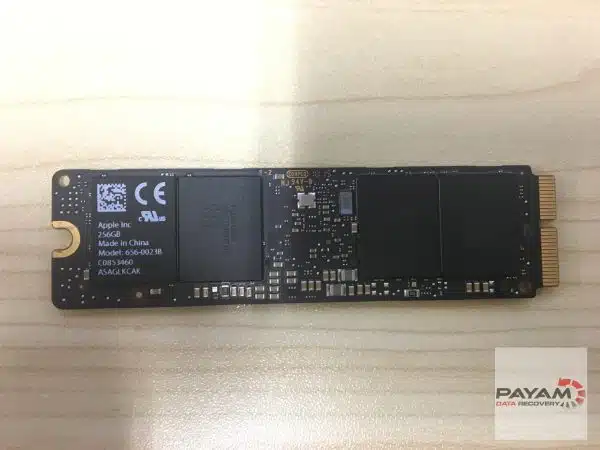
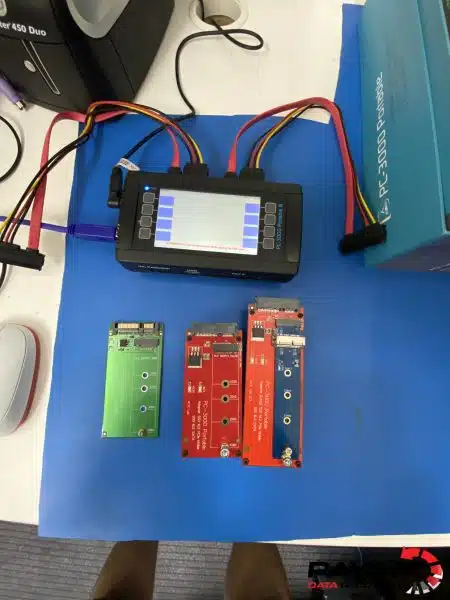
He connected it to the PC-3000, and straight away the SSD showed up in a busy state. A busy state means the drive has power but will not answer the commands sent to it. On an SSD that is a sign of a serious problem inside, and it told the data recovery engineer this was not a loose cable or a flat battery.
The cause was NAND degradation. NAND is the flash memory that actually stores the data on an SSD. Over time those memory chips wear out, and when enough of them start to fail, the drive can stop working completely. From the outside it looks exactly like this: a MacBook that was fine yesterday and is dead today.
The MacBook Air A1369 SSD Data Recovery Process
There was good news early on. The controller on this particular SSD is supported by the PC-3000, so there was a clear path to getting the data out.
Then came the tricky part. To reach the drive’s service area, where its key information lives, the data recovery engineer had to find the two correct short points on the board. He shorted them and, at the right moment, cut the connection so the recovery process could begin.
From there he uploaded the loader and rebuilt the translator. The translator is the map the SSD uses to make sense of where everything is stored. When worn memory damages that map, the data can still be sitting in the chips, but the drive has no way of finding it. Rebuilding the map is what lets the files be read again.
The data recovery engineer was honest about one thing. This was not a repair. The SSD itself was gone and would never work again. The whole job was about rescuing the data from it before it was lost for good.
MacBook Air A1369 SSD Data Recovery Results
Once the translator was rebuilt, most of Daniel’s data came back into view. The data recovery engineer began copying it across to one of the lab’s target drives.
In the end, a MacBook that would not even switch on gave up its files. Once the data was saved, the team ran verification checks to confirm everything opens. Daniel then receives a file listing, a video preview and a link to pay online. After payment, his data is shipped back to him on the spare drive he supplied.
Can an Old MacBook Air SSD Still Be Recovered?
Often, yes, and this job shows why the age of the laptop is not the deciding factor. What decides it is whether the SSD’s controller is supported by professional equipment, and whether the memory chips still hold readable data.
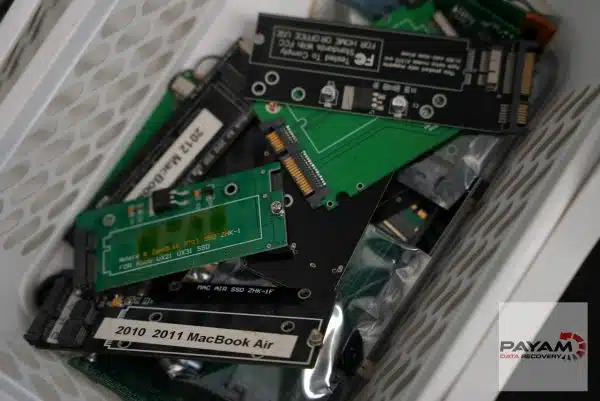
A worn SSD is also a clear case for professional help rather than trial and error. Recovery software cannot help, because a drive stuck in a busy state never shows up for the software to read. The route in is through the drive’s own service area and translator, with a PC-3000 and a data recovery engineer who knows which points to use on that board.
If a MacBook dies overnight, the most useful thing you can do is stop trying to start it, and send it in. You can read more about how we handle a failed Mac on our Mac recovery service page.
Why People Choose Payam Data Recovery
When a MacBook will not start, its data is usually locked to its own chips, so those chips have to be working again before anything can be copied. That is the work we do every day.
- We are a specialist data recovery lab, not a computer repair shop. We have been recovering data since 1998, from over 300,000 devices.
- We are listed on Apple’s data recovery provider page, one of three recommended data recovery providers.
- Board level repair under the microscope by our own data recovery engineers, here in Australia and never outsourced overseas.
- Over 2,000 IT companies and computer shops across Australia send us their customers’ complex cases, and data recovery labs and IT companies in more than 50 countries have sent us their difficult cases over the past ten years.
- Your data stays private. Our data recovery engineers open only a few random, non-sensitive files to check the recovery worked, and we can sign an NDA on request.
- Rated 4.9 from more than 2,300 Google reviews.
- See your files before you pay. You tell us which files matter most. Before you pay for the recovery, we’ll send you a list of your recovered files so you can check them. If any of the files you listed are missing, tell us and we’ll search again.
- There is no card surcharge. Pay by Visa, Mastercard, American Express, Afterpay, Zip or bank deposit (EFT).
We are not the cheapest. We are the best in Australia at this work. We know what to do, how to do it, and we will do our very best for you. Your best chance of getting your data back is with us.
MacBook Data Recovery Pricing and Services
Every MacBook case starts with a free assessment and a written quote. We examine the MacBook, then email you the problem we found, how we can help, the cost and the time involved, for your approval before any chargeable work. Nothing is charged until you say yes.
The price of MacBook recovery depends on the fault and how quickly you need it, and current prices are on our MacBook data recovery page. Economy service usually takes about a week, and Priority and Emergency service are faster. Some complex cases carry a non-refundable attempt fee that forms part of the total quoted price: you pay it to begin, then the balance only if the data is recovered. Where it applies, it is stated in the quote before you approve anything. We can supply a destination drive, or you can send your own, as Daniel did. If you cannot wait for the standard assessment, an urgent written quote within 1 to 2 hours is available for a fee.
Sending a MacBook From Interstate or Overseas
Daniel is in Perth, on the other side of the country from our main data recovery lab in Rhodes, NSW, and distance made no difference to the job. Start with the free quote form. Once you are happy with the next step, we send job instructions, you send the MacBook to us, and the recovered data comes back to you on a drive.
International customers are always welcome. The easiest way to reach us from overseas is by email at help@payam.com.au, which works in every time zone.
Frequently Asked Questions
My MacBook Air died overnight and will not turn on. Is my data gone?
Not necessarily. In this case the MacBook Air was completely dead, and the cause was a worn out SSD. The memory chips were failing, but most of the data was still there to be rescued. Stop pressing the power button, do not run recovery software, and have it assessed.
What is NAND degradation?
NAND is the flash memory inside an SSD that stores your files. With use and age those memory chips wear out and start to fail. When that happens the drive can stop responding altogether, which is what we found on this MacBook Air. The data may still be readable with the right equipment.
Can you repair the SSD so my MacBook works again?
No. On this job the SSD was gone and will never work again, and the data recovery engineer said so plainly. The work was about rescuing the data, not repairing the drive. Your files come back on a separate drive, either one you supply or one we provide.
Does it matter that my MacBook Air is an older model?
It can help. The MacBook Air A1369 keeps its storage on a small removable SSD, so the SSD can be taken out and connected straight to our equipment. Newer MacBooks, including every Apple silicon model, have storage soldered to the logic board, which calls for a different method.
How do I get my files back?
Once the data is saved, we run checks to confirm the files open, then email you a file listing, a video preview and a link to pay online. After payment, the data is shipped back to you on a drive, or you can collect it. Return delivery is free on every completed and paid job.
If you cannot recover my data, is there nothing to pay?
Yes. The assessment and quote are free, and for most faults there is nothing to pay unless we recover your data. See your files before you pay. You tell us which files matter most. Before you pay for the recovery, we’ll send you a list of your recovered files so you can check them. If any of the files you listed are missing, tell us and we’ll search again. The one exception is cleanroom and other high risk work, where part of the quoted price is a non-refundable attempt fee paid upfront so we can begin. That covers the data recovery engineer time and donor parts we commit whatever the outcome. If an attempt fee applies to your job, it will be stated clearly in your quote before you approve anything.
Will taking my MacBook to you affect Apple service later?
Apple lists Payam Data Recovery as one of three recommended data recovery providers. Apple’s page states it will not exclude warranty coverage because a company it recommends modified the product during data recovery. The cost of the recovery itself is not covered by the Apple Limited Warranty or AppleCare.
I am overseas. Can I send my MacBook to you?
Yes. International customers are always welcome. Request a free quote first, then send the MacBook once you are happy with the next step, and the recovered data comes back to you on a drive. The easiest way to reach us from overseas is by email at help@payam.com.au, which works in every time zone.
About Payam Data Recovery
Payam Data Recovery has been recovering data since 1998, with more than 300,000 devices recovered. Apple lists us as one of three recommended data recovery providers, and our team holds Apple Certified Macintosh Technician and Apple Certified iOS Technician certifications. For SSDs the lab runs the Ace Lab PC-3000, with donor parts held in-house. Everything is done in Australia and never outsourced overseas. Head office and full service lab in Sydney CBD, with our main data recovery lab for complex cases in Rhodes, NSW, full service labs in Melbourne and Brisbane, and secure drop-off offices in Adelaide and Perth with free overnight delivery to Rhodes, NSW. International customers are always welcome. You can read more about Payam Data Recovery.
Request a Free MacBook Data Recovery Assessment
MacBook died overnight and will not switch on? Older MacBook Air with a failed SSD? We can help.
Free assessment and written quote before any chargeable work begins. Your quote confirms the exact price.
Every MacBook model, from anywhere in Australia. International customers are always welcome.
MacBook Data Recovery Service
Get a Free Quote
Ready to send it in? Submit a job.
Call 1300 444 800 or email help@payam.com.au
Related Case Studies
- MacBook Pro 16 M2 Pro dead after an old liquid spill
- SATA SSD NAND degradation, translator rebuilt
- MacBook Air M2 with a dead logic board
- Formatted SSD recovered before TRIM finished
- MacBook Pro A1707 after a coffee spill
Video Transcript
Hi, Mike here. Back in the lab at Payam Data Recovery in Sydney. This morning, I caught one of their data recovery engineers right as a MacBook landed on his bench, one that had died overnight without warning. The customer, Daniel from Perth, brought in a MacBook Air, the A1369 model. Everything had been working perfectly, but the next morning he went to turn it on and nothing happened.
The engineer started by extracting the SSD from the MacBook, a 128 gigabyte Samsung V-NAND drive, model MZ-CPA1280, and connecting it to the PC-3000. Straight away, the SSD showed up in what he called a busy state, which told him there was a serious problem. This was NAND degradation, where the memory chips that actually store the data start to wear out and fail. The good news was that this particular controller is supported by the PC-3000, so there was a clear path to getting the data out.
Then came the tricky part. To reach the drive’s service area, where the key information lives, the engineer had to find the two correct short points on the board. He carefully shorted them and at the right moment, cut the connection so the recovery process could begin. From there, he uploaded the loader and rebuilt the translator, which is the map the drive uses to make sense of where everything is stored.
The engineer was honest with me about one thing. This was not a repair. The SSD itself was gone and would never work again. The whole job was about rescuing the data from it before it was lost for good. Once the translator was rebuilt, most of Daniel’s data came back into view, and the engineer began copying it across to one of the lab’s target drives.
In the end, a MacBook that would not even switch on gave up its files. Once the data is saved, the team runs verification checks to confirm everything opens and sends Daniel a file listing, a video preview, and a link to pay online. After payment, his data is shipped back on the spare drive he supplied.
Payam Data Recovery specialises in every kind of Apple recovery, from MacBooks and iMacs to hard drives, SSDs, and iPhones, backed by a large inventory of spare parts and deep experience with everything Apple. Based in Sydney, Australia, they take on jobs like this from right across the country and around the world. Thanks for watching.