


Published 10 May 2025. Updated 8 November 2026.
Published 10 May 2025. Updated 23 October 2026.
Quick answer: Files can sometimes be recovered from an SSD that has failed, including some drives a computer no longer detects. But it depends on what has actually failed, how that particular drive stores and protects its data, and what has happened to the drive since. A drive that is not detected is not automatically unrecoverable, and memory chips that are still physically intact do not guarantee recoverable files.
This guide explains what fails inside an SSD, how TRIM and garbage collection affect deleted or formatted data, why encryption (including on Apple T2 and Apple silicon Macs) changes the picture, where chip-off recovery stops working, and what to do first. It is written for people facing data loss, and for students, teachers and IT staff who want a plain reference. Where a statement rests on a manufacturer or standards document, it is linked in the reference list.
What to do first if the files matter
If the SSD holds the only copy of something important, the aim is to keep your options open. The steps below are cautious preservation advice. They are not a promise that any step restores lost files, and they are not a do-it-yourself repair procedure.
- Stop using the drive. Avoid repeated restarts and reconnecting it just to see whether it comes back.
- Do not format, initialise, factory-reset, secure-erase or reinstall the operating system on the affected drive. Microsoft states plainly that resetting a device removes all files [3].
- Hold off on repair tools, firmware updates, benchmarks and long scans until you have decided how to protect the data. Some of these write to the drive.
- Do not open the drive, heat it, short test points or try to replace components.
- Check for a backup or another copy from a different device, including cloud copies.
- Find your encryption information now. That means a BitLocker recovery key, or your Apple account and FileVault details. Keep keys out of emails, public comments and screenshots.
- Using a work, school or university device? Contact the authorised IT team before removing the drive or sharing any key.
- If a computer is still running with an encrypted drive unlocked and you do not have the key, tell a specialist before you change its power state. Switching off could lock the data away.
- Write down the exact model, what happened beforehand, and anything already tried.
Why the caution? Some SSDs carry out internal housekeeping whenever they have power, even when you are not copying files [5]. More on that below.
A symptom is not a diagnosis
“It will not boot”, “it shows up but will not open” and “it is not detected” are different observations. None of them, alone, tells you which part has failed. A technician has to separate a host or cable problem from file system damage, an encryption lock and a fault inside the SSD.
| What you see | Possible explanations to tell apart | What it does not prove |
|---|---|---|
| The computer will not start | Boot settings, operating system damage, a storage fault, or another hardware problem | That the SSD controller is dead |
| The drive appears, but a volume will not open or mount | File system damage, unreadable areas, an encryption lock, or a file or application problem | That the flash memory has failed |
| The drive is missing from the file browser | A mounting, partition or file system problem, a lock state, or a connection problem | That the drive is absent at every hardware level |
| An external SSD has a light on but no usable drive appears | Power, cable, port, enclosure electronics, a security state, or a fault in the SSD | That the data has been erased |
| A BitLocker recovery screen appears | Microsoft says this can follow a security risk or a hardware change [3] | That the drive has failed |
| Slow copying, freezing or disconnections | Media, controller, heat, connection or host problems | Any particular cause, or how much can be recovered |
This table is a diagnostic framework, not a measured breakdown of how often each cause occurs. No published figure is implied.
What is inside an SSD, and why a chip is not a file
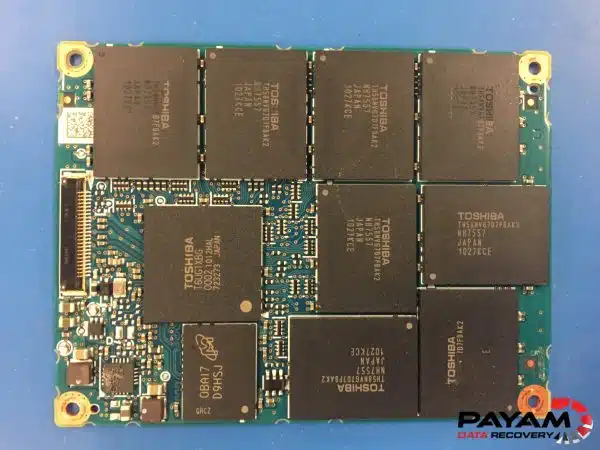
An SSD has no spinning platters. It stores data in NAND flash memory chips, and a controller chip manages everything between the computer and that flash. The controller runs firmware, translates the logical addresses the computer asks for into physical flash locations, corrects read errors, and spreads wear across the memory [11]. The list of translations is often called the flash translation layer.
Because of that arrangement, a raw read of the memory chips is not automatically a set of readable files. The data in the chips may be stored out of logical order, transformed by the controller, or encrypted. Turning it back into files can require the translation information, the controller’s processing and, where used, the encryption keys.
A simplified example. Imagine the computer asks for logical block 42. A translation table says block 42 currently lives at one flash location. After the file is updated, the new version is written somewhere else and the table changes. A raw chip read can therefore contain physical data without the correct logical order or the current version. The number 42 is an illustration only. This is a simplification and it does not describe any specific recovery job.

TRIM and garbage collection: related, but not the same
These two terms are often used as if they mean one thing. They do not.
- TRIM is a message from the operating system. It tells the SSD which logical areas the system no longer needs, for example after files are deleted [4].
- Garbage collection is the SSD’s own housekeeping. Flash cannot be overwritten in place, so the controller copies still-valid data into a fresh block, erases the old block and reuses it. It usually runs on its own when the drive is idle [4].
What does that mean for deleted or formatted files? ACE Lab, a maker of professional recovery tools, notes that TRIM does not erase data instantly. It lets the controller know the data can be erased, and the physical erasing happens later as part of garbage collection [6]. ACE Lab also describes a quick format on some drives as erasing the translation table, after which the drive returns only zeros when read normally [6].
Three limits are worth stating plainly:
- There is no dependable recovery window. How soon anything is erased depends on the drive, the commands issued and what happens afterwards. No timing applies to every SSD.
- Erased cells cannot be un-erased. If the data has been physically erased inside the flash, no tool can rebuild those bytes. Switching a drive off cannot reverse erasure that has already happened.
- Leaving a drive powered is not neutral. Crucial describes a background clean-up function that runs when its SSD has power and is not actively reading or writing [5]. Other drives differ, but it is a reason not to leave a drive running “just to see”.
In 2026, ACE Lab published worked examples of recovering data from certain formatted SSDs using controller-specific functions and earlier versions of translation data, including a Transcend ESD310C external SSD with a Silicon Motion SM2320G controller [7]. These are tool-vendor demonstrations for supported controllers. They do not show that every trimmed or formatted SSD can be recovered, and they do not bring back data that has been physically erased.
A failed drive and an accidentally deleted file are different problems. A hardware fault can block access to data that still exists. Deleting or formatting can lead the drive to discard it.
Encryption: Apple T2, Apple silicon, BitLocker and portable drives
Encryption can mean that the data in the chips is meaningless without the right key. Several different things get called “encryption”, and they should be kept apart:
- Scrambling or compression applied by a controller as part of how it stores data.
- Cryptographic encryption managed by hardware, such as the system Apple uses in its Macs.
- Operating system encryption, such as BitLocker or FileVault, set up by the user or an organisation.
- Password security built into a portable drive by its maker.
A statement about one of these does not automatically apply to another.
Apple T2 and Apple silicon Macs
Apple documents that on Macs with Apple silicon or the Apple T2 Security Chip, internal storage is encrypted even when FileVault is turned off. In that case the volume encryption key is protected only by a hardware key in the Secure Enclave. Turning on FileVault adds protection tied to the user’s credentials. All FileVault key handling takes place in the Secure Enclave, and encryption keys are never directly exposed to the main processor [1].
The practical consequence is that recovery depends on more than whether the storage chips are intact. Moving or reading the flash chips on their own does not bypass this protection. Restoring access through the original security hardware may be essential. A password or recovery key does not make up for every hardware or cryptographic failure either. Apple also states that when a volume is deleted, its key is securely deleted by the Secure Enclave, which makes the volume cryptographically inaccessible [1].
This does not mean every damaged Apple logic board is a lost cause. Damage to a board is not necessarily the same as losing the key-bearing hardware, and each case needs a model-specific assessment. It also applies to Apple silicon and T2 Macs, not to every older Mac or to an ordinary external encrypted drive.
One more Apple caution: Apple describes two different firmware procedures. Revive does not erase the Mac. Restore erases it and returns it to factory settings [2]. If the files matter, do not choose Restore as a casual troubleshooting step.
Windows and BitLocker
Microsoft says a BitLocker recovery key is needed when BitLocker cannot automatically unlock an encrypted drive. The key is a 48-digit number, and the first 8 digits of its ID help you pick the right key if you have several. It may be saved in your Microsoft account, in a work or school account, on a printout or on a USB drive. Microsoft Support cannot retrieve or recreate a lost key [3].
Microsoft’s suggestion to reset the device is a way to get the computer working again after accepting that the files are gone. It is not a data recovery step.
Secure erase is not the same as failure
Deliberate sanitisation is designed to make access to data infeasible for a given level of effort. NIST’s SP 800-88 Revision 2 (September 2025) covers this. Cryptographic erase works by sanitising the relevant keys under defined conditions, which is different from deleting a file [10]. This is about the limits of recovery, not a how-to for destroying data.
Why chip-off is not a universal fix
“Chip-off” means removing flash chips from a board so they can be read directly. It is a legitimate technique in some cases, and it is well established for simpler flash media. For SSDs it is not a general answer to a failed controller.
- Encryption and scrambling. ACE Lab states that SSD chip-off is more complicated because of the encryption of data inside the NAND [8], and that modern SSDs commonly use hardware encryption or XOR scrambling with compression, so no usable data appears in the raw read before it is decoded [6]. Those are vendor statements about common designs, not a rule for every drive.
- Controller-specific layout. Even without encryption, rebuilding files needs the mapping and processing the controller applied [11].
- Model by model. A controller repair, firmware access or chip transplant that works for one design cannot be assumed to work for another. Some cases need the original electronics repaired or supported firmware access restored instead.
So “the memory chips are fine” is only the start of the question. What matters is the exact SSD model, controller, firmware, the condition of the flash, whether encryption is in play, and whether recovery tools support that combination. Specialist platforms such as ACE Lab’s PC-3000 SSD publish lists of supported controllers, and having a tool does not mean it supports a particular drive [6]. Professional work usually combines hardware, firmware utilities and imaging software, so it is not simply “hardware instead of software”.

A clone is not the same as working files
When an engineer reports progress, four different things can be meant:
| Stage | What has been achieved | What is still unproven |
|---|---|---|
| The device communicates | A tool can identify the drive or read something from it | That all of the data is accessible |
| An image or clone exists | Some or all addressable data has been copied | That encrypted content can be decrypted, or that every copied file is intact |
| An encrypted volume unlocks | The required key or credential works for that volume | That every file is complete and usable |
| Files are checked | The files or samples tested passed the stated checks | That untested files are valid |
A good report says what was copied, how read errors were counted and how the files were checked. A file list or preview is useful, but it is not proof that every file is undamaged.
M.2, SATA and NVMe are different things
These terms are often mixed up because they describe different aspects of an SSD.
| Term | What it describes | What it does not tell you |
|---|---|---|
| M.2 | A physical form factor and connector. M.2 drives can use either the SATA or the PCIe/NVMe interface [9] | Which protocol the drive uses, or that it works in every M.2 slot |
| SATA | A storage interface used by some 2.5-inch drives and some M.2 drives [9] | That any M.2 module that physically fits will work |
| PCIe | An interconnect that many modern SSDs use | The storage protocol or the module size |
| NVMe | An open storage protocol, usually used over PCIe [12] | The physical size, or any recovery outcome |
| USB-C | A connector shape on many external drives | The controller or encryption inside the enclosure |
The label “M.2” alone does not tell you which interface a module uses [9]. Check the model’s specification sheet, and tell any recovery provider the exact model number.
Heat, power loss and wear: why this guide makes no brand claims
Heat, sudden power loss and flash wear are all commonly discussed as reasons SSDs fail. This guide deliberately does not rank them, and does not blame particular brands or device types, because the sources reviewed do not support those claims.
- Wear. Flash cells tolerate a limited number of program and erase cycles, and controllers manage wear to spread it out [11]. How quickly that matters depends on the model and the workload.
- Heat and power. A hot drive, a slowdown, or a drive that failed after a power cut tells you what happened, not which component is damaged. Check the manufacturer’s specification for your exact model.
- Failure rates. There is no single, current failure rate for all consumer SSDs. A study of one fleet describes that fleet, and the drives a recovery lab receives are a selected group of already-failed devices. Neither tells you how likely your own drive is to fail.
Questions to ask any recovery provider
- What device, controller and firmware have you identified?
- What evidence separates the diagnosed fault from the symptom I described?
- Is encryption involved, and what access information will you need?
- What method do you propose, and what are its limits?
- Will you work from an image where that is feasible?
- What counts as success, and how will partial results be reported?
- What fees apply if the attempt does not work?
- What happens to my original drive and to any copies afterwards?
Some access-restoration work has to happen on the original hardware before an image can be made, so a good provider will tell you which case yours is.
Five things to note before you contact anyone
Use what you have already seen. Do not power the drive on again just to answer these.
- Where is the drive visible or missing: the file browser, disk utility, firmware settings, or nowhere?
- What is its exact model and connection type?
- What happened just before access was lost?
- Was a deletion, format, update, liquid exposure or repair attempted?
- Is there a backup, and do you have the encryption recovery information?
Getting help in Australia
Need help with a failed SSD? Payam provides SSD data recovery in Australia, and international customers are welcome. Tell us the model, what happened and which files matter most, and we will explain the options for your drive. Please keep passwords and recovery keys out of the first message.
About Payam Data Recovery. Payam Data Recovery is Australia’s oldest data recovery company, operating since 1998, and has recovered data from over 300,000 devices. Complex SSD cases are handled in-house in Australia, never outsourced overseas, in our ISO 5 certified laminar flow cabinet at the lab in Rhodes, NSW, using PC-3000 SSD, PC-3000 Flash, DeepSpar Disk Imager and Atola Insight Forensic. We have labs in Sydney, Rhodes NSW, Melbourne and Brisbane, and secure drop-off offices in Adelaide and Perth. Over 2,000 IT companies and repair shops around Australia send us their complex cases, and over 2,400 customer reviews are published on our reviews page. Before you pay, you receive a file list and a video preview so you can check the recovery.
Real SSD recoveries are documented in our case studies, including a SanDisk SSD Plus controller failure and a Dynabook portable SSD firmware recovery.
Costs depend on the fault and the service level, so they are not listed here. See how much data recovery costs for current information, or call 1300 444 800.
Common questions
Can data be recovered from an SSD that is not detected?
Sometimes. “Not detected” is a symptom with several possible causes, from a cable or port issue to a fault inside the SSD, and the data may still exist. Whether it can be reached depends on the fault, the controller and firmware, the flash and any encryption.
Can a failed SSD controller be replaced?
It depends on the design. Some faults are addressed by repairing the original electronics or restoring firmware access with controller-specific tools. Replacing a controller is not a general solution, and encryption or controller-specific data layout can still prevent usable files even when the memory is readable.
Does chip-off recovery work on every SSD?
No. Encryption, scrambling and controller-specific layout can make a raw read of the flash unusable, and support differs model by model. See why chip-off is not a universal fix.
Can deleted or formatted SSD files be recovered?
Sometimes, but not reliably. TRIM and garbage collection are separate processes that can lead to deleted data being erased inside the drive, and there is no timing that applies to every SSD. Some tool vendors have shown recovery from specific formatted drives with supported controllers, but nothing can recreate data that has been physically erased.
Does a quick format leave the files recoverable?
Not necessarily. On some drives a quick format erases the translation table, so a normal read returns zeros [6]. Stop using the drive and seek advice before doing anything else.
Can an encrypted SSD be recovered without the password or recovery key?
Often not. A copy of encrypted data stays encrypted. Without the key, or a working path to the hardware that holds it, the files may stay unreadable. Locate any BitLocker recovery key or Apple credentials early, through the proper channel.
Is recovering a Mac with Apple silicon or a T2 chip the same as removing an SSD?
No. Internal storage on these Macs is encrypted even with FileVault off, and the keys are handled by the Secure Enclave [1]. Removing the flash chips does not bypass that.
Is an M.2 SSD the same as an NVMe SSD?
No. M.2 is a physical form factor, while NVMe is a protocol. An M.2 module can be SATA or NVMe. See the table above.
Can recovery software help if the computer cannot see the drive?
Generally no, because the software needs the drive to respond. Running scans or repairs on a drive that matters can also write to it. If the files are important, get advice before running anything against the drive.
Does a successful clone mean every file has been recovered?
No. A clone is a copy of addressable data. Encrypted content still needs the key, and files still need to be checked. See the stages table.
How are recovery cost and turnaround worked out?
They depend on the diagnosed fault, the SSD’s design, the work needed and the service level. Ask for a written quote that separates assessment, recovery work and delivery of the data, and ask whether an attempt fee applies. Current information is on Payam’s pricing page.
Glossary
- SSD
- Solid-state drive. Storage built from flash memory with no moving parts.
- NAND flash
- The non-volatile memory that holds the data in most SSDs.
- Controller
- The processor on the SSD that manages access to the flash.
- Firmware
- The software that runs the controller.
- Logical address
- The location the computer asks for, which is not necessarily where the data physically sits.
- Flash translation layer (FTL)
- The mapping between logical addresses and physical flash locations.
- TRIM
- A notification from the operating system that certain logical areas are no longer needed.
- Garbage collection
- The SSD’s internal process of moving valid data and erasing blocks so they can be reused.
- Error correction (ECC)
- Extra data used to detect and correct read errors, within its limits.
- Image or clone
- A copy of a defined range of a drive. Its completeness and any read errors need to be reported.
- Encryption key
- The secret information needed to turn encrypted data back into readable data.
- Recovery key
- A backup code that unlocks an encrypted drive, such as BitLocker’s 48-digit key.
- Chip-off
- Removing memory chips from a board to read them directly. It does not guarantee readable files.
- M.2
- A physical form factor for SSD modules.
- SATA
- A storage interface used by some SSDs and hard drives.
- NVMe
- A storage protocol commonly used by PCIe SSDs.
References
These are the sources behind the technical statements above. Tool-vendor pages describe what the vendor says its tools do. They are not independent success-rate research. This guide is general information, not a promise of any result for a particular drive.
- Apple Platform Security, Volume encryption with FileVault in macOS (January 2026).
- Apple Support, How to revive or restore Mac firmware.
- Microsoft Support, Find your BitLocker recovery key.
- Kingston, The importance of garbage collection and TRIM processes for SSD performance.
- Crucial, My SSD used to be so much faster (describes Crucial’s own SSDs).
- ACE Lab, PC-3000 SSD. Beyond TRIM: QUMO SSD SM2259XT, Part 1 (18 February 2026), and PC-3000 SSD: how to bypass the TRIM (28 June 2023).
- ACE Lab, Beyond TRIM: Formatted Transcend USB SSD SM2320G, Part 3 (2 July 2026).
- ACE Lab, The alternative way of recovering data from a burnt SSD (16 September 2021).
- Kingston, 2 types of M.2 SSDs: SATA and NVMe.
- NIST, SP 800-88 Revision 2, Guidelines for Media Sanitization (September 2025).
- Cai, Ghose, Haratsch, Luo and Mutlu, Errors in Flash-Memory-Based Solid-State Drives: Analysis, Mitigation, and Recovery (arXiv, 2017, revised 2018).
- NVM Express, What is the NVM Express Base Specification?
Cite this guide
Toloo, P. “Failed SSD: What Is Recoverable, What Is Not, and What to Do First.” Payam Data Recovery. Published 10 May 2025, updated 23 October 2026. https://www.payam.com.au/failed-ssd-data-recovery-guide-australia/ (add your own access date). Spotted an error or want to use a diagram in teaching material? Contact Payam through the contact page.
About this guide: written by Payam Toloo from manufacturer, standards and tool-vendor documentation plus experience of recovery work. Examples are explanations, not statistics, and no success rate is implied.


