

Published 19 September 2025. Updated 25 October 2026.
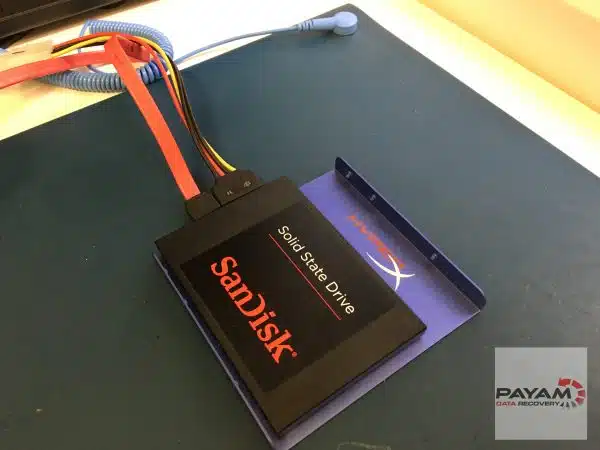
SanDisk SSD data recovery case study documents a successful recovery performed for Simon from Adelaide after his SanDisk SSD Plus suddenly stopped working without warning. The SSD was completely unresponsive, placing all of his photos, videos, work documents, and emails at risk.
Case Study Summary
- Client: Simon (Adelaide, Australia)
- Device: SanDisk SSD Plus, 2.5-inch SATA
- Problem: SSD not detected and stuck in busy state
- Cause: NAND flash degradation and firmware corruption
- Outcome: 110GB of data fully recovered
Understanding the SanDisk SSD Failure
Unlike traditional hard drives, SSDs often fail without warning. In this case, Simon’s SanDisk SSD Plus suddenly stopped responding inside his computer. Testing showed the drive was permanently stuck in a busy state, which commonly indicates NAND flash memory degradation.
As explained by Payam Toloo during the video, many people believe SSD failures are impossible to recover. This case study demonstrates that professional SSD recovery is often still possible, even when the drive appears completely dead.
For background on how SSDs differ from mechanical drives, see the technical overview on SanDisk storage technology.
SanDisk SSD Data Recovery Process
After opening the SSD, data recovery engineers identified a Silicon Motion controller. This controller family is well supported by professional SSD recovery tools, which significantly improves recovery options when firmware damage is present.
The main challenge in this SanDisk SSD data recovery case study was corrupted firmware preventing the controller from accessing the NAND memory correctly. Data recovery engineers used specialised techniques to bypass the firmware and load a temporary recovery loader directly onto the controller using professional PC-3000 equipment.
The final step involved rebuilding the translator, which allows the controller to correctly map logical data to the physical NAND flash memory. Once recreated, the file system structure became accessible and data extraction could begin.
SanDisk SSD Data Recovery Results
All 110GB of Simon’s data was successfully recovered. This included personal photos and videos, work documents, and email data. The entire recovery process was completed within two business days.
- Family photos and videos recovered
- Work documents and spreadsheets restored
- Email data recovered
Preventing Future SSD Failures
While SSD failures can occur suddenly, some preventative steps may help reduce risk. Keeping firmware updated using manufacturer tools and replacing SSDs after several years of heavy use can help minimise unexpected failures. Monitoring SSD health indicators can also provide early warning in some cases.
Why People Choose Payam Data Recovery
A failed SSD needs an experienced data recovery engineer and professional tools, because its own controller and firmware decide where your files sit on its memory chips. That is the work we do every day.
- We are a specialist data recovery lab, not a computer repair shop. We have been recovering data since 1998, from over 300,000 devices.
- The best equipped data recovery lab in Australia: the Ace Lab PC-3000 for SSD firmware faults, Rusolut tools to read memory chips directly, microscopes and microsoldering stations for circuit board work, and over 30,000 donor parts, including around 20,000 donor hard drives.
- Over 2,000 IT companies and computer shops across Australia send us their customers’ complex cases, and data recovery labs and IT companies in more than 50 countries have sent us their difficult cases over the past ten years.
- Rated 4.9 from over 2,400 Google reviews.
- About 90% of our jobs are no fix, no fee. The hardest 10% carry an attempt fee.
- See your files before you pay. You tell us which files matter most. Before you pay for the recovery, we’ll send you a list of your recovered files so you can check them. If any of the files you listed are missing, tell us and we’ll search again.
- Pay by Visa, Mastercard, American Express, Apple Pay, Google Pay, Link or PayPal, split the cost with Afterpay, Zip, Klarna or PayPal Pay in 4, or pay by bank deposit (EFT).
- Everything is done in our own labs in Australia and never outsourced overseas. Call or visit us, and you can speak with the data recovery engineers who do the work.
We are not the cheapest. We are the best in Australia at this work. We know what to do, how to do it, and we will do our very best for you. Your best chance of getting your data back is with us.
Professional SanDisk SSD Data Recovery in Australia
Payam Data Recovery provides professional SSD recovery services for SATA, NVMe, and laptop SSDs, including those used in MacBooks and Microsoft Surface devices. Customers can deliver devices in person or send them by post or courier.
Full service laboratories are located in Sydney CBD, Rhodes NSW, Melbourne CBD, and Brisbane CBD. Secure drop-off offices are available in Adelaide CBD and Perth CBD, with devices sent to the main lab in Rhodes NSW for recovery. International customers are also welcome. The easiest way for an international customer to reach us is by email at help@payam.com.au, which works in every time zone.
SSD Data Recovery Pricing
For SSDs that have failed due to firmware or controller issues, the price depends on the complexity of the fault, and current prices are on our SSD data recovery page. Priority and Emergency are faster and cost more. All non-mobile devices receive a free assessment and quote before any work begins.
Work only starts after approval.
Read more about our SSD Data Recovery Service
Frequently Asked Questions
My SSD stopped working with no warning at all. Is that normal?
Yes. Unlike a mechanical hard drive, which often gives warning signs first, SSDs frequently fail suddenly and without symptoms. That is what happened here: the drive simply stopped responding inside the computer.
My SSD is not detected and seems completely dead. Is recovery still possible?
Often yes. Many people assume a dead SSD means the data is gone. This drive was permanently stuck in a busy state and was not detected at all, and 110GB was fully recovered.
What does it mean when an SSD is stuck in a busy state?
The controller cannot present the data to the computer. It commonly points to NAND flash memory degradation, firmware corruption, or both, rather than a problem with your files.
Does it matter which controller my SSD uses?
It affects the options available. This drive used a Silicon Motion controller, which is well supported by professional recovery tools, and that improves what can be done when firmware damage is present.
What is a translator rebuild?
The translator is the firmware component that maps your files to the physical NAND memory cells. Without a working translator the data cannot be read even when the memory itself is intact, so it has to be rebuilt before anything can be extracted.
What does SSD data recovery cost, and when do I pay?
Every SSD starts with a free assessment, then a written quote with Economy, Priority and Emergency service levels. About 90% of our jobs are no fix, no fee. The hardest 10% carry an attempt fee. On SSDs these include faults such as a damaged controller; the attempt fee is non-refundable and forms part of the total price, and where one applies it is stated in your quote before you approve anything.
Related SSD Data Recovery Case Studies
- iMac Fusion Drive SSD not detected data recovery case study
- SSD NAND Degradation Recovery Case Study
- SSD Data Recovery Case Study Brisbane
- Dead Microsoft Surface SSD Recovery
Payam Data Recovery works with individuals, students, families, small and medium businesses, IT companies, and organisations that need their data recovered safely and professionally. Some customers come to us with a single damaged device containing personal memories, while others rely on us for complex technical recoveries that require specialist tools and experience.
We are based in Australia and have been recovering data since 1998. Our clients also include governments, law enforcement agencies, corporations, and public figures. Every job is handled with 100 percent confidentiality and privacy.
Email: help@payam.com.au
Phone: 1300 444 800


