

Published 1 March 2026. Updated 25 October 2026.
WD My Cloud EX4100 Data Recovery Case Study Summary
- Client: Robert, Annandale, NSW
- Device: WD My Cloud EX4100 (4-bay NAS, 4TB drives, RAID 5)
- Problem: All four drive indicator lights turned red, volume failure, no configured volumes detected
- Diagnosis: Two drives had bad sectors and read errors; one drive had failed approximately four months earlier
- Solution: Cloned all four drives using Atola Insight Forensic, rebuilt RAID 5 array in UFS Explorer using three viable drives
- Outcome: 9TB of family photos, videos, and documents recovered in good condition
- Service: RAID and NAS Data Recovery
Proven WD My Cloud EX4100 Data Recovery Case Study Australia: 9TB RAID 5 Failure Fully Recovered
When Robert from Annandale, NSW, saw all four drive indicator lights turn red on his WD My Cloud EX4100, he knew something had gone seriously wrong. His 4-bay NAS, configured in RAID 5 with four 4TB drives, held 9TB of family photos, videos, and documents. The system reported no configured volumes, and he had received both power supply failure alerts and volume failure warnings. This WD My Cloud EX4100 data recovery case study documents how Payam Data Recovery’s RAID and NAS recovery specialists diagnosed the multi-drive failure and recovered every file.
After rebooting the NAS twice with no improvement, Robert wisely stopped attempting any further fixes and sent the entire unit to Payam Data Recovery for professional assessment. That decision proved critical to the successful outcome of this recovery. Based in Australia, Payam Data Recovery also regularly handles complex RAID cases from the USA, New Zealand, UK, and worldwide.
The Problem: WD My Cloud EX4100 RAID 5 Volume Failure
Robert’s WD My Cloud EX4100 had been reliably storing his family’s digital life for years. Then, without warning, all four drive lights went red. The NAS reported a complete volume failure with no configured volumes detected. Robert received power supply failure alerts and volume failure warnings from the system.
What Robert did not realise at the time was that one of the four drives had actually failed approximately four months earlier. The RAID 5 configuration had been running in a degraded state for months, placing additional stress on the remaining drives. When a second drive began developing bad sectors, the array could no longer maintain data integrity, resulting in the complete volume failure Robert experienced.
This type of cascading failure is one of the most common and dangerous scenarios in NAS and RAID data recovery. A single undetected drive failure can silently degrade the array until a second failure triggers a catastrophic collapse.
The WD My Cloud EX4100 Data Recovery Case Study Process
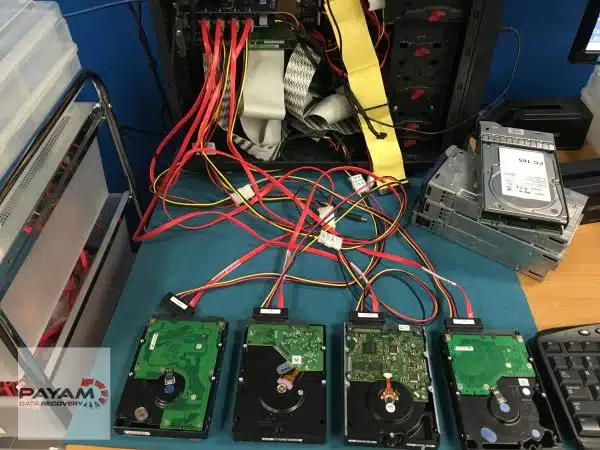
At the Payam Data Recovery laboratory, Payam Toloo began by testing all four drives individually using the Atola Insight Forensic imaging tool. The results showed a mixed picture: two drives were healthy, while the other two had bad sectors and read errors.
Before attempting any reconstruction, Payam cloned all four drives onto fresh, healthy replacement drives. This is a fundamental step in professional RAID data recovery, as it preserves the original evidence and prevents further degradation of failing drives during the recovery process.
With the clones ready, Payam loaded them into UFS Explorer on a dedicated recovery computer. The software automatically detected the RAID configuration, but the partition appeared damaged with no files visible. After reviewing Robert’s notes and conducting deep scanning with multiple configurations, Payam determined that one of the failed drives had actually died approximately four months earlier.
The breakthrough came when Payam excluded the long-failed drive and rebuilt the RAID 5 array using the three remaining cloned drives. Once the correct configuration was applied, all files appeared. The entire 9TB dataset, including family photos, videos, and documents, was recovered in good condition.
WD My Cloud EX4100 Data Recovery Case Study Results
The recovery was a complete success. All 9TB of Robert’s data was recovered in good condition, including:
- Family photos spanning years of memories
- Personal videos
- Important documents
The key to this successful WD My Cloud EX4100 data recovery case study outcome was the combination of proper diagnostic tools, the decision to clone all drives before any reconstruction work, and the experience to recognise that a much earlier drive failure was the root cause of the array collapse.
The Critical Lesson: Never Rebuild a Failing RAID Array Yourself
This case study highlights one of the most important rules in NAS data recovery: when your NAS shows drive failure warnings, do not attempt to repair or rebuild the array yourself.
Trying to force a RAID rebuild through the NAS web interface with failing drives can cause severe file system corruption. This can make professional data recovery significantly more difficult, or in some cases, impossible. If Robert had attempted to rebuild the array instead of sending it to professionals, the outcome could have been very different.
With experience since 1998 and the patience required for complex troubleshooting, Payam Data Recovery was able to identify the hidden cause and recover every file. As this WD My Cloud EX4100 data recovery case study demonstrates, sometimes the difference between total data loss and full recovery comes down to knowing which drive to exclude from the rebuild.
Why Professional NAS Data Recovery Matters
NAS devices running RAID configurations provide redundancy, but they are not immune to failure. When multiple drives fail or when a RAID array collapses, the data recovery process requires specialised tools and deep expertise that go far beyond consumer-level solutions.
Professional RAID and NAS data recovery involves:
- Individual drive diagnostics using forensic-grade tools like the Atola Insight Forensic
- Sector-by-sector cloning of all drives before any reconstruction
- Professional RAID reconstruction software such as UFS Explorer
- The experience to identify hidden failures and select the correct drive combination for rebuilding
Attempting DIY recovery on a failed RAID array risks permanent data loss. Forced rebuilds, incorrect drive ordering, or further use of failing drives can overwrite the very data you are trying to save.
Why People Choose Payam Data Recovery
When a RAID, NAS or server fails, the array has to be rebuilt correctly the first time, without putting the original drives at further risk. That is the work we do every day.
- We are a specialist data recovery lab, not an IT support company. We have been recovering data since 1998, from over 300,000 devices.
- Over 2,000 IT companies and computer shops across Australia send us their customers’ complex cases, and data recovery labs and IT companies in more than 50 countries have sent us their difficult cases over the past ten years.
- Every drive is tested and cloned first on professional tools such as Atola Insight Forensic, the PC-3000 and the DeepSpar Disk Imager, and the RAID is rebuilt from the clones. A drive that needs a head swap is opened in our ISO 5 certified laminar flow cabinet, with over 30,000 donor parts in-house, including around 20,000 donor hard drives.
- Emergency service for businesses. Many of our business and IT customers choose it, because every day a server is offline usually costs more than the difference in price. 24/7 emergency service is available as a premium option on 0404 872 926.
- Your data stays private. Our data recovery engineers open only a few random, non-sensitive files to check the recovery worked, and we will sign your NDA on request.
- See your files before you pay. You tell us which files matter most. Before you pay for the recovery, we’ll send you a list of your recovered files so you can check them. If any of the files you listed are missing, tell us and we’ll search again.
- Pay by Visa, Mastercard, American Express, Apple Pay, Google Pay, Link or PayPal, split the cost with Afterpay, Zip, Klarna or PayPal Pay in 4, or pay by bank deposit (EFT).
- Rated 4.9 from over 2,400 Google reviews.
We are not the cheapest. We are the best in Australia at this work. We know what to do, how to do it, and we will do our very best for you. Your best chance of getting your data back is with us.
NAS and RAID Data Recovery Assessment and Services
Payam Data Recovery offers comprehensive RAID and NAS data recovery services for all configurations, including RAID 0, RAID 1, RAID 5, RAID 6, RAID 10, JBOD, and proprietary NAS formats. We recover data from all NAS brands, including Synology, QNAP, Western Digital, Buffalo, Netgear, Drobo, ASUSTOR, TerraMaster, Seagate, LaCie, Thecus, D-Link, Promise Technology, OWC, UniFi, Ugreen, Dell, HPE, Lenovo, and custom-built server systems. We work with SATA, SAS, and SCSI hard drives as well as SSD-based RAID arrays.
The first step is always an assessment and quote. Payam Data Recovery offers two assessment options:
- Free Assessment and Quote: Completed within 1 to 2 days of receiving your device. No cost, no obligation.
- Urgent Assessment and Quote: Available for a fee, completed within 2 to 3 hours from the time your device is delivered to us. Ideal when time is critical.
The price of NAS and RAID data recovery depends on the number of drives and the fault, and current prices are on our RAID and NAS data recovery page. RAID 5 recovery carries a non-refundable attempt fee, paid upfront to cover time and labour. It is part of the total price, with the remainder due upon successful completion. With a high success rate for most RAID recoveries, the vast majority of cases are completed successfully. Priority and Emergency are faster and cost more. All prices include GST. If we recover your data and you pay, return delivery is free, including to New Zealand.
Payam Data Recovery serves customers across Australia with laboratories in Sydney, Melbourne, and Brisbane, plus secure drop-off offices in Perth and Adelaide, which send your device to our lab in Rhodes, NSW at no cost. We also welcome international customers from the USA, New Zealand, UK, and worldwide, particularly for complex RAID cases where other data recovery companies have been unable to help. The easiest way for an international customer to reach us is by email at help@payam.com.au, which works in every time zone.
Frequently Asked Questions: NAS RAID 5 Data Recovery
Can data be recovered from a WD My Cloud NAS with all red lights?
Yes. Red indicator lights on a WD My Cloud NAS typically signal a volume failure, which can be caused by one or more drive failures. In this WD My Cloud EX4100 data recovery case study, Payam Data Recovery successfully recovered all 9TB of data where all four drive lights were red. Professional diagnosis, drive cloning, and RAID reconstruction are required for a safe recovery.
What is RAID 5 and how does it protect data?
RAID 5 distributes data and parity information across three or more drives. It can tolerate the failure of one drive without data loss. However, if a second drive fails before the first is replaced and rebuilt, the array collapses and professional data recovery is needed. This is exactly what happened in Robert’s case.
Why should I not attempt to rebuild a failed RAID array myself?
Attempting a RAID rebuild through the NAS web interface with failing drives can cause severe file system corruption. A forced rebuild may overwrite critical data structures, making professional recovery significantly harder or even impossible. Always send a failed NAS to a professional data recovery service before attempting any repairs.
How much does NAS RAID data recovery cost in Australia?
The price of NAS and RAID data recovery at Payam Data Recovery depends on the number of drives and the fault. Priority and Emergency are faster and cost more. RAID 5 recovery carries a non-refundable attempt fee, paid upfront to cover time and labour. It is part of the total price, with the remainder due upon successful completion. With a high success rate for most RAID recoveries, the vast majority of cases are completed successfully. All prices include GST. We offer a free assessment and a free written quote, completed within 1 to 2 days of receiving your device. The quote explains the cost, the attempt fee, your chances of success and the time involved, for your approval before we start. If you need results faster, a paid urgent assessment and quote is available, completed within 2 to 3 hours from delivery.
What NAS brands can Payam Data Recovery recover data from?
Payam Data Recovery recovers data from all NAS brands and RAID configurations. We regularly work with Synology, QNAP, Western Digital (WD My Cloud, My Book Duo), Buffalo (LinkStation, TeraStation), Netgear (ReadyNAS), Drobo, ASUSTOR, TerraMaster, Seagate (Personal Cloud, IronWolf NAS), LaCie, Thecus, D-Link (ShareCenter), Promise Technology, Infortrend, OWC, UniFi (UNAS), Ugreen (NASync), Dell (PowerVault), HPE (ProLiant, StoreEasy), and Lenovo (ThinkSystem). We also recover data from custom-built NAS and server systems. All RAID types are supported, including RAID 0, RAID 1, RAID 5, RAID 6, RAID 10, JBOD, and proprietary configurations. We work with SATA, SAS, and SCSI hard drives as well as SSD-based RAID arrays.
What tools are used for professional NAS data recovery?
Payam Data Recovery uses forensic-grade equipment including the Atola Insight Forensic for drive diagnostics and cloning, the Ace Lab PC-3000 for complex drive repairs, and UFS Explorer for RAID reconstruction. All drives are cloned to healthy replacements before any reconstruction work begins, ensuring the original data is preserved.
How long does the NAS data recovery assessment take?
Payam Data Recovery offers two assessment options. The free assessment and quote is completed within 1 to 2 days of receiving your device. For urgent situations, a paid urgent assessment and quote is completed within 2 to 3 hours from the time your device is delivered. After the assessment, recovery turnaround depends on the complexity of the case. Quick and straightforward recoveries can be completed in as little as 1 to 2 days. Complex cases involving large datasets, for example 50TB to 100TB, take considerably longer due to the time required for data transfer to a new destination drive.
What happens if the recovery is unsuccessful?
You pay only the attempt fee. We offer a free assessment and a free written quote. The quote explains the cost, the attempt fee, your chances of success and the time involved, for your approval before we start. RAID 5 recovery carries a non-refundable attempt fee, which is part of the total quoted price, not an extra on top. You pay it to begin, and the balance only if we recover your data. See your files before you pay. You tell us which files matter most. Before you pay for the recovery, we’ll send you a list of your recovered files so you can check them. If any of the files you listed are missing, tell us and we’ll search again.
Can one failed drive cause a RAID 5 to completely collapse later?
Yes. This is exactly what happened in this case study. One drive had failed approximately four months before the complete collapse, but the failure went unnoticed. The RAID 5 array was running in a degraded state, and when a second drive developed bad sectors, the entire array failed. Regular monitoring of NAS health status and drive condition is essential to prevent this scenario.
Does Payam Data Recovery accept RAID cases from outside Australia?
Yes. While Payam Data Recovery is based in Australia, we regularly handle complex RAID and NAS cases from the USA, New Zealand, UK, and worldwide. We often recover data from RAID and NAS cases that need a specialist lab. If your local provider cannot help, contact us at help@payam.com.au or call 1300 444 800 to discuss your case.
About Payam Data Recovery
Payam Data Recovery is an Australian data recovery company founded in 1998 with over 300,000 devices recovered. The company operates an ISO 5 certified laminar flow cabinet and maintains over 30,000 donor parts, including around 20,000 donor hard drives, in house for immediate use.
With full-service laboratories in Sydney (including our head office in Sydney CBD and our main data recovery lab in Rhodes, NSW), Melbourne, and Brisbane, plus secure drop-off offices in Perth and Adelaide, which send your device to our lab in Rhodes, NSW at no cost, Payam Data Recovery serves customers across Australia and internationally. We regularly receive complex RAID and NAS cases from the USA, New Zealand, UK, and other countries where local data recovery companies have been unable to recover the data. All recovery work is performed in Australia and is never outsourced overseas.
For NAS and RAID recoveries, the team uses industry-leading tools including the Atola Insight Forensic, Ace Lab PC-3000, DeepSpar Disk Imager, and UFS Explorer to diagnose, clone, and reconstruct failed arrays. This WD My Cloud EX4100 data recovery case study is just one example of over 300,000 devices recovered since 1998.
Request a Free NAS and RAID Data Recovery Assessment
Is your NAS showing red lights, drive failure warnings, or volume errors? Do not attempt to rebuild the array yourself. Payam Data Recovery offers a free assessment and quote, completed within 1 to 2 days. Need answers faster? A paid urgent assessment and quote is available, completed within 2 to 3 hours from delivery.
NAS and RAID data recovery is quoted after a free assessment, with a $500 non-refundable attempt fee paid upfront, which is part of the total price. The remainder is due upon successful completion. With a high success rate for most RAID recoveries, you are in safe hands. Priority and Emergency are faster and cost more. All prices include GST. If we recover your data and you pay, return delivery is free, including to New Zealand.
Supported devices: All NAS brands including Synology, QNAP, Western Digital, Buffalo, Netgear, Drobo, ASUSTOR, TerraMaster, Seagate, LaCie, Thecus, D-Link, Promise Technology, OWC, UniFi, Ugreen, Dell, HPE, and Lenovo. All RAID levels (RAID 0, 1, 5, 6, 10, JBOD) with SATA, SAS, SCSI hard drives and SSD RAID arrays.
Based in Australia. International customers welcome. We regularly handle complex RAID and NAS cases from the USA, New Zealand, UK, and worldwide. If another data recovery company has given up on your case, we can help. Nobody will try harder or invest more expertise into your case.
Submit your NAS for assessment | Phone: 1300 444 800 | Email: help@payam.com.au
Related RAID and NAS Data Recovery Case Studies
- 16-Drive RAID Recovery Case Study: 10TB Recovered from Mining Company Server
- Seagate Personal Cloud NAS Recovery Case Study
- Western Digital Hard Drive Data Recovery Case Study
- LaCie 2big Time Machine RAID 1 recovery case study
- Architecture firm RAID 5 head swap case study
Video Transcript: WD My Cloud EX4100 Data Recovery Case Study
Hey, I’m Mike back at Payam Data Recovery for a complex one today. Robert from Annandale sent in a WD My Cloud EX4100, a 4-bay NAS with 4TB drives in RAID 5. One night, all four lights went red. Volume failure, no configured volumes, 9TB of family photos potentially gone.
Robert got power supply failure alerts and volume failure warnings. He rebooted it twice, then wisely stopped and sent it to Payam.
Using his favourite tool, the Atola Insight Forensic, Payam tested all four drives. Two are healthy, two had bad sectors and read errors. So, he cloned all four to fresh, healthy drives before touching anything else.
On their dedicated recovery computer, Payam loaded the clones into UFS Explorer. It detected the RAID automatically, but the partition showed damaged. Red dot, no files visible.
After reviewing Robert’s notes, Payam suspected he tried to rebuild the RAID through the web interface with failing drives. That can cause severe file system corruption.
Good news. After deep scanning and testing multiple configurations, Payam worked out that one of the failed drives had actually died 4 months earlier. By excluding that drive and rebuilding the RAID 5 with the remaining three, all files appeared. 9TB of family photos, videos, and documents recovered in good condition.
Here’s the lesson. When your NAS shows drive failures, don’t try to repair or rebuild it yourself. You might make it worse permanently. Robert was lucky. Payam’s experience since 1998 and patience in troubleshooting saved his family memories.
If your RAID fails, Payam Data Recovery offers a free assessment. Sometimes the difference between total loss and full recovery is knowing which drive to leave out.


