

Published 19 June 2025. Updated 17 October 2026.
Watch our apple macbook data recovery video to see how we saved the day! Apple MacBook data recovery saved the day for a 2019 MacBook Pro with a T2 firmware problem. When you need professional macbook data recovery, every second counts. Picture this: your MacBook Pro suddenly stops working, and all your important files are trapped inside. That’s exactly what happened to someone with a 2019 MacBook Pro (model A2141). Most repair shops would be stumped, but at Payam Data Recovery in Sydney, we specialise in apple macbook data recovery for even the toughest cases. We managed to get the laptop working again and save all the data.
Case study summary
Device: 2019 MacBook Pro, model A2141
Problem: Dead silent. No fan, no chime, no display, even though the charger was delivering a healthy 20 volts
Solution: Every voltage rail on the logic board tested normal, which pointed at the T2 security chip rather than the power system. A firmware revive was performed using Apple Configurator, putting the machine into DFU mode and reloading the T2 firmware from another Mac
Outcome: The Mac booted to the login screen with all data intact, and a full backup was taken to an external drive. A few hours from start to finish
Service: MacBook data recovery
The Mystery of the Dead MacBook
This particular laptop, a 2019 model, had a common problem: issues with Apple’s T2 security chip. The computer was completely dead: no fan, no sound, no display. Here’s the weird part though: the charger was working fine, delivering a healthy 20 volts. So the power supply wasn’t the issue.
An expert data recovery engineer at Payam started by checking all the voltage rails on the logic board. Think of it like checking the pulse of the machine’s internal organs. Everything looked normal. The power system was healthy, which pointed to a more complex issue. The main suspect? Apple’s T2 security chip.
The T2 Chip: A Tiny Problem with Big Consequences
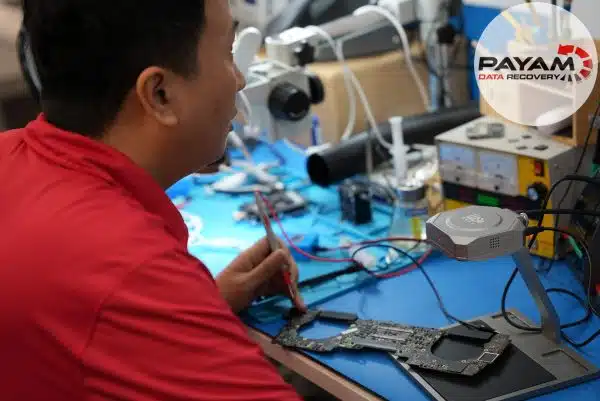
This small chip controls important functions like startup, encryption, and Touch ID. When its firmware gets corrupted, the whole Mac turns into a very expensive paperweight. The data recovery engineer opened up the laptop and found a lot of dust inside. While dust doesn’t directly cause T2 corruption, it’s something he often sees in machines with these kinds of symptoms.
The Solution: Apple Configurator and Firmware Revive
Fixing this problem requires special Apple software called Apple Configurator. It’s not your typical repair. It’s more like performing surgery on the computer’s brain. The process is called a firmware revive.
The data recovery engineer put the laptop into DFU mode, which is basically a deep recovery state. Then, he connected it to another Mac to carefully reload the T2 firmware. This was the moment of truth. If it didn’t work, the data could be lost forever.
A Successful Recovery
Suddenly, the Apple logo appeared. The Mac booted to the login screen, and all the customer’s data was completely safe. The data recovery engineer immediately made a full backup to an external drive. The customer got their working computer back, plus a complete backup of everything that was almost lost.
In just a few hours, what seemed like a total loss became a complete recovery with apple macbook data recovery. When your important data is at risk, experience and the right tools make all the difference. Thanks to the team at Payam Data Recovery for showing that sometimes, the impossible is just another day at the office.
Key Takeaways
- The Apple T2 security chip can cause serious problems if its firmware gets corrupted.
- Even if your laptop seems completely dead, apple macbook data recovery might still be possible.
- Specialised tools and software, like Apple Configurator, are needed for complex repairs.
- Always back up your data! If you need help with data recovery, check out Payam’s Apple laptop data recovery services.
- You can get a free data recovery quote if you’re in a tough spot.
- Learn more about T2 issues on Apple’s support page.
MacBook Data Recovery: The 10 Most Common Problems and Every Model We Fix
We can help you get important files back from any of these Apple laptops, no matter what’s wrong. Contact us for a free quote.
The 10 Most Common Problems That Kill Your Data
1. T2 Security Chip Meltdown
Here’s something that’ll make your heart sink: when Apple’s T2 Security Chip fails, it’s like losing the keys to your own house. This tiny chip, found in models from 2018 onwards, stores the encryption keys needed to unlock your data. When it dies (and trust me, it does), your files become completely inaccessible. The chip is soldered directly to the logic board, which makes recovery incredibly tricky. We’re talking about specialised board-level repair just to get temporary access for data extraction with apple macbook data recovery.
Models at risk: Most Pro and Air models from 2018-2020, plus Mac Studio and iMac Pro
2. Logic Board Failure
This one’s a real nightmare. When the main circuit board fails, whether from overheating, power surges, or just plain bad luck, your laptop becomes a very expensive doorstop. What makes it worse? Modern Apple laptops have storage soldered directly to the logic board. So when the board dies, your data goes with it unless you know someone with serious micro-soldering skills.
Warning signs: Won’t turn on at all, random shutdowns, display going haywire, or just… nothing when you hit the power button
Why People Choose Payam Data Recovery
When a MacBook will not start, its data is usually locked to its own chips, so those chips have to be working again before anything can be copied. That is the work we do every day.
- We are a specialist data recovery lab, not a computer repair shop. We have been recovering data since 1998, from over 300,000 devices.
- We are listed on Apple’s data recovery provider page, one of three recommended data recovery providers.
- Board level repair under the microscope by our own data recovery engineers, here in Australia and never outsourced overseas.
- Over 2,000 IT companies and computer shops across Australia send us their customers’ complex cases, and data recovery labs and IT companies in more than 50 countries have sent us their difficult cases over the past ten years.
- Your data stays private. Our data recovery engineers open only a few random, non-sensitive files to check the recovery worked, and we can sign an NDA on request.
- Rated 4.9 from over 2,400 Google reviews.
- See your files before you pay. You tell us which files matter most. Before you pay for the recovery, we’ll send you a list of your recovered files so you can check them. If any of the files you listed are missing, tell us and we’ll search again.
- Pay by Visa, Mastercard, American Express, Apple Pay, Google Pay, Link or PayPal, split the cost with Afterpay, Zip, Klarna or PayPal Pay in 4, or pay by bank deposit (EFT).
We are not the cheapest. We are the best in Australia at this work. We know what to do, how to do it, and we will do our very best for you. Your best chance of getting your data back is with us.
Frequently asked questions
My MacBook is completely dead. No fan, no chime, no screen. Where do you start?
By ruling out the power supply. On this machine the charger was delivering a healthy 20 volts, so the problem was not the charger. Every voltage rail on the logic board was then checked in turn, and all of them tested normal, which pointed somewhere else entirely.
If the power system is fine, what else stops a Mac starting?
On this model, the T2 security chip. It controls startup, encryption and Touch ID, and when its firmware is corrupted the machine will not boot at all. The 2019 16 inch MacBook Pro, model A2141, has a known weakness here.
What is a firmware revive?
The Mac is put into DFU mode, a deep recovery state, then connected to a second Mac running Apple Configurator, which reloads the T2 firmware. It is Apple’s own software, and it is not something most repair shops use.
Does dust cause this?
Not on its own. This machine had heavy dust throughout the internals, and that is a pattern we see often in machines with these symptoms, but dust alone does not corrupt T2 firmware.
Is my data at risk during the revive?
It is the moment that decides the job. If a revive does not work the data can be lost, which is why it is done deliberately and only after the power system has been cleared. Here the Mac booted to the login screen with everything intact.
How long does this take?
This one took a few hours from arrival to a full backup on an external drive.
Do I get the computer back as well as the data?
In this case yes. The customer got a working machine back plus a complete backup of everything that was nearly lost.
Video transcript
Click to expand full transcript
According to Wai, this particular model has a known weakness, issues with Apple’s T2 security chip that can render the entire machine useless. The symptoms: dead silent, no fan, no chime, no display. But here is the twist, the charger is delivering a healthy 20 volts, so it is not the power supply. Wai’s first step, systematically check every voltage rail on the logic board. Think of it like checking the pulse of each organ in the machine. The results, everything tests normal. The power system is healthy, which means we are dealing with something more complex.
The prime suspect, Apple’s T2 security chip. This tiny component controls startup, encryption and Touch ID. When its firmware corrupts, the entire Mac becomes a very expensive paperweight. Wai opens up the machine and finds something interesting, heavy dust buildup throughout the internals. While dust alone does not cause T2 corruption, it is a pattern he sees frequently in machines with these symptoms.
The solution requires specialised Apple software that most people have never heard of, Apple Configurator. This is not your typical repair. It is more like performing surgery on the machine’s brain. The process is called a firmware revive, where he puts the MacBook into DFU mode, essentially a deep recovery state, then connects it to another Mac to carefully reload the T2 firmware.
This is the moment of truth. If this does not work, the data could be lost forever. There it is, the Apple logo. The Mac boots to the login screen, and more importantly, all the customer’s data is completely intact. Wai immediately creates a full backup to an external drive. The customer will get their working computer back, plus a complete backup of everything that was nearly lost.
In just a few hours, what seemed like a total loss became a complete recovery. When your irreplaceable data is on the line, experience and the right tools make all the difference. Thanks to the team at Payam Data Recovery for showing us that sometimes, the impossible is just another day at the office.
Professional MacBook Data Recovery Services
Look, I get it. There are YouTube videos showing people fixing laptops with hair dryers and toothpicks. But here’s the reality with modern Apple machines and why professional apple macbook data recovery matters:
- Hardware-level encryption means you can’t just plug the drive into another computer
- Soldered components require microscopic soldering skills (we’re talking about parts smaller than rice grains)
- Proprietary everything: Apple uses custom connectors that you can’t buy at an electronics store
- Complex procedures: while Apple Configurator is built into every Mac, using it for T2 firmware recovery requires precise technical knowledge
Get Your MacBook Data Recovery Started Today
Don’t panic if your laptop has died. Our apple macbook data recovery specialists have literally seen it all, and chances are, your data is still recoverable.
- ✅ Free Assessment: We’ll tell you what’s wrong and if your data can be saved
- ✅ Every Model Covered: From 2006 polycarbonate models to brand new M4 machines
- ✅ Complex Cases Welcome: T2 failures, water damage, logic board issues, bring it on
- ✅ Quick Turnaround: Emergency service available when you’re under pressure
- ✅ Australia-Wide Service: labs in Sydney CBD, Rhodes NSW, Melbourne and Brisbane, plus secure drop-off offices in Adelaide and Perth
- ✅ International Welcome: Worldwide customers can ship devices to us. The easiest way for an international customer to reach us is by email at help@payam.com.au, which works in every time zone.
Contact Payam Data Recovery today and let’s get your important files back where they belong.


