

Published 25 April 2026. Updated 25 October 2026.
Case Study Summary
- Client: David, commercial shipping company. Vessel docked in Sydney.
- Device: Windows server with 10 Toshiba MG04ACA200E 2TB enterprise SATA drives
- Problem: Onboard server crash. Unusual nested RAID 0+1 configuration on top of ReFS with Microsoft Data Deduplication. Internal IT in Singapore could not recover remotely. Server had been offline for 5 to 6 months.
- Solution: Imaged all 10 drives with Atola Insight Forensic, virtually rebuilt the nested RAID, and parsed the deduplicated ReFS volumes using UFS Explorer at the Rhodes lab in New South Wales.
- Outcome: All four 3 TB data partitions recovered in 18 hours of round-the-clock work, copied to a new 10 TB external drive.
- Service Page: RAID and Server Data Recovery
Windows Server RAID Data Recovery: A Cargo Ship’s Critical Server Lands at the Rhodes, NSW Lab
David’s commercial shipping company had a server crash on board their vessel. By the time the ship docked in Sydney, the IT manager in Singapore had already spent days trying to bring the storage back online remotely, with no success. The crew pulled all 10 drives, drove them straight to Payam Data Recovery’s lab in Rhodes, New South Wales, and asked for an urgent assessment. This Windows Server RAID data recovery case study covers the Windows Server RAID data recovery diagnosis, the unusual nested RAID configuration, the ReFS deduplication problem on top of it, and how the data came back inside 18 hours. If you are looking for the matching service, see our RAID and server data recovery service.
The Problem: 10 Toshiba MG04 Drives, an Unusual RAID, and a Deduplicated ReFS Volume
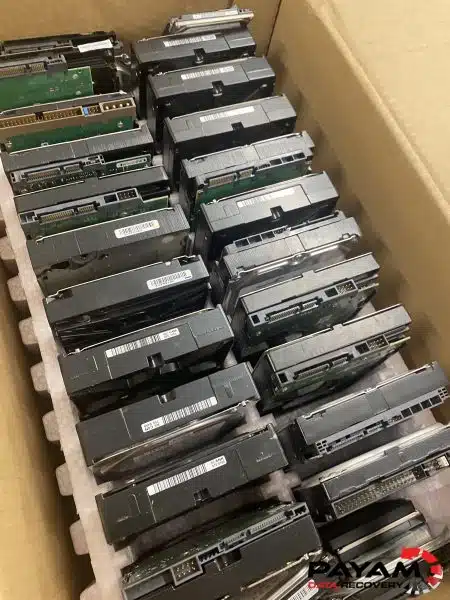
David handed over 10 Toshiba MG04ACA200E 2TB 3.5-inch enterprise SATA hard drives, all pulled from a Windows server that had been powered off for around 5 to 6 months. Any Windows Server RAID data recovery starts with bench testing, and the first round on the Atola Insight Forensic imaging hardware was not encouraging. Three of the 10 drives wouldn’t detect at all. With a multi-drive set that has been sitting cold for half a year, that is the worst sound you can hear from your bench.
For Windows Server RAID data recovery work like this, every cable was pulled, every connector reseated, and the imaging run started fresh. This time every drive came up. All 10 reported good S.M.A.R.T. status with no hardware failures. Crisis averted on the physical side.
The logical side then served up a different problem. With 10 drives at 2 TB each, the expected logical view was a single partition somewhere between 18 and 20 TB. Instead, UFS Explorer showed multiple partitions: four data partitions of around 3 TB each, plus several smaller system volumes that held no user data. That partition map only makes sense once you understand the array layout.
The configuration was a nested RAID. Two drives ran in RAID 0, another two drives ran in RAID 0, and those two stripe sets were then mirrored together with RAID 1. It is a very uncommon layout for any Windows Server RAID data recovery job, and it complicates the rebuild because both the stripe order and the mirror pairing have to be correct before the file system on top will mount.
Sitting on top of the array was the next surprise. UFS Explorer threw a pop-up warning that Microsoft Data Deduplication was active on the ReFS volumes. Data Deduplication is a Windows Server feature that compresses storage by breaking files into chunks, storing each unique chunk once in a hidden chunk store, and rebuilding the original files on demand using reparse-point pointers. Most recovery tools cannot read a deduplicated ReFS volume. They see the reparse-point stubs, copy them out, and the customer ends up with files that open at zero bytes or fail to open at all.
That is exactly the wall the IT manager in Singapore had hit trying to recover remotely.
The Windows Server RAID Data Recovery Process
Step one of the Windows Server RAID data recovery was a clean image of every drive. With 10 drives that had been off for half a year, no further reads happened against the originals. Each drive was sector-imaged on the Atola Insight Forensic so that all subsequent rebuild and parsing work happened on copies. This is standard practice for any RAID and server recovery where the customer’s only copy of the data is the failed array itself.
Step two of the Windows Server RAID data recovery was virtually rebuilding the nested RAID inside UFS Explorer. The tool let us define each RAID 0 stripe pair, set the RAID 1 mirror across both pairs, and then re-present the result as a single logical disk for the file system parser to read. UFS Explorer is one of the few professional recovery suites with proper support for ReFS combined with Microsoft Data Deduplication, which meant the chunk store could be parsed alongside the reparse points and the original full-size files reconstructed correctly.
Step three of the Windows Server RAID data recovery was verification. The virtual machine files inside the recovered structure were previewed first to confirm they opened cleanly with real content, not the empty stubs that come out of a deduplicated volume when the wrong tool reads it. Once that checked out, the four data partitions were copied off to a new 10 TB external hard drive. The smaller empty system volumes were skipped. Every step happened in house at the lab in Rhodes, NSW, with the team rotating 24/7 from drives-on-bench through to the final copy. Nothing was sent out to a third party at any stage, which is why the entire job closed inside 18 hours.
Windows Server RAID Data Recovery Results
The Windows Server RAID data recovery delivered all four 3 TB data partitions in full, handed back on a fresh 10 TB external drive. The recovered set included the virtual machine files that the company relied on for day-to-day operations. From drives-on-bench to drive-out-the-door, the elapsed time was 18 hours. The team worked around the clock to keep David’s downstream operations moving while the ship was in port.
Total drives processed: 10. Total recovered partitions: 4. Total turnaround: 18 hours. As Windows Server RAID data recovery results go, that is about as good an outcome as you can ask for on a 10-drive nested array with deduplicated ReFS volumes.
Why Professional Windows Server RAID Data Recovery Matters
Two things make a Windows Server RAID data recovery case like this dangerous in the wrong hands. The first is the nested RAID. Get the stripe order wrong and you read gibberish. Get the mirror pairing wrong and you read the failed half. Most consumer recovery tools assume a flat RAID 5 or RAID 6 and silently produce a corrupted output when handed a nested array. The second is Microsoft Data Deduplication on ReFS. Standard recovery tools simply do not parse the chunk store. They copy out the reparse points, the customer thinks the recovery worked, and then every file opens at zero bytes or with a “file is corrupt” error.
Running consumer software in place of proper Windows Server RAID data recovery often makes things worse. The drives can be written to inadvertently, mount attempts can replay journal transactions, and a chkdsk pass can damage the very metadata UFS Explorer needs to rebuild the file content. If your Windows server has failed, the safest move is to power the system off, label every drive with its bay position, and call a professional.
Successful Windows Server RAID data recovery on a setup like this needs proper rebuild logic and a tool that can read the deduplicated ReFS volumes underneath. For background on how nested RAID works, the Wikipedia article on RAID covers the standard levels and common nested configurations. For more on what makes Microsoft Data Deduplication different from ordinary file compression, the Wikipedia article on data deduplication explains the chunk-store model used by Windows Server.
Why People Choose Payam Data Recovery
When a RAID, NAS or server fails, the array has to be rebuilt correctly the first time, without putting the original drives at further risk. That is the work we do every day.
- We are a specialist data recovery lab, not an IT support company. We have been recovering data since 1998, from over 300,000 devices.
- Over 2,000 IT companies and computer shops across Australia send us their customers’ complex cases, and data recovery labs and IT companies in more than 50 countries have sent us their difficult cases over the past ten years.
- Every drive is tested and cloned first on professional tools such as Atola Insight Forensic, the PC-3000 and the DeepSpar Disk Imager, and the RAID is rebuilt from the clones. A drive that needs a head swap is opened in our ISO 5 certified laminar flow cabinet, with over 30,000 donor parts in-house, including around 20,000 donor hard drives.
- Emergency service for businesses. Many of our business and IT customers choose it, because every day a server is offline usually costs more than the difference in price. 24/7 emergency service is available as a premium option on 0404 872 926.
- Your data stays private. Our data recovery engineers open only a few random, non-sensitive files to check the recovery worked, and we will sign your NDA on request.
- See your files before you pay. You tell us which files matter most. Before you pay for the recovery, we’ll send you a list of your recovered files so you can check them. If any of the files you listed are missing, tell us and we’ll search again.
- Pay by Visa, Mastercard, American Express, Apple Pay, Google Pay, Link or PayPal, split the cost with Afterpay, Zip, Klarna or PayPal Pay in 4, or pay by bank deposit (EFT).
- Rated 4.9 from over 2,400 Google reviews.
We are not the cheapest. We are the best in Australia at this work. We know what to do, how to do it, and we will do our very best for you. Your best chance of getting your data back is with us.
Windows Server RAID Data Recovery Service Tiers
Windows Server RAID data recovery jobs are quoted after a free assessment, because the work depends on the number of drives, the RAID level, the file system on top, and whether any drives have physical faults. Three Windows Server RAID data recovery turnaround tiers are available so customers can pick what fits their situation:
Economy. The right Windows Server RAID data recovery choice if you are working to a tight budget. Turnaround is typically 2 to 3 weeks.
Priority. A faster Windows Server RAID data recovery path through the lab for jobs where waiting two to three weeks isn’t realistic. Turnaround is typically about 7 days. Pricing is quoted on the free assessment.
Emergency. Round-the-clock Windows Server RAID data recovery work for cases like David’s, where a ship is in port, a business is offline, or downstream operations are losing money by the hour. Turnaround is 1 to 2 days on average, with no guarantee. Pricing is quoted on the free assessment.
Because every step happens in house in Australia, there are no overseas handoffs, no shipping queues between subcontractors, and no waiting on a third-party lab to schedule your job. The same team that opens the assessment is the team that finishes the recovery, which is the only way to deliver Emergency turnarounds reliably.
How Our Process Works for International Customers
Payam is an Australian company, but a steady share of our caseload comes from outside Australia. Managed IT service providers, internal IT managers, and other data recovery companies around the world send us Windows Server RAID data recovery cases their tools or workflow can’t cover. The process is straightforward:
- Complete the free quote form. Use our Windows Server RAID data recovery quote page and describe the device, the failure, and any urgency. We come back with an indicative price range so you know whether the job fits your budget before any drives move.
- If the quote works, submit the job. Once you are happy with the indicative pricing, fill out our submit a new job form. You receive a job number and detailed delivery instructions for our Australian lab.
- Ship with a trusted international courier. Use FedEx, DHL, or UPS. On the customs declaration, the items must be declared as faulty for repair with a very low declared value. The drives are not being sold or bought, they are faulty hardware coming in for diagnostic and recovery work, so a low declared value is accurate and avoids unjustified customs duties or import taxes on a transaction that isn’t actually a sale.
- Free assessment, then a fixed quote. Once your drives arrive at the lab in Rhodes, NSW, the assessment runs and a fixed written quote follows.
- Recovery, then return shipping. If you approve the quote, recovery begins. We can organise return shipping back to you anywhere in the world. The full recovered data comes back on an external drive. If you need a few files urgently before it arrives, we can upload a small amount to a Google Drive folder we provide, or to a folder you share with us.
Every step from the moment the drives land at our lab to the moment the data leaves it happens in house, by our own Australian team, on our own equipment. Nothing is outsourced and nothing is shipped to another lab during the recovery, which is why we can hold the same Emergency turnarounds for international clients as we do for Australian ones. The easiest way for an international customer to reach us is by email at help@payam.com.au, which works in every time zone.
Frequently Asked Questions About Windows Server RAID Data Recovery
My Windows server crashed and not all the drives detect. Is the data gone?
Almost never. In David’s case, three of the 10 drives initially didn’t detect on the imager, but after careful reseating and a fresh imaging pass on Atola Insight Forensic, every drive came up with good S.M.A.R.T. status and no hardware failures. Detection failure is often caused by backplane connector issues, loose SATA cables, or controller faults rather than drive death. The right diagnostic process tells the difference.
What is Microsoft Data Deduplication on ReFS, and why does it break standard recovery tools?
Microsoft Data Deduplication splits files into chunks, stores each unique chunk once in a hidden chunk store, and replaces the original files with reparse-point pointers. On Windows Server’s ReFS file system this is common in modern deployments. Standard recovery tools read the reparse points, copy out empty stubs, and leave the customer with files that open at zero bytes. Recovery requires a tool that parses the chunk store and reassembles the original files, which is something UFS Explorer supports.
Can you recover data from a nested RAID like RAID 0+1 or RAID 10?
Yes. Nested arrays need both the stripe parameters and the mirror pairing detected correctly before the file system on top will mount. Our process images every drive first, then virtually rebuilds the array on the imaged copies, so we can test multiple configurations without risking the originals. The 10-drive Toshiba set in this case study was a nested RAID 0+1 (two RAID 0 stripes mirrored together with RAID 1), which is uncommon but recoverable.
How long does Windows Server RAID data recovery take?
A Windows Server RAID data recovery turnaround depends on the tier. David’s 10-drive Toshiba server was returned in 18 hours on our Emergency tier with the team working 24/7. Standard turnarounds are typically 2 to 3 weeks for Economy and about 7 days for Priority. Imaging time scales with drive count and capacity, so a 20 TB array takes longer to image than a 4 TB array regardless of recovery complexity.
I am working to a tight budget. Can you still help with a Windows Server RAID data recovery?
Yes. The Economy tier of our Windows Server RAID data recovery service is built for exactly that situation. The price depends on drive count and complexity. We offer a free assessment and a free written quote. The quote explains the cost, the attempt fee, your chances of success and the time involved, for your approval before we start. Server RAID recovery like this carries a non-refundable attempt fee, which is part of the total quoted price, not an extra on top. You pay it to begin, and the balance only if we recover your data. Current prices are on our RAID and NAS data recovery page. If the timeline isn’t critical, Economy gets your data back at the lowest cost we offer.
My business is offline and I need this back today. Can you do that?
That’s what the Emergency tier is for. Our team works 24/7 on Emergency cases, including overnight and weekend hours. Turnaround is 1 to 2 days on average, with no guarantee. David’s 10-drive shipping case closed in 18 hours. Because we never outsource any part of the work, there is no waiting on a third-party lab to fit your job in. The Australian team that opens the assessment is the team that closes the recovery.
We have an internal IT team. Why couldn’t they recover this themselves?
The IT manager in Singapore tried for several days. The blocker was Microsoft Data Deduplication on ReFS sitting on top of a nested RAID 0+1. Even capable IT teams rarely have licences for professional rebuild tools like UFS Explorer with deduplication support, and they almost never have the hardware bandwidth to image 10 drives before doing anything else. Most internal teams reach the limit at exactly this point. We work with managed IT service providers, internal IT managers, and other data recovery companies regularly, taking the cases their tools or workflow can’t cover.
I’m not based in Australia. How does shipping and customs work?
Start with our free quote form so you can see whether the indicative pricing fits your budget. If it does, fill out the submit-a-job form to receive a job number and delivery instructions, then ship the drives in via a trusted international courier (FedEx, DHL, or UPS work well). On the customs declaration, the items should be declared as faulty hardware for repair with a very low declared value. The drives aren’t being sold or bought, they are faulty for repair, so a low value is accurate and avoids unjustified customs duties or import taxes. We organise return shipping at the end of the job, and your recovered data comes back on an external drive.
What should I do right now if my Windows server has crashed?
Power the system down. Don’t run chkdsk, don’t try to mount the array, and don’t replace any drive into the original bay. Label each drive with its slot number, place the drives in anti-static bags, and ship them or drop them at a Payam lab. The first hour of action after a server failure has more impact on recoverability than anything else that happens later.
About Payam Data Recovery
Payam Data Recovery is an Australian company, in business since 1998, with more than 300,000 devices recovered to date including hundreds of Windows Server RAID data recovery jobs. Every recovery happens in our own labs in Sydney, Rhodes NSW (where David’s case was handled), Melbourne and Brisbane, with secure drop-off offices in Adelaide and Perth, which send your device to our lab in Rhodes, NSW at no cost. Our equipment includes Ace Lab PC-3000, DeepSpar Disk Imager, Atola Insight Forensic, and UFS Explorer Professional Recovery, plus an ISO 5 certified laminar flow cabinet for any drive work that requires it. Nothing is ever outsourced. The team that opens the assessment is the same team that finishes the recovery, start to finish, which is what makes Emergency turnarounds possible. We regularly take international cases referred by managed IT service providers, IT managers, and other data recovery companies from around the world. Visit our homepage or read more about our RAID and server data recovery service.
Request a Free Windows Server RAID Data Recovery Assessment
Failed Windows server, dead RAID, deduplicated ReFS volume, or a NAS that won’t mount? Our Windows Server RAID data recovery team can help.
On a tight budget? Ask about our Economy Windows Server RAID data recovery service, with the full quote confirmed after a free assessment.
Need it back fast? Priority and Emergency Windows Server RAID data recovery tiers are built for urgent cases. Because every step is done in house by our own Australian team, there is no waiting on a third-party lab and no overseas handoffs slowing things down. Emergency jobs run 24/7 for the fastest turnaround humanly possible.
We cover: All RAID levels (0, 1, 5, 6, 10, 0+1, 50, 60), Windows Server (NTFS, ReFS, Storage Spaces, Data Deduplication), VMware and Hyper-V virtual disks, Synology, QNAP, Netgear, Buffalo, Drobo, and custom Linux mdadm and ZFS arrays.
Australian Windows Server RAID data recovery, international clients welcome. Managed IT service providers, IT managers, and other data recovery companies from around the world send us cases regularly. Start with a free quote, then ship in via FedEx, DHL, or UPS once the indicative price works for you. We can return the drive anywhere in the world.
RAID and Server Recovery Service
Get a Free Quote
Or submit a new job online once you have an indicative quote.
Phone: 1300 444 800 | Email: help@payam.com.au
Related RAID and Server Recovery Case Studies
- 16-drive enterprise RAID recovery case study
- RAID 5 dual drive failure recovery in Sydney
- QNAP server RAID 6 data recovery case study
- QNAP RAID 5 with two failed drives
- Seagate 2.5 inch PCB repair
- scratched hard drive platter recovery
- Lenovo SAP server recovered after a RAID 5 rebuild went wrong
Video Transcript (click to expand)
Hey, it’s Mike, and today I’m visiting Payam Data Recovery’s lab in Rhodes, New South Wales, for an urgent commercial shipping company RAID recovery. David’s company had a server crash on board their ship. When the vessel docked in Sydney, they drove it straight to Payam for an urgent two-hour assessment.
Payam received 10 Toshiba 2TB MG04ACA200E 3.5-inch SATA hard drives from their Windows server. Payam started testing with his Atola Insight Forensic tool. The first three drives wouldn’t detect. He rechecked all connections and tried again. This time, all 10 drives detected with good S.M.A.R.T. status and no hardware failures. Crisis averted.
Payam connected all 10 drives to his data recovery PC. With 10 two-terabyte drives, he expected to see an 18 to 20 terabyte partition. Instead, UFS Explorer showed multiple partitions: four partitions around three terabytes each containing data, plus several other small volumes that had no user data.
The RAID configuration was unusual. Two drives in RAID 0, another two drives in RAID 0, and those two RAID 0 sets mirrored with RAID 1. This is very uncommon. When Payam opened UFS Explorer, a pop-up warned about Microsoft Data Deduplication being enabled, a Windows Server feature that compresses data by eliminating duplicates. The IT manager in Singapore had tried remotely and failed. The server had been off for five or six months.
Most recovery tools can’t read deduplicated ReFS file systems, but UFS Explorer has specialised support. Payam previewed the virtual machine files and confirmed good data inside. Payam saved the four data partitions, ignoring the empty system volumes, to a new 10 terabyte external hard drive. The recovery took 18 hours. Payam worked 24/7 on this emergency service case.
This shows that when IT companies can’t solve a problem, they turn to Payam Data Recovery. While others outsource overseas for 10 times the price, Payam handles the complex cases locally, including unusual RAID configurations with ReFS data deduplication that most can’t touch. If you have a failed RAID or Windows Server storage issue, Payam offers free assessments. Thanks for watching.


