

Published 7 June 2026. Updated 25 October 2026.
Client: Anthony, a music producer in Melbourne, Victoria
Device: Dynabook Boost X20 1TB portable SSD (USB-C)
Problem: The power light flashed once on connection, then the drive went completely unresponsive
Solution: Firmware repair on a PC-3000 Portable SSD Pro. A working loader was uploaded and the translator was rebuilt from the service area metadata
Outcome: 90 GB and over 12,000 files recovered in good condition, including every Logic Pro session
Service: SSD data recovery
When a Portable SSD Goes Dark
Anthony makes a living writing and producing music in Melbourne. His Dynabook Boost X20 1TB portable SSD held the lot: Logic Pro projects, raw WAV files, and full audio sessions built up over months of work. One day the drive simply stopped. Plug it in, the light blinks once, then nothing. No volume on the desktop, no warning, just a dead-feeling drive with a career’s worth of sessions locked inside. This kind of portable SSD data recovery job lands on our bench most weeks, and the panic behind it is always the same.
The good news for Anthony is that a single flash followed by silence usually points at the controller and firmware, not at dead memory. That distinction is the whole case.
The Problem: One Flash, Then Silence
The symptom was specific. On every connection the activity light gave one quick flash and the host saw nothing usable. The drive never enumerated as a working volume, so the operating system could not read a single byte. A lot of people read that as “the SSD is dead” and give up. It often means the opposite: the storage is fine and the drive cannot work out how to present it.
Inside the Lab: Reaching the Bare SSD
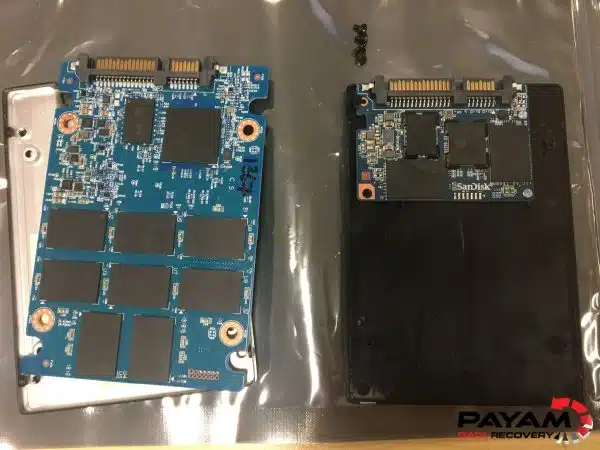
Our data recovery engineer started by opening the plastic enclosure and removing the SSD itself. On the Boost X20 that board is small, with the USB-C port soldered straight onto the same PCB as the controller and the NAND. There is no separate bridge to swap out, so the work has to happen on the drive’s own electronics.
From there the board went onto a PC-3000 Portable SSD Pro by Ace Lab, the 2026 version. It is a piece of equipment that costs around $30,000 in Australia, and it is not something a local repair shop keeps on the shelf. The tool is only half the job though. The other half is reading what the drive is telling you and knowing what to change, which comes from years of doing exactly this.
The Portable SSD Data Recovery Process
The first finding was reassuring. The NAND flash was healthy. Nothing was physically wrong with the memory holding Anthony’s sessions. The fault sat in the firmware, the hidden software the controller runs before it ever shows up as a drive. Two parts of it had become corrupted: the loader, which brings the controller to life, and the translator, the map that converts logical addresses into the physical flash locations where data actually lives.
Our data recovery engineer uploaded a known-good loader to get the controller responding, then rebuilt the translator using the metadata stored in the drive’s service area. Once that map was reconstructed, the drive presented itself as a logical volume for the first time since it failed. We then imaged the whole drive to fresh hardware before reading any user files, so the original board was never put at further risk during the work. This is standard SSD data recovery practice and it matters more on firmware cases, where every read counts.
Portable SSD Data Recovery Results
With the image in hand, our data recovery engineer opened a selection of Anthony’s Logic projects and they loaded cleanly, audio tracks and all. The recovery came to 90 GB and more than 12,000 files, every one of them in good condition. The team copied the data off the clone onto a new external USB hard drive, emailed Anthony a full listing of every recovered file, and put together a short video preview so he could see his sessions were safe before paying anything. He got back work he thought was gone for good.
Why Professional Portable SSD Data Recovery Matters
Firmware faults are where well-meaning DIY attempts cause the real damage. Reformatting, running consumer “repair” utilities, or repeatedly power-cycling a drive in this state can push the controller to overwrite the very service area structures needed to rebuild the translator. Once those are gone, the odds drop sharply. A solid-state drive hides this complexity from you on a good day, which is exactly why it feels like nothing can be done on a bad one.
Professional portable SSD data recovery works the other way around. We read first, change as little as possible, and always work from an image rather than the patient drive. If you have already been told your SSD is unrecoverable, that verdict is often based on what an ordinary computer can see, not on what the firmware can be coaxed into doing on the right gear.
Why People Choose Payam Data Recovery
A failed SSD needs an experienced data recovery engineer and professional tools, because its own controller and firmware decide where your files sit on its memory chips. That is the work we do every day.
- We are a specialist data recovery lab, not a computer repair shop. We have been recovering data since 1998, from over 300,000 devices.
- The best equipped data recovery lab in Australia: the Ace Lab PC-3000 for SSD firmware faults, Rusolut tools to read memory chips directly, microscopes and microsoldering stations for circuit board work, and over 30,000 donor parts, including around 20,000 donor hard drives.
- Over 2,000 IT companies and computer shops across Australia send us their customers’ complex cases, and data recovery labs and IT companies in more than 50 countries have sent us their difficult cases over the past ten years.
- Rated 4.9 from over 2,400 Google reviews.
- About 90% of our jobs are no fix, no fee. The hardest 10% carry an attempt fee.
- See your files before you pay. You tell us which files matter most. Before you pay for the recovery, we’ll send you a list of your recovered files so you can check them. If any of the files you listed are missing, tell us and we’ll search again.
- Pay by Visa, Mastercard, American Express, Apple Pay, Google Pay, Link or PayPal, split the cost with Afterpay, Zip, Klarna or PayPal Pay in 4, or pay by bank deposit (EFT).
- Everything is done in our own labs in Australia and never outsourced overseas. Call or visit us, and you can speak with the data recovery engineers who do the work.
We are not the cheapest. We are the best in Australia at this work. We know what to do, how to do it, and we will do our very best for you. Your best chance of getting your data back is with us.
SSD Data Recovery Pricing and Services
Every non-mobile case starts with a free assessment and a written quote, and you decide whether to go ahead once you have it. Nothing chargeable happens until the terms are agreed in writing. The price of SSD recovery depends on the fault, and current prices are on our SSD data recovery page. Priority and Emergency are faster and cost more. Straightforward logical jobs sit at the lower end. Firmware-level work like Anthony’s, where the loader and translator have to be rebuilt on specialist equipment, sits higher and may involve an attempt fee. When an attempt fee applies it is agreed up front and forms part of the total quote, never an extra charge added on top.
We offer Economy, Priority and Emergency turnaround so you can match the speed to how urgently you need the files. Everything is done here in Australia. We never outsource overseas, and international customers are welcome, and return delivery is free after a paid recovery.
Frequently Asked Questions
My portable SSD flashes once then does nothing. Is the drive dead?
Usually not. A single flash followed by silence most often means the controller and firmware cannot bring the drive up, while the memory holding your files is intact. That is a recoverable situation in most cases.
Can data be recovered if the SSD firmware is corrupted?
Yes, in most cases. When the loader or translator is corrupted but the NAND is healthy, the firmware can be repaired or rebuilt on professional equipment and the data imaged off. Anthony’s drive is a textbook example.
What is the translator and why does it matter so much?
The translator is the map an SSD uses to convert logical addresses into the physical flash cells where your data sits. Without a working translator the drive cannot present your files, even though every byte is still there. Rebuilding it correctly is the heart of the job.
Should I try repair software at home first?
No. Consumer utilities and reformatting can overwrite the service area structures needed to rebuild the firmware, which can turn a recoverable drive into a much harder one. Stop using the drive and have it assessed.
How much does portable SSD data recovery cost in Australia?
The price of SSD recovery depends on the fault, and Priority and Emergency are faster and cost more. Firmware-level cases sit toward the higher end and may carry an attempt fee that is included in the total, not added on top. You get a written quote after a free assessment and decide from there.
How long does it take?
It depends on the fault and the turnaround level you choose. We offer Economy, Priority and Emergency options, and we confirm a realistic timeframe with your quote.
Do you recover Logic Pro and other music production files?
Yes. We recover Logic Pro projects, WAV and other audio files, and full session folders, exactly as we did here. We also send a file listing and a video preview so you can confirm your sessions are intact before paying.
I am outside Australia. Can you still help?
Yes. International customers are a regular part of our work. Get in touch and we will sort out shipping and the assessment. The easiest way for an international customer to reach us is by email at help@payam.com.au, which works in every time zone.
About Payam Data Recovery
Payam Data Recovery has been recovering data in Australia since 1998, with more than 300,000 devices recovered behind us. We run our own ISO 5 certified laminar flow cabinet and labs in Sydney and Rhodes NSW, Melbourne, and Brisbane, with secure drop-off offices in Adelaide and Perth, which send your device to our lab in Rhodes, NSW at no cost. For flash storage we use professional gear such as the Ace Lab PC-3000 Flash and Portable SSD platforms and the Rusolut Visual NAND Reconstructor, backed by microsoldering when a board needs it. Every case is handled here in our own labs. We never send your drive overseas. You can read more about our team and history on our about page.
Request a Free SSD Data Recovery Assessment
Has your portable SSD stopped showing up, or has another shop told you the data is gone? Before you give up on it, let us take a look.
Every SSD recovery comes with a written quote after a free assessment. We handle portable and internal SSDs, USB-C drives, and NVMe and SATA modules. International customers are welcome.
SSD Data Recovery Service
Get a Free Quote
Ready to send it in? You can submit a new job online in a couple of minutes.
Phone: 1300 444 800 | Email: help@payam.com.au
Related Case Studies
- Worn MacBook Air SSD, translator rebuilt on a PC-3000
- SSD NAND degradation: rebuilding the translator on a failed SATA SSD
- SanDisk SSD recovery using a chip-off approach
- SSD data recovery for a Brisbane customer
- eMMC chip-off case study
- CFexpress wedding photo recovery
- Samsung T7 Shield data recovery case study
Video Transcript
I’m Mike, visiting Payam Data Recovery’s lab in Australia to show you what happens behind the scenes. Today I’m watching one of their data recovery engineers work on a Dynabook Boost X20 1TB portable SSD belonging to Anthony, a music producer from Melbourne. The drive holds his Logic Pro projects, WAV files, and audio sessions.
The light flashes for a second when it’s plugged in, then nothing. The data recovery engineer opens the plastic case and pulls out the SSD itself, which is a small PCB with the USB-C port built straight onto it. He connects it to a PC-3000 Portable SSD Pro by Ace Lab, the 2026 version. The tool costs around $30,000 Australian. It’s not something a local computer shop has, and frankly the tool is only half the job. The other half is knowing exactly what to do with it.
The SSD itself is healthy. The fault is in the firmware. Specifically, the loader and translator are corrupted. He uploads a working loader, rebuilds the translator from the metadata in the service area, and the drive appears as a logical volume. He images it, verifies the Logic projects open cleanly, and Anthony gets every session back. In total, 90 GB of data and over 12,000 files are recovered, all in good condition.
From there, Payam’s team copies the data from the clone onto a new USB external hard drive, emails Anthony a full file listing, and generates a short video preview so he can see his data is safe before paying. If you have a dead SSD and somebody has told you it can’t be fixed, try Payam Data Recovery. They fix problems others say are impossible every single day.


