


2019 MacBook Pro T2 firmware corruption case study follows a 2019 MacBook Pro that suddenly stopped powering on, leaving the customer unable to access important files. In this case, the initial fault was a dust-related capacitor short that reduced power delivery, followed by T2 firmware corruption that left the Mac stuck in recovery mode.
Case Study Summary
- Device: 2019 MacBook Pro (T2 model)
- Problem: No power and no boot, then stuck in recovery mode
- Findings: Dust buildup contributed to a capacitor short and low voltage
- Complication: T2 firmware corruption after unexpected shutdown
- Outcome: T2 revived and data cloned to an external drive
What happened to the 2019 MacBook Pro
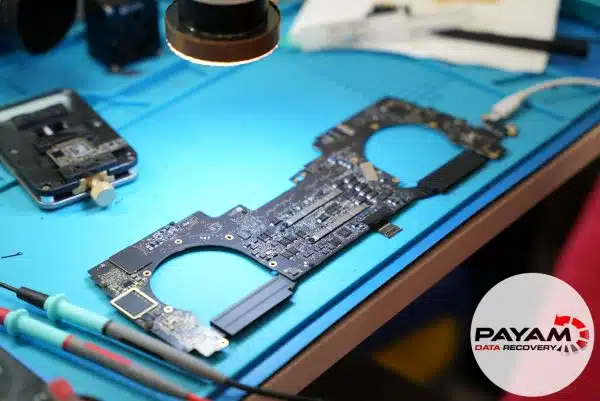
The MacBook arrived with no signs of life. When the logic board was inspected, extensive dust buildup was found underneath the board, likely entering through normal vents. In the video, the engineer explains this contamination caused electrical interference near critical power components.
Key symptom from the diagnosis
The system was only receiving about 5 volts instead of the required 20 volts, which prevented normal power-up.
Capacitor short caused by dust contamination
Using a multimeter, the engineer identified a capacitor that had short-circuited. After replacing the damaged capacitor, correct power was restored, but the MacBook still would not boot normally.
T2 firmware corruption and revival
After power was restored, the Mac remained stuck in recovery mode. The video explains that the sudden shutdown corrupted the T2 chip firmware. On T2 models, the chip is involved in secure boot, storage encryption, and device management, so firmware damage can prevent startup and block data access.
Apple documents the role of the T2 Security Chip here: Apple T2 Security Chip.
Using specialised revival techniques, the engineer restored the T2 firmware and brought the MacBook back to life. The final step was cloning the customer’s data to a new external drive.
Why cases like this need specialist handling
- The SSD is integrated into the logic board on these models, so standard “remove the drive” approaches do not apply.
- Power faults can be the visible symptom, but security and firmware issues can still block access after repair.
- Incorrect repair attempts can worsen board damage or complicate recovery.
Service process for MacBooks
For MacBooks and other computers, we provide a free assessment and quote. Quotes are typically provided within 1 to 2 business days. Work starts only after approval.
Payam Data Recovery has laboratories in Sydney CBD, Rhodes NSW, Melbourne CBD, and Brisbane CBD. Secure drop-off points are available in Adelaide CBD and Perth CBD. International customers are welcome and we have regular clients in the USA, Europe, the Middle East, and Asia. The easiest way for an international customer to reach us is by email at help@payam.com.au, which works in every time zone.
Frequently Asked Questions
My MacBook Pro will not power on at all. What causes that?
Often a power delivery fault on the logic board. In this case the machine was receiving only about 5 volts instead of the 20 volts it needs, which stopped it powering up at all.
Can dust really damage a MacBook logic board?
Yes. Extensive dust had built up underneath the board, entering through the normal vents, and it caused electrical interference near critical power components. A capacitor had short circuited as a result.
My Mac powers on but is stuck in recovery mode. What does that mean?
On a T2 model it can mean the T2 firmware is corrupted. Here the sudden shutdown corrupted it, so even after correct power was restored the Mac still would not boot normally.
What does the T2 chip actually do?
It handles secure boot, storage encryption and device management. Because it sits between the system and the storage, damage to its firmware can both prevent startup and block access to your data.
If the T2 firmware is corrupted, is my data lost?
Not necessarily. The T2 firmware was revived using specialist techniques, the MacBook came back to life, and the data was then cloned to an external drive.
What does MacBook data recovery cost, and when do I pay?
Every MacBook starts with a free assessment, then a written quote with Economy, Priority and Emergency service levels. For MacBook SSD recovery there is no attempt fee: you pay nothing up front and pay only if the recovery succeeds. Before that final payment we send you a complete file list and a video preview so you can check the quality first.
Related MacBook data recovery case studies
- MacBook Air M2 data recovery case study
- MacBook Pro logic board repair data recovery case study
- Liquid damaged MacBook data recovery case study
Payam Data Recovery works with individuals, students, families, small and medium businesses, IT companies, and organisations that need their data recovered safely and professionally. Some customers come to us with a single damaged device containing personal memories, while others rely on us for complex technical recoveries that require specialist tools and experience.
We are based in Australia and have been recovering data since 1998. Our clients also include governments, law enforcement agencies, corporations, and public figures. Every job is handled with 100 percent confidentiality and privacy.
Read more about our MacBook Data Recovery Service
Email: help@payam.com.au
Phone: 1300 444 800