


WD My Cloud EX4100 Data Recovery Case Study Summary
- Client: Robert, Annandale, NSW
- Device: WD My Cloud EX4100 (4-bay NAS, 4TB drives, RAID 5)
- Problem: All four drive indicator lights turned red, volume failure, no configured volumes detected
- Diagnosis: Two drives had bad sectors and read errors; one drive had failed approximately four months earlier
- Solution: Cloned all four drives using Atola Insight Forensic, rebuilt RAID 5 array in UFS Explorer using three viable drives
- Outcome: 9TB of family photos, videos, and documents recovered in good condition
- Service: RAID and NAS Data Recovery
Proven WD My Cloud EX4100 Data Recovery Case Study Australia: 9TB RAID 5 Failure Fully Recovered
When Robert from Annandale, NSW, saw all four drive indicator lights turn red on his WD My Cloud EX4100, he knew something had gone seriously wrong. His 4-bay NAS, configured in RAID 5 with four 4TB drives, held 9TB of family photos, videos, and documents. The system reported no configured volumes, and he had received both power supply failure alerts and volume failure warnings. This WD My Cloud EX4100 data recovery case study documents how Payam Data Recovery’s RAID and NAS recovery specialists diagnosed the multi-drive failure and recovered every file.
After rebooting the NAS twice with no improvement, Robert wisely stopped attempting any further fixes and sent the entire unit to Payam Data Recovery for professional assessment. That decision proved critical to the successful outcome of this recovery. Based in Australia, Payam Data Recovery also regularly handles complex RAID cases from the USA, New Zealand, UK, and worldwide, often recovering data that other data recovery companies have given up on.
The Problem: WD My Cloud EX4100 RAID 5 Volume Failure
Robert’s WD My Cloud EX4100 had been reliably storing his family’s digital life for years. Then, without warning, all four drive lights went red. The NAS reported a complete volume failure with no configured volumes detected. Robert received power supply failure alerts and volume failure warnings from the system.
What Robert did not realise at the time was that one of the four drives had actually failed approximately four months earlier. The RAID 5 configuration had been running in a degraded state for months, placing additional stress on the remaining drives. When a second drive began developing bad sectors, the array could no longer maintain data integrity, resulting in the complete volume failure Robert experienced.
This type of cascading failure is one of the most common and dangerous scenarios in NAS and RAID data recovery. A single undetected drive failure can silently degrade the array until a second failure triggers a catastrophic collapse.
The WD My Cloud EX4100 Data Recovery Case Study Process
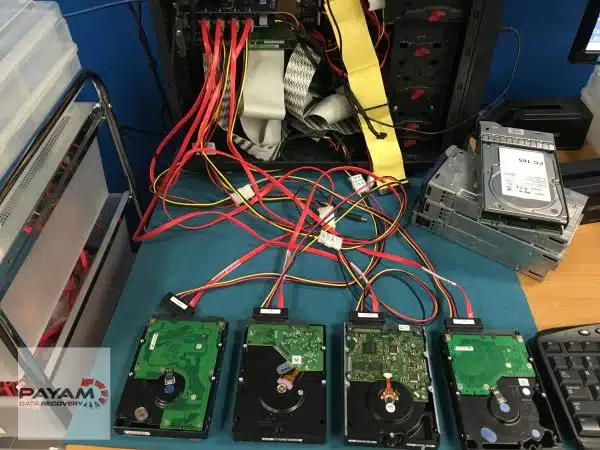
At the Payam Data Recovery laboratory, senior technician Payam began by testing all four drives individually using the Atola Insight Forensic imaging tool. The results showed a mixed picture: two drives were healthy, while the other two had bad sectors and read errors.
Before attempting any reconstruction, Payam cloned all four drives onto fresh, healthy replacement drives. This is a fundamental step in professional RAID data recovery, as it preserves the original evidence and prevents further degradation of failing drives during the recovery process.
With the clones ready, Payam loaded them into UFS Explorer on a dedicated recovery computer. The software automatically detected the RAID configuration, but the partition appeared damaged with no files visible. After reviewing Robert’s notes and conducting deep scanning with multiple configurations, Payam determined that one of the failed drives had actually died approximately four months earlier.
The breakthrough came when Payam excluded the long-failed drive and rebuilt the RAID 5 array using the three remaining cloned drives. Once the correct configuration was applied, all files appeared. The entire 9TB dataset, including family photos, videos, and documents, was recovered in good condition.
WD My Cloud EX4100 Data Recovery Case Study Results
The recovery was a complete success. All 9TB of Robert’s data was recovered in good condition, including:
- Family photos spanning years of memories
- Personal videos
- Important documents
The key to this successful WD My Cloud EX4100 data recovery case study outcome was the combination of proper diagnostic tools, the decision to clone all drives before any reconstruction work, and the experience to recognise that a much earlier drive failure was the root cause of the array collapse.
The Critical Lesson: Never Rebuild a Failing RAID Array Yourself
This case study highlights one of the most important rules in NAS data recovery: when your NAS shows drive failure warnings, do not attempt to repair or rebuild the array yourself.
Trying to force a RAID rebuild through the NAS web interface with failing drives can cause severe file system corruption. This can make professional data recovery significantly more difficult, or in some cases, impossible. If Robert had attempted to rebuild the array instead of sending it to professionals, the outcome could have been very different.
With 28 years of experience and the patience required for complex troubleshooting, Payam Data Recovery was able to identify the hidden cause and recover every file. As this WD My Cloud EX4100 data recovery case study demonstrates, sometimes the difference between total data loss and full recovery comes down to knowing which drive to exclude from the rebuild.
Why Professional NAS Data Recovery Matters
NAS devices running RAID configurations provide redundancy, but they are not immune to failure. When multiple drives fail or when a RAID array collapses, the data recovery process requires specialised tools and deep expertise that go far beyond consumer-level solutions.
Professional RAID and NAS data recovery involves:
- Individual drive diagnostics using forensic-grade tools like the Atola Insight Forensic
- Sector-by-sector cloning of all drives before any reconstruction
- Professional RAID reconstruction software such as UFS Explorer
- The experience to identify hidden failures and select the correct drive combination for rebuilding
Attempting DIY recovery on a failed RAID array risks permanent data loss. Forced rebuilds, incorrect drive ordering, or further use of failing drives can overwrite the very data you are trying to save.
NAS and RAID Data Recovery Assessment and Services
Payam Data Recovery offers comprehensive RAID and NAS data recovery services for all configurations, including RAID 0, RAID 1, RAID 5, RAID 6, RAID 10, JBOD, and proprietary NAS formats. We recover data from all NAS brands, including Synology, QNAP, Western Digital, Buffalo, Netgear, Drobo, ASUSTOR, TerraMaster, Seagate, LaCie, Thecus, D-Link, Promise Technology, OWC, UniFi, Ugreen, Dell, HPE, Lenovo, and custom-built server systems. We work with SATA, SAS, and SCSI hard drives as well as SSD-based RAID arrays.
The first step is always an assessment and quote. Payam Data Recovery offers two assessment options:
- Free Assessment and Quote: Completed within 1 to 2 days of receiving your device. No cost, no obligation.
- Urgent Assessment and Quote: $500, completed within 2 to 3 hours from the time your device is delivered to us. Ideal when time is critical.
In most cases, NAS and RAID data recovery ranges from $800 to $5,000. A small upfront attempt fee of around $500 is typically required to cover time and labour, with the remainder due upon successful completion. With a success rate of approximately 99% for most RAID recoveries, the vast majority of cases are completed successfully. Priority and Emergency services for complex cases can be up to $10,000. All prices include GST and free return postage.
Payam Data Recovery serves customers across Australia with laboratories in Sydney, Melbourne, and Brisbane, plus secure drop-off points in Perth and Adelaide with free shipping both ways. We also welcome international customers from the USA, New Zealand, UK, and worldwide, particularly for complex RAID cases where other data recovery companies have been unable to help.
Frequently Asked Questions: NAS RAID 5 Data Recovery
Can data be recovered from a WD My Cloud NAS with all red lights?
Yes. Red indicator lights on a WD My Cloud NAS typically signal a volume failure, which can be caused by one or more drive failures. In this WD My Cloud EX4100 data recovery case study, Payam Data Recovery successfully recovered all 9TB of data where all four drive lights were red. Professional diagnosis, drive cloning, and RAID reconstruction are required for a safe recovery.
What is RAID 5 and how does it protect data?
RAID 5 distributes data and parity information across three or more drives. It can tolerate the failure of one drive without data loss. However, if a second drive fails before the first is replaced and rebuilt, the array collapses and professional data recovery is needed. This is exactly what happened in Robert’s case.
Why should I not attempt to rebuild a failed RAID array myself?
Attempting a RAID rebuild through the NAS web interface with failing drives can cause severe file system corruption. A forced rebuild may overwrite critical data structures, making professional recovery significantly harder or even impossible. Always send a failed NAS to a professional data recovery service before attempting any repairs.
How much does NAS RAID data recovery cost in Australia?
In most cases, NAS and RAID data recovery at Payam Data Recovery ranges from $800 to $5,000. Priority and Emergency services for complex cases can be up to $10,000. A small upfront attempt fee of around $500 is typically required to cover time and labour, with the remainder due upon successful completion. With a success rate of approximately 99% for most RAID recoveries, the vast majority of cases are completed successfully. All prices include GST. The process begins with a free assessment and quote, completed within 1 to 2 days of receiving your device. If you need results faster, an urgent assessment and quote is available for $500, completed within 2 to 3 hours from delivery.
What NAS brands can Payam Data Recovery recover data from?
Payam Data Recovery recovers data from all NAS brands and RAID configurations. We regularly work with Synology, QNAP, Western Digital (WD My Cloud, My Book Duo), Buffalo (LinkStation, TeraStation), Netgear (ReadyNAS), Drobo, ASUSTOR, TerraMaster, Seagate (Personal Cloud, IronWolf NAS), LaCie, Thecus, D-Link (ShareCenter), Promise Technology, Infortrend, OWC, UniFi (UNAS), Ugreen (NASync), Dell (PowerVault), HPE (ProLiant, StoreEasy), and Lenovo (ThinkSystem). We also recover data from custom-built NAS and server systems. All RAID types are supported, including RAID 0, RAID 1, RAID 5, RAID 6, RAID 10, JBOD, and proprietary configurations. We work with SATA, SAS, and SCSI hard drives as well as SSD-based RAID arrays.
What tools are used for professional NAS data recovery?
Payam Data Recovery uses forensic-grade equipment including the Atola Insight Forensic for drive diagnostics and cloning, the Ace Lab PC-3000 for complex drive repairs, and UFS Explorer for RAID reconstruction. All drives are cloned to healthy replacements before any reconstruction work begins, ensuring the original data is preserved.
How long does the NAS data recovery assessment take?
Payam Data Recovery offers two assessment options. The free assessment and quote is completed within 1 to 2 days of receiving your device. For urgent situations, a $500 urgent assessment and quote is completed within 2 to 3 hours from the time your device is delivered. After the assessment, recovery turnaround depends on the complexity of the case. Quick and straightforward recoveries can be completed in as little as 1 to 2 days. Complex cases involving large datasets, for example 50TB to 100TB, take considerably longer due to the time required for data transfer to a new destination drive.
What happens if the recovery is unsuccessful?
For most RAID and NAS recoveries, Payam Data Recovery requires a small upfront attempt fee of around $500 to cover time and labour. The remainder of the total price is due upon successful completion. With a success rate of approximately 99% for most RAID recoveries, the vast majority of cases result in a full recovery. If recovery is unsuccessful, the attempt fee is the only cost. Your personalised quote will clearly outline all fees before you decide to proceed, and there is never any pressure to go ahead.
Can one failed drive cause a RAID 5 to completely collapse later?
Yes. This is exactly what happened in this case study. One drive had failed approximately four months before the complete collapse, but the failure went unnoticed. The RAID 5 array was running in a degraded state, and when a second drive developed bad sectors, the entire array failed. Regular monitoring of NAS health status and drive condition is essential to prevent this scenario.
Does Payam Data Recovery accept RAID cases from outside Australia?
Yes. While Payam Data Recovery is based in Australia, we regularly handle complex RAID and NAS cases from the USA, New Zealand, UK, and worldwide. We often recover data from cases that other data recovery companies have been unable to complete or have given up on. If your local provider cannot help, contact us at help@payam.com.au or call 1300 444 800 to discuss your case.
About Payam Data Recovery
Payam Data Recovery is Australia’s longest-established data recovery company, founded in 1998 with over 150,000 successful recoveries completed. The company operates a Class 100 cleanroom facility and maintains over 20,000 donor parts in-house for immediate use.
With full-service laboratories in Sydney (including the head office and main specialised lab in Rhodes, NSW), Melbourne, and Brisbane, plus secure drop-off points in Perth and Adelaide with free shipping both ways, Payam Data Recovery serves customers across Australia and internationally. We regularly receive complex RAID and NAS cases from the USA, New Zealand, UK, and other countries where local data recovery companies have been unable to recover the data. All recovery work is performed in Australia and is never outsourced overseas.
For NAS and RAID recoveries, the team uses industry-leading tools including the Atola Insight Forensic, Ace Lab PC-3000, DeepSpar Disk Imager, and UFS Explorer to diagnose, clone, and reconstruct failed arrays. This WD My Cloud EX4100 data recovery case study is just one example of over 150,000 successful recoveries completed with 28 years of expertise.
Request a Free NAS and RAID Data Recovery Assessment
Is your NAS showing red lights, drive failure warnings, or volume errors? Do not attempt to rebuild the array yourself. Payam Data Recovery offers a free assessment and quote, completed within 1 to 2 days. Need answers faster? An urgent assessment and quote is available for $500, completed within 2 to 3 hours from delivery.
NAS and RAID data recovery ranges from $800 to $5,000 in most cases, with a small upfront attempt fee of around $500 to cover time and labour. The remainder is due upon successful completion. With a 99% success rate for most RAID recoveries, you are in safe hands. Priority and Emergency services for complex cases can be up to $10,000. All prices include GST and free return postage.
Supported devices: All NAS brands including Synology, QNAP, Western Digital, Buffalo, Netgear, Drobo, ASUSTOR, TerraMaster, Seagate, LaCie, Thecus, D-Link, Promise Technology, OWC, UniFi, Ugreen, Dell, HPE, and Lenovo. All RAID levels (RAID 0, 1, 5, 6, 10, JBOD) with SATA, SAS, SCSI hard drives and SSD RAID arrays.
Based in Australia. International customers welcome. We regularly handle complex RAID and NAS cases from the USA, New Zealand, UK, and worldwide. If another data recovery company has given up on your case, we can help. Nobody will try harder or invest more expertise into your case.
Submit your NAS for assessment | Phone: 1300 444 800 | Email: help@payam.com.au
Related RAID and NAS Data Recovery Case Studies
- 16-Drive RAID Recovery Case Study: 10TB Recovered from Mining Company Server
- Seagate Personal Cloud NAS Recovery Case Study
- Western Digital Hard Drive Data Recovery Case Study
Video Transcript: WD My Cloud EX4100 Data Recovery Case Study
Hey, I’m Mike back at Payam Data Recovery for a complex one today. Robert from Annandale sent in a WD My Cloud EX4100, a 4-bay NAS with 4TB drives in RAID 5. One night, all four lights went red. Volume failure, no configured volumes, 9TB of family photos potentially gone.
Robert got power supply failure alerts and volume failure warnings. He rebooted it twice, then wisely stopped and sent it to Payam.
Using his favourite tool, the Atola Insight Forensic, Payam tested all four drives. Two are healthy, two had bad sectors and read errors. So, he cloned all four to fresh, healthy drives before touching anything else.
On their dedicated recovery computer, Payam loaded the clones into UFS Explorer. It detected the RAID automatically, but the partition showed damaged. Red dot, no files visible.
After reviewing Robert’s notes, Payam suspected he tried to rebuild the RAID through the web interface with failing drives. That can cause severe file system corruption.
Good news. After deep scanning and testing multiple configurations, Payam worked out that one of the failed drives had actually died 4 months earlier. By excluding that drive and rebuilding the RAID 5 with the remaining three, all files appeared. 9TB of family photos, videos, and documents recovered in good condition.
Here’s the lesson. When your NAS shows drive failures, don’t try to repair or rebuild it yourself. You might make it worse permanently. Robert was lucky. Payam’s 28 years of experience and patience in troubleshooting saved his family memories.
If your RAID fails, Payam Data Recovery offers a free assessment. Sometimes the difference between total loss and full recovery is knowing which drive to leave out.