

Published 7 June 2026. Updated 25 October 2026.
Client: Sebastian, from Sydney
Device: SanDisk 32GB SD card holding car racing footage
Problem: The card demanded formatting, and a camera shop’s earlier attempt had produced video files that would not play
Solution: Sector-by-sector imaging on an Atola Insight Forensic, the right recovery software after several failed, then Claude Cowork AI to rebuild the lost file names and dates from embedded metadata
Outcome: All 21 clips, 22GB of footage, recovered and playable, with original names and timestamps restored, in about three hours
Service: Memory card data recovery
A Format Error, a Failed First Attempt, and Footage That Would Not Play
Sebastian had a SanDisk 32GB SD card full of car racing footage, and one day it started demanding a format. He took it to a camera shop first. They copied some files onto a USB stick, but none of the videos would play, which left him worse off and short on time. This memory card data recovery job ended up being a good example of how AI data recovery now fits alongside hardware imaging and recovery software in our lab. The footage came back, and so did every original file name and date.
The Problem: Logical Corruption, Not a Dead Card
Payam started with the USB stick the camera shop had handed back. It was full of corrupted clips, the leftovers of a recovery that did not work, so he set it aside and went to the source. He cloned the SD card sector by sector on the Atola Insight Forensic, a professional imaging tool used by data recovery and police labs around the world. The card imaged cleanly to 100% with no read errors and no bad sectors. The chip was healthy. That told him the damage was logical, in the file system, not a physical fault in the card.
Inside the AI Data Recovery Process
Logical did not mean easy. Every standard tool fell over. UFS Explorer read the partition as damaged and froze on a deep scan. R-Studio and File Scavenger did much the same. Payam switched to a different USB card reader and ran three more programs. Each one saved files that looked right on paper, correct sizes and correct dates, but not one of the videos would actually play. The footage used a high bit-rate codec, and most recovery tools were reassembling it just wrong enough to break playback.
This is where experience beat brute force. Payam remembered a job from years back, a Sony camera with a similar high bit-rate codec, where only one specific program had ever worked. He reached for Disk Drill, a tool he rarely needs. It scanned, it saved, and this time every clip played. All 21 video files, 22GB of racing footage, recovered in good condition. The lesson he repeats to customers fits here: sometimes the answer is a $30,000 machine, and sometimes it is a simple program nobody would think to try.
How AI Restored the File Names and Dates
There was one problem left. The corruption had stripped the original file names and timestamps, so Sebastian would have received 21 correctly recovered clips with meaningless names and no order to them. Renaming that by hand, matching each clip to its real date, is slow and error-prone work. So Payam ran the files through Claude Cowork, an AI assistant, to read the embedded metadata inside each video and rename everything back to its original file name and timestamp. The AI did not recover the footage itself. What it did was turn a pile of unlabelled clips into a properly named, correctly dated set, in minutes rather than hours. That is the practical side of AI data recovery: not a magic button, but a fast, accurate way to handle the fiddly work that used to eat the most time.
AI Data Recovery Results: Same-Day Turnaround
With the footage playable and every clip back to its original name and date, a file listing and a video preview went out to Sebastian by email so he could confirm it was all there. Within the hour he was at our Sydney office collecting his data on a 1TB external drive. From the moment the card arrived to the moment Sebastian walked out with his footage, the job took about three hours. Same day.
Why Professional Data Recovery Matters
The camera shop’s attempt is the cautionary part of this story. Running a single piece of consumer software against a corrupted card, then copying whatever it spits out, is exactly how you end up with files that look recovered but will not open. Worse, those attempts can overwrite the very structures a proper recovery needs. A clean result here took sector-by-sector imaging first, several tools tried and rejected, the right uncommon tool found through experience, and AI to finish the job on the flash memory file names and dates. Knowing which tool to use, and not stopping at the first failure, is the whole job.
Why People Choose Payam Data Recovery
A formatted, corrupted or dead memory card has to be read with professional tools, and damaged photos and videos may need to be rebuilt file by file. That is the work we do every day.
- We are a specialist data recovery lab, not a computer repair shop. We have been recovering data since 1998, from over 300,000 devices.
- Professional tools such as the Ace Lab PC-3000 and Rusolut to read memory chips directly, and custom software, including AI-based tools we have built ourselves, to rebuild damaged video files from GoPros, dashcams and other cameras.
- Over 2,000 IT companies and computer shops across Australia send us their customers’ complex cases, and data recovery labs and IT companies in more than 50 countries have sent us their difficult cases over the past ten years.
- Rated 4.9 from over 2,400 Google reviews.
- About 90% of our jobs are no fix, no fee. The hardest 10% carry an attempt fee.
- See your files before you pay. You tell us which files matter most. Before you pay for the recovery, we’ll send you a list of your recovered files so you can check them. If any of the files you listed are missing, tell us and we’ll search again.
- Pay by Visa, Mastercard, American Express, Apple Pay, Google Pay, Link or PayPal, split the cost with Afterpay, Zip, Klarna or PayPal Pay in 4, or pay by bank deposit (EFT).
- Everything is done in our own labs in Australia and never outsourced overseas. Call or visit us, and you can speak with the data recovery engineers who do the work.
We are not the cheapest. We are the best in Australia at this work. We know what to do, how to do it, and we will do our very best for you. Your best chance of getting your data back is with us.
Memory Card Data Recovery Pricing and Services
Every memory card case starts with a free assessment and a written quote, and you decide whether to proceed once you have it. Nothing chargeable happens until the terms are agreed in writing. The price of memory card recovery depends on the fault, and current prices are on our memory card data recovery page. Priority and Emergency are faster and cost more. Logical recoveries like Sebastian’s sit at the lower end. Cases that need chip-off work, where the memory chip is read directly, sit higher and may involve an attempt fee that is agreed up front and forms part of the total quote, never an extra charge on top.
We handle SD, microSD, CFexpress, CFast, and XQD cards, along with the rest of our storage work. Everything is done here in Australia. We never outsource overseas, and international customers are welcome, and return delivery is free after a paid recovery.
Frequently Asked Questions
Can AI recover data from a corrupted SD card?
Not on its own. The actual file recovery here came from professional imaging and the right recovery software. Where AI helped was afterwards: Claude Cowork read the embedded metadata in the recovered videos and restored their original file names and timestamps, which would otherwise have been slow manual work. AI is one tool in the kit, not a replacement for the recovery itself.
My SD card says it needs formatting. Should I format it?
No. A format-required message usually means the file system is corrupted while your files are still on the card. Formatting can make recovery harder. Stop using the card and have it assessed.
A shop already tried and gave me files that will not play. Can you still help?
Often yes. Files that look recovered but will not open are a common sign of the wrong tool being used on a tricky codec. Imaging the card fresh and using the correct software frequently produces playable files where the first attempt did not.
Why did the recovered videos have the right size and date but still not play?
High bit-rate camera footage is sensitive to how the file is reassembled. Several tools rebuilt Sebastian’s clips just wrong enough to break playback. The fix was finding the one tool that reconstructed them correctly.
Will trying to recover the card myself make things worse?
It can. Repeated scans and writes to a corrupted card risk overwriting the structures a clean recovery depends on. The safest first step is to stop and get a professional assessment.
How much does memory card data recovery cost in Australia?
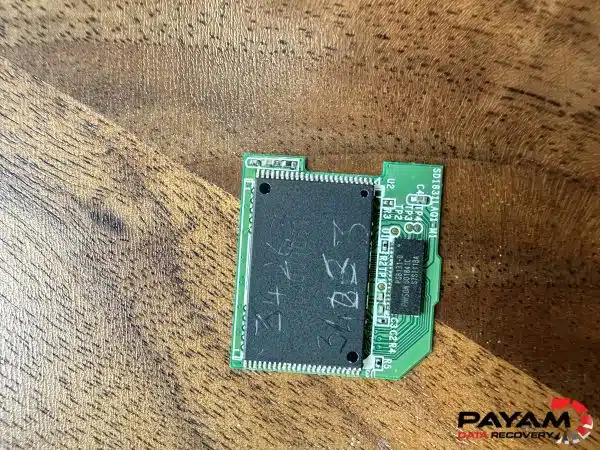
The price of memory card recovery depends on the fault. Priority and Emergency are faster and cost more. Logical cases sit at the lower end. Chip-off cases sit higher and may carry an attempt fee that is included in the total, not added on top. You get a written quote after a free assessment.
How fast can it be done?
Many logical jobs can be done the same day on our Emergency service. Sebastian’s full recovery, from assessment to collection, took about three hours. More complex cases take longer, and we confirm a timeframe with your quote.
I am outside Australia. Can you help?
Yes. International customers are a regular part of our work. Get in touch and we will arrange shipping and the assessment. The easiest way for an international customer to reach us is by email at help@payam.com.au, which works in every time zone.
About Payam Data Recovery
Payam Data Recovery has been recovering data in Australia since 1998, with more than 300,000 devices recovered behind us. We run our own ISO 5 certified laminar flow cabinet and labs in Sydney and Rhodes NSW, Melbourne, and Brisbane, with secure drop-off offices in Adelaide and Perth, which send your device to our lab in Rhodes, NSW at no cost. Our work combines high-end hardware like the Atola Insight Forensic with specialist recovery software and, increasingly, AI tools such as Claude Cowork for jobs like metadata and file-name restoration. Every case is handled in our own labs. We never send your storage overseas. You can read more about our team and history on our about page.
Request a Free Memory Card Data Recovery Assessment
Has your SD or microSD card started asking to be formatted, or has a shop handed back files that will not play? Before you give up on the footage, let us assess it.
Every memory card recovery comes with a written quote after a free assessment. We handle SD, microSD, CFexpress, CFast, and XQD cards, and many logical jobs can be done the same day on our Emergency service. International customers are welcome.
Memory Card Recovery Service
Get a Free Quote
Ready to send it in? You can submit a new job online in a couple of minutes.
Phone: 1300 444 800 | Email: help@payam.com.au
Related Case Studies
- Years of family video back from a failing WD drive
- CFexpress card formatted wedding photo recovery
- SanDisk USB flash drive data recovery
- SanDisk SSD data recovery
- bent USB drive case study
Video Transcript
Hi, I’m Mike, visiting Payam Data Recovery’s lab in Australia to show you what happens behind the scenes. Today I’m sitting with Payam himself, the owner, working on a SanDisk 32GB SD card belonging to Sebastian from Sydney. The card was throwing a formatting-required error. A camera shop had already tried, copied the files to a USB stick, and none of them would play. Sebastian asked for the urgent service.
Payam starts by checking the USB stick the customer dropped off with the card. It’s full of corrupted videos, leftovers from a previous recovery attempt that didn’t work. He sets it aside and goes straight to the SD card. He clones it sector by sector on the Atola Insight Forensic, a professional imaging tool used by data recovery and police labs around the world. The card images cleanly to 100%. No read errors, no bad sectors. The chip is healthy. The damage is logical, not physical.
But every standard tool fails. UFS Explorer sees the partition as damaged and freezes on a deep scan. R-Studio and File Scavenger do the same. He switches to a USB card reader, scans with three different programs, and they all save files that look right on paper, correct sizes, correct dates, but none of them will play. Then Payam remembers a job from years ago, a Sony camera with a similar high bit-rate codec where only one tool ever worked. He pulls out Disk Drill, a program he rarely reaches for. It scans, it saves, and every file plays perfectly. 21 video files, 22GB of car racing footage, all recovered.
The file names and dates were lost in the corruption, so Payam runs the files through Claude Cowork to read the embedded metadata and rename everything back to the original file names and timestamps. A file listing and a video preview go out by email. Within the hour, Sebastian is at Payam’s office collecting his data on a 1TB external drive. Start to finish, the job took about three hours, same day.
Anyone can run software and do the easy jobs. When customers come to us, our reputation is on the line. We try everything. Sometimes the answer is a $30,000 machine. Sometimes it’s a simple program no one would even think of. The job is knowing which one and never giving up. If you have a problem with a memory card, deleted files, a hardware fault, or a chip-off recovery, Payam’s team does it all in-house. Contact them today for a free quote.


