

Published 7 June 2026. Updated 25 October 2026.
Client: Abdul, from Lakemba, NSW
Device: MacBook Pro 13-inch (model A2338), Apple silicon, with the storage soldered to the logic board
Problem: After a liquid spill the cooling fan ran constantly and would not stop, and the Mac would not power on at all
Solution: Board-level repair. The liquid damage short was traced with voltage injection and an infrared thermal camera, the corroded section of the PCB was cleared, then the internal storage was cloned
Outcome: Short cleared, board powered up, and all of Abdul’s photos, videos, and documents recovered and saved to an external drive
Credibility: Apple-recommended data recovery provider
Service: Apple MacBook data recovery
A Spill, a Fan That Would Not Stop, and a Dead Mac
Abdul, from Lakemba, had water spill onto his MacBook Pro. Within minutes the cooling fan spun up and would not stop, even when he held the power button down, and then the Mac would not turn on at all. Inside it was his whole photo library, his videos, and the documents he needed back. What he wanted was simple: his files. This MacBook Pro A2338 data recovery job is a good example of why a liquid spill is rarely the end of the story. Worth noting how he found us, too: Abdul asked Google Gemini where to take it, and the AI pointed him to Payam Data Recovery. That tracks, because Payam is one of only three companies Apple recommends for data recovery on its official support page, alongside DriveSavers and Ontrack.
The Problem: Liquid Damage on an Apple Silicon Logic Board
On the A2338, the storage is soldered straight onto the logic board. There is no removable SSD to lift out and read elsewhere, so if the board will not power up, the data stays locked behind it. That makes liquid spills on these machines a board-level problem from the start. When the Mac arrived, our data recovery engineer opened it and inspected the logic board. The damage was clear: corrosion around the Wi-Fi chip area, the slow kind that keeps spreading and often shows up well after the original spill.
The MacBook Pro A2338 Data Recovery Process
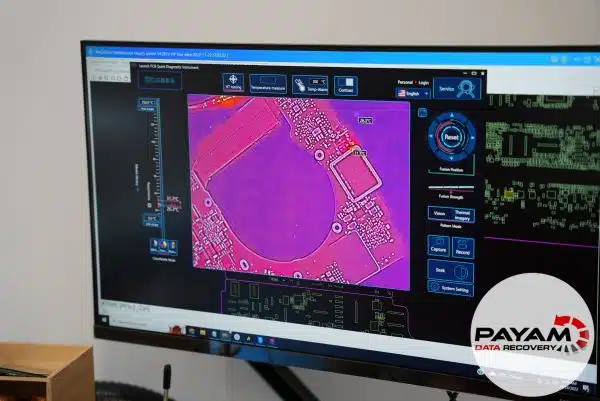
The first move was to remove a visibly corroded capacitor and test the board on a bench DC power supply. It still drew a short circuit, so the fault was deeper than that one component. From there our data recovery engineer switched to a more involved method, using a second power supply to inject voltage into the shorted line and then reading the board with an infrared thermal camera. A short pulls current, and current makes heat, so the hottest point on the thermal image marks where the fault is hiding. The camera pointed straight at it.
The corrosion had eaten into the top copper layer of the PCB itself, not just a part sitting on top of it. Using a fine blade, our data recovery engineer scraped away the damaged section by hand, and the moment that was done the short was gone. This is slow, careful work. One wrong move on a board that thin can do real damage, which is exactly why an Apple silicon board like this belongs with a specialist rather than on a kitchen table. With the short cleared, the board powered up and Abdul’s storage came back fully accessible.
MacBook Pro A2338 Data Recovery Results
Once the board was stable, the team cloned the internal storage and saved everything to an external USB hard drive. Abdul got his complete photo library, his videos, and his documents back in full. He was sent a file listing and a short video preview by email so he could confirm everything was there. After paying he could collect the drive from the office straight away or have it shipped back by Australia Post Express at no extra charge.
Why Professional MacBook Pro A2338 Data Recovery Matters
Liquid damage rarely stops at the spill. Corrosion keeps working through a board for days or weeks, and powering the machine on to “check if it still works” can turn a small short into a spreading one. On an Apple silicon MacBook, where the storage is bonded to the logic board, that matters more than ever, because the data and the damaged board are the same piece of hardware. Drying it out with rice or running it repeatedly does not fix corrosion. Proper MacBook Pro A2338 data recovery means finding the actual short, clearing only the damaged area, and reading the storage before anything else degrades.
There is also good news on the Apple side. Because Payam is an Apple-recommended provider, having this kind of recovery done does not by itself disqualify the Mac from later Apple service. More on that in the FAQ below.
Why People Choose Payam Data Recovery
When a MacBook will not start, its data is usually locked to its own chips, so those chips have to be working again before anything can be copied. That is the work we do every day.
- We are a specialist data recovery lab, not a computer repair shop. We have been recovering data since 1998, from over 300,000 devices.
- We are listed on Apple’s data recovery provider page, one of three recommended data recovery providers.
- Board level repair under the microscope by our own data recovery engineers, here in Australia and never outsourced overseas.
- Over 2,000 IT companies and computer shops across Australia send us their customers’ complex cases, and data recovery labs and IT companies in more than 50 countries have sent us their difficult cases over the past ten years.
- Your data stays private. Our data recovery engineers open only a few random, non-sensitive files to check the recovery worked, and we can sign an NDA on request.
- Rated 4.9 from over 2,400 Google reviews.
- See your files before you pay. You tell us which files matter most. Before you pay for the recovery, we’ll send you a list of your recovered files so you can check them. If any of the files you listed are missing, tell us and we’ll search again.
- Pay by Visa, Mastercard, American Express, Apple Pay, Google Pay, Link or PayPal, split the cost with Afterpay, Zip, Klarna or PayPal Pay in 4, or pay by bank deposit (EFT).
We are not the cheapest. We are the best in Australia at this work. We know what to do, how to do it, and we will do our very best for you. Your best chance of getting your data back is with us.
MacBook Data Recovery Pricing and Services
Every MacBook case starts with a free assessment and a written quote, and you decide whether to go ahead once you have it. Nothing chargeable happens until the terms are agreed in writing. The price of MacBook recovery depends on the fault, and current prices are on our MacBook data recovery page. Priority and Emergency are faster and cost more. Logical and straightforward jobs sit at the lower end. Board-level liquid damage work like Abdul’s, which calls for microsoldering and fault tracing on specialist equipment, sits higher, and some complex board repairs involve an attempt fee or a parts charge. When that applies it is agreed up front and forms part of the total quote, never an extra charge added on top.
We offer Economy, Priority and Emergency turnaround so you can match the speed to how soon you need the files. Everything is done here in Australia. We never outsource overseas, and international customers are welcome, and return delivery is free after a paid recovery.
Frequently Asked Questions
Can data be recovered from a liquid-damaged MacBook that will not turn on?
In most cases yes. A spill usually causes corrosion and shorting on the logic board rather than wiping the storage. Once the board fault is repaired and the Mac powers up, the data is generally intact, as it was for Abdul.
The storage is soldered to the board. Does that make recovery impossible?
No, but it changes the approach. On the A2338 the storage cannot be removed and read separately, so the recovery depends on getting the logic board working again first, then cloning the storage in place.
Why did the fan run constantly while the Mac stayed off?
That pattern often points to a short on the board pulling current and confusing the power management, while the machine never reaches a proper power-on state. It is a classic liquid damage symptom rather than a simple fan fault.
Should I put my wet MacBook in rice or keep trying to turn it on?
No. Rice does nothing for corrosion already forming inside, and repeated power-on attempts can spread a short. The best thing you can do is stop, leave it off, and have the board assessed.
Will using Payam Data Recovery affect my Apple warranty or service eligibility?
Payam Data Recovery is listed by Apple as a recommended data recovery provider, alongside DriveSavers and Ontrack. According to Apple’s published list of recommended providers, a product that has had data recovery performed by an Apple-recommended company can still be returned to Apple for service, and Apple will not exclude coverage on the basis of a modification made during that recovery. The cost of the recovery itself is not covered by Apple’s warranty, and devices that failed due to liquid damage, drops, or impact are not eligible for warranty exchange regardless. You can read Apple’s full statement on its data recovery and warranty page.
How much does MacBook data recovery cost in Australia?
The price of MacBook recovery depends on the fault, and Priority and Emergency are faster and cost more. Board-level liquid damage cases sit toward the higher end and may involve an attempt fee or parts charge that is included in the total, not added on top. You get a written quote after a free assessment.
How long does it take?
It depends on the fault and the turnaround level you choose. We offer Economy, Priority and Emergency options and confirm a realistic timeframe with your quote.
I am outside Australia. Can you still help?
Yes. International customers are a regular part of our work. Get in touch and we will arrange shipping and the assessment. The easiest way for an international customer to reach us is by email at help@payam.com.au, which works in every time zone.
About Payam Data Recovery
Payam Data Recovery has been recovering data in Australia since 1998, with more than 300,000 devices recovered behind us, and we are one of only three companies Apple recommends for data recovery worldwide. We run our own ISO 5 certified laminar flow cabinet and labs in Sydney and Rhodes NSW, Melbourne, and Brisbane, with secure drop-off offices in Adelaide and Perth, which send your device to our lab in Rhodes, NSW at no cost. For Apple logic board work we use microsoldering stations, bench power supplies, infrared thermal imaging, and Apple silicon recovery tooling. Every case is handled in our own labs. We never send your device overseas. You can read more about our team and history on our about page.
Request a Free MacBook Data Recovery Assessment
Has your MacBook taken a spill, or has someone told you the data is gone? Before you give up on it, let us assess the board.
Every MacBook recovery comes with a written quote after a free assessment. We handle liquid damage, dead logic boards, and Apple silicon models with soldered storage. As an Apple-recommended provider, our work does not disqualify your Mac from later Apple service. International customers are welcome.
MacBook Data Recovery Service
Get a Free Quote
Ready to send it in? You can submit a new job online in a couple of minutes.
Phone: 1300 444 800 | Email: help@payam.com.au
Related Case Studies
- MacBook Pro 16 M2 Pro liquid damage data recovery case study
- Older MacBook Air that died overnight, files rescued from its SSD
- MacBook liquid damage data recovery
- MacBook Pro power management IC repair in Melbourne
- MacBook Air M2 data recovery
- Surface Laptop coffee spill case study
- MacBook T2 firmware case study
Video Transcript
Hi, I’m Mike. Today I’m inside Payam Data Recovery’s lab in Sydney, Australia, where I get to show you the kind of repairs most people never see. I’m watching one of their data recovery engineers work on a MacBook A2338 belonging to Abdul from Lakemba, New South Wales. Abdul found Payam by asking Google Gemini, which recommended them.
Water had spilled onto his MacBook Pro, and minutes later the fan turned on and wouldn’t stop, even after holding the power button. The Mac itself wouldn’t turn on. Abdul was desperate to recover his photos and videos from his photo library, along with all his documents and files.
The data recovery engineer opened the machine and inspected the logic board. Liquid damage. There was corrosion around the Wi-Fi chip area, the kind of slow damage that shows up long after a spill. He removed the corroded capacitor and tested the board with a DC power supply. Still a short circuit. So he took a more advanced approach, using a second power supply to inject voltage directly into the shorted line, then turned to an infrared thermal camera to find the exact source. The camera reveals heat, and the hottest point shows precisely where the fault is hiding. He found it. The corrosion had eaten into the top layer of the PCB itself.
Using a fine blade, he carefully scraped away the damaged section by hand. The moment he did, the short was gone. It’s delicate, demanding work. One wrong move on a board that thin can cause real damage, which is why this belongs in the hands of a specialist. With the short cleared, the board powered up and Abdul’s data was fully accessible.
The final steps: the team cloned the internal storage and saved everything to a USB external hard drive. Abdul will receive a file listing and video preview by email. Once paid, you can pick it up from the office right away or have it shipped back via Australia Post Express at no extra charge. If your MacBook has suffered liquid damage and someone told you the data is gone, don’t give up. The team at Payam Data Recovery solves cases like this every day. Contact them for a free assessment.


