

Published 4 March 2026. Updated 25 October 2026.
WD My Passport External Hard Drive Data Recovery Case Study Summary
- Client: Rosa, Australia
- Device: Western Digital My Passport 5TB external hard drive
- Problem: Drive filled up while downloading videos, unplugged without safely ejecting. File Explorer froze, system became unresponsive, all files inaccessible. Local computer shop tried for 2 weeks with no success
- Diagnosis: Atola Insight Forensic detected drive spinning normally with partition and folders visible, but SMART warnings indicated bad sectors causing read errors
- Solution: Cloned using Atola Insight Forensic custom multi-pass imaging algorithm over 18 hours, recovering 99.99% of the data
- Outcome: All files recovered and saved to a new SSD purchased by Rosa. File listing and video preview generated. Shipped back via Australia Post Express overnight at no extra charge
- Service: Hard Drive Data Recovery
Rosa had been downloading videos to her Western Digital My Passport 5TB external drive when it filled up. She unplugged it without safely ejecting, and from that moment, the drive would not open. File Explorer froze and her entire system became unresponsive. Rosa described every file as priceless: years of work and memories. She had already tried a local computer shop for 2 weeks with no success before sending the drive to Payam Data Recovery in Australia.
This WD My Passport external hard drive data recovery case study documents how professional hardware imaging tools recovered 99.99% of Rosa’s data in 18 hours, after a local computer shop spent 2 weeks using software-based tools with no results. Based in Australia, Payam Data Recovery handles external hard drive recovery cases for customers across Australia and internationally, including from the USA, New Zealand, UK, and worldwide. The easiest way for an international customer to reach us is by email at help@payam.com.au, which works in every time zone.
The Problem: WD My Passport External Hard Drive Freezing Computer
Rosa’s WD My Passport 5TB external drive was her storage for years of work and memories. When the drive filled up during a video download and she unplugged it without safely ejecting, it stopped working entirely. File Explorer froze whenever the drive was connected, and her whole computer became unresponsive.
This is a common scenario at Payam Data Recovery. When an external hard drive develops bad sectors, the operating system repeatedly tries to read the damaged areas and gets stuck. The result is a frozen computer, File Explorer hanging, and folders that appear empty even though the files are still there.
Rosa tried a local computer shop first, but they worked on the drive for 2 weeks with no success. This is a common outcome when software-based tools are used on drives with bad sectors, because the software freezes just like the customer’s own computer did. This WD My Passport external hard drive data recovery case study shows why professional hardware imaging is essential for these situations.
WD My Passport External Hard Drive Data Recovery Case Study: Diagnosis
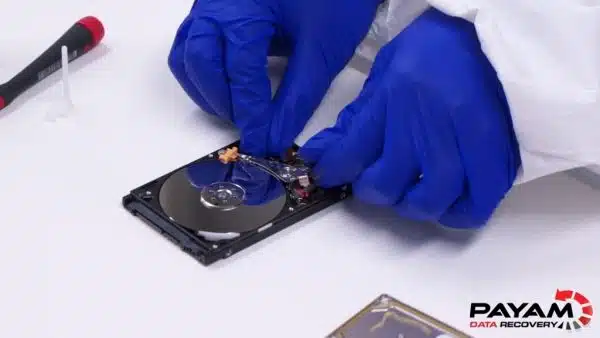
When the drive arrived at Payam Data Recovery in Sydney, the data recovery engineer plugged it into the Atola Insight Forensic tool and listened. The drive was spinning normally with no clicking sounds, which ruled out head damage. It was detected with the correct model and capacity.
However, the SMART status showed warnings indicating bad sectors. These are exactly what cause drives to freeze computers: the system repeatedly tries to read damaged areas, locking up the entire machine.
The good news was that the data recovery engineer could detect the partition and preview folders on the drive. This is a very good sign for successful recovery, as it means the file system structure is intact and the data is still there, just trapped behind the bad sectors.
The WD My Passport External Hard Drive Data Recovery Case Study Process
The data recovery engineer began cloning the data to a healthy working drive. About a minute into the process, read errors appeared. These slow-reading sectors are exactly what freeze Windows PCs and Macs, making folders appear empty even though the files are still there.
To handle this, the data recovery engineer used the Atola Insight Forensic’s custom multi-pass imaging algorithm, designed to maximise data recovery without stressing the drive. Professional hardware imaging tools handle bad sectors differently from consumer software. They use multiple passes with custom timeouts, reading the easy sectors first and then going back for the difficult ones, rather than getting stuck on each bad sector sequentially.
After 18 hours of cloning, the process was complete with 99.99% of the data recovered. This WD My Passport external hard drive data recovery case study demonstrates why professional hardware tools succeed where software fails: 18 hours to a near-perfect clone, compared to 2 weeks of failed attempts at the local shop.
WD My Passport External Hard Drive Data Recovery Case Study Results
The recovery was a complete success. The data recovery engineer saved everything to a new SSD that Rosa had purchased, generated a complete file listing and video preview for her to review, and shipped it back via Australia Post Express overnight at no extra charge.
All of Rosa’s files were recovered: years of work and memories, every file she described as priceless. This WD My Passport external hard drive data recovery case study was completed using Payam Data Recovery’s bad sector recovery method, which combines professional hardware imaging with the expertise to use the tools properly.
Why Professional External Hard Drive Data Recovery Matters
This WD My Passport external hard drive data recovery case study highlights the difference between professional and consumer-level recovery approaches:
Professional hardware imaging tools like the Atola Insight Forensic cost around $14,000 Australian plus $3,000 in yearly licensing. They operate independently from the computer’s operating system, use custom multi-pass algorithms, and can handle bad sectors without freezing. In Rosa’s case, 18 hours to a 99.99% clone.
Local computer shops typically use software-based solutions that run on a standard computer. When the drive has bad sectors, the software freezes just like the customer’s own computer did. This results in slow turnaround (2 weeks in Rosa’s case) and often corrupted or incomplete files.
The difference is not just the tools but the expertise to use them properly. Professional hard drive data recovery at Payam Data Recovery uses the Ace Lab PC-3000, DeepSpar Disk Imagers, Atola Insight Forensic, and an ISO 5 certified laminar flow cabinet for drives requiring mechanical work. Over 2,000 IT companies and computer repair businesses across Australia trust Payam with their most difficult cases.
How to Prevent External Hard Drive Data Loss
Rosa’s WD My Passport external hard drive data recovery case study began because she unplugged the drive without safely ejecting while it was full. To help prevent this kind of data loss:
- Always safely eject external drives before unplugging. On Windows, use “Safely Remove Hardware.” On Mac, use “Eject” in Finder
- Do not fill drives to 100% capacity. Leave at least 10 to 15% free space for the drive to operate properly
- Monitor your drive’s health using free software like CrystalDiskInfo (Windows) or Disk Utility (Mac)
- Keep backups of important files on a second drive or cloud storage
- If your drive freezes your computer, stop using it immediately and contact a professional data recovery company
Why People Choose Payam Data Recovery
A failed hard drive needs an experienced data recovery engineer, and often a matching donor part. We work on 10 to 15 drives with failed heads every day.
- We are a specialist data recovery lab, not a computer repair shop. We have been recovering data since 1998, from over 300,000 devices.
- The best equipped data recovery lab in Australia: an ISO 5 certified laminar flow cabinet for head replacements, an anti-static lab, microscopes and microsoldering stations for circuit board work, the Ace Lab PC-3000, Atola Insight Forensic and DeepSpar Disk Imager, and over 30,000 donor parts, including around 20,000 donor hard drives. When your drive needs a matching part, it is usually already on our shelf.
- Over 2,000 IT companies and computer shops across Australia send us their customers’ complex cases, and data recovery labs and IT companies in more than 50 countries have sent us their difficult cases over the past ten years.
- Rated 4.9 from over 2,400 Google reviews.
- About 90% of our jobs are no fix, no fee. The hardest 10% carry an attempt fee.
- See your files before you pay. You tell us which files matter most. Before you pay for the recovery, we’ll send you a list of your recovered files so you can check them. If any of the files you listed are missing, tell us and we’ll search again.
- Pay by Visa, Mastercard, American Express, Apple Pay, Google Pay, Link or PayPal, split the cost with Afterpay, Zip, Klarna or PayPal Pay in 4, or pay by bank deposit (EFT).
- Everything is done in our own labs in Australia and never outsourced overseas. Call or visit us, and you can speak with the data recovery engineers who do the work.
We are not the cheapest. We are the best in Australia at this work. We know what to do, how to do it, and we will do our very best for you. Your best chance of getting your data back is with us.
External Hard Drive Data Recovery Assessment
If you are facing a situation similar to this WD My Passport external hard drive data recovery case study, hard drive data recovery at Payam Data Recovery starts with a free assessment and quote with no obligation. For urgent situations, we also offer a $150 urgent assessment that gives you a written quote within 1 to 2 hours.
The cost of hard drive bad sector recovery varies with the fault found, urgency, and other factors, and current prices are on our hard drive data recovery page. You receive a detailed quote before any work begins. Bad sector recovery has no attempt fee: nothing is paid upfront, and you only pay if we successfully recover your data.
Three service tiers are available:
- Economy: Best value, standard turnaround
- Priority: Faster turnaround, moves ahead of the Economy queue
- Emergency: Fastest possible, after-hours and weekends if needed
Payam Data Recovery recovers data from all external hard drive brands including Western Digital (My Passport, Elements, My Book), Seagate (Backup Plus, Expansion, One Touch), Toshiba (Canvio), LaCie, Samsung, and all others.
All prices include GST. If we recover your data and you pay, return delivery is free, including to New Zealand. Payam Data Recovery serves customers across Australia with laboratories in Sydney, Melbourne, and Brisbane, plus secure drop-off offices in Perth and Adelaide, which send your device to our lab in Rhodes, NSW at no cost. We also welcome international customers from the USA, New Zealand, UK, and worldwide. If anyone can recover your data, it’s us.
Frequently Asked Questions: External Hard Drive Bad Sectors Recovery
Why does my external hard drive freeze my computer?
An external hard drive that freezes your computer typically has bad sectors. When the operating system tries to read these damaged areas, it gets stuck waiting for a response, which locks up File Explorer and the entire system. In this WD My Passport external hard drive data recovery case study, the same freezing behaviour occurred on both Rosa’s computer and the local shop’s system.
Can data be recovered from an external hard drive with bad sectors?
Yes. In this case study, 99.99% of data was recovered from a WD My Passport 5TB drive with bad sectors using professional hardware imaging. The Atola Insight Forensic’s custom multi-pass algorithm cloned the drive in 18 hours. All files were recovered in working order.
Why did unplugging without safely ejecting cause the problem?
Removing an external drive without safely ejecting can interrupt write operations, leaving the file system in an inconsistent state. If the drive was already developing bad sectors, this sudden disconnection can make the problem worse by corrupting the file system on top of the existing physical damage.
Why couldn’t the local computer shop recover the data?
Most computer shops use software-based recovery tools that run on standard computers. When a drive has bad sectors, these tools freeze just like the customer’s own computer did. Professional hardware imaging tools like the Atola Insight Forensic operate independently and use custom algorithms to read around bad sectors without freezing.
How much does external hard drive bad sector recovery cost in Australia?
The cost of external hard drive bad sector recovery varies with the fault found, urgency, and other factors. Payam Data Recovery offers a free assessment and quote before starting any work, so you know the exact cost upfront with no obligation. All prices include GST. If we recover your data and you pay, return delivery is free, including to New Zealand.
How long does external hard drive recovery take?
In this case study, the hardware cloning took 18 hours to complete a 99.99% clone of the 5TB drive. Overall turnaround depends on the service tier: Economy has a standard turnaround, Priority is faster, and Emergency is the fastest possible. The local computer shop spent 2 weeks with no results, while professional tools completed the job in under a day.
What is a multi-pass imaging algorithm?
A multi-pass imaging algorithm reads a failing drive in multiple stages. The first pass reads the easy, healthy sectors quickly. Subsequent passes go back for the difficult sectors with adjusted timeouts and reading strategies. This approach maximises data recovery without overstressing the drive, which could cause further damage.
What external hard drive brands does Payam Data Recovery support?
Payam Data Recovery recovers data from all external hard drive brands including Western Digital (My Passport, Elements, My Book), Seagate (Backup Plus, Expansion, One Touch), Toshiba (Canvio), LaCie, Samsung, G-Technology, and all others. All fault types are supported including bad sectors, clicking drives, dropped drives, and drives not detected.
Should I keep trying to plug in my frozen external drive?
No. If your external hard drive freezes your computer when plugged in, stop using it immediately. Each time you plug it in and the system tries to read the bad sectors, the drive’s condition can worsen. Do not run chkdsk, disk repair utilities, or recovery software. Send the drive to a professional data recovery company.
Does Payam Data Recovery accept external hard drive cases from outside Australia?
Yes. Payam Data Recovery welcomes international customers from the USA, New Zealand, UK, and worldwide. Contact us at help@payam.com.au or call 1300 444 800 to discuss your case and arrange shipping.
About Payam Data Recovery
Payam Data Recovery is an Australian data recovery company founded in 1998 with over 300,000 devices recovered. The company is trusted by over 2,000 IT professionals and computer repair businesses across Australia who send their most difficult cases, including external hard drive recoveries like this WD My Passport external hard drive data recovery case study.
With full-service laboratories in Sydney (including our head office in Sydney CBD and our main data recovery lab in Rhodes, NSW), Melbourne, and Brisbane, plus secure drop-off offices in Perth and Adelaide, which send your device to our lab in Rhodes, NSW at no cost, Payam Data Recovery serves customers across Australia and internationally. All recovery work is performed in Australia and is never outsourced overseas.
For hard drive recoveries, the team uses the Ace Lab PC-3000, DeepSpar Disk Imagers, Atola Insight Forensic imagers, and an ISO 5 certified laminar flow cabinet for drives requiring mechanical work. Everything is done here in Australia. We never outsource overseas.
Is Your External Hard Drive Freezing Your Computer? We Can Help.
External hard drive freezing your computer? File Explorer not responding? Local computer shop unable to recover your data? Stop plugging it in. Contact Payam Data Recovery for a free assessment with professional hardware imaging tools that succeed where software fails.
Bad sector recovery: No attempt fee, no charge if unsuccessful. Free assessment and quote with no obligation. Urgent assessment (written quote within 1 to 2 hours) available for time-critical cases.
All external drive brands supported: Western Digital, Seagate, Toshiba, LaCie, Samsung, and all others. Bad sectors, clicking drives, dropped drives, and drives not detected.
Based in Australia. International customers welcome. Over 2,000 IT companies across Australia trust us with their toughest cases. Nobody will try harder or invest more expertise into your case.
Submit your hard drive for recovery | Phone: 1300 444 800 | Email: help@payam.com.au
Related Hard Drive Data Recovery Case Studies
- How to Fix a Clicking Hard Drive Case Study
- Western Digital Hard Drive Data Recovery Case Study
- Samsung Hard Drive Data Recovery Case Study
- Hard Drive Bad Sectors Data Recovery Case Study
- Fire Water Damaged Hard Drive Recovery Case Study
- Time Machine WD My Passport data recovery case study
- Western Digital hard drive case study
Video Transcript: WD My Passport External Hard Drive Data Recovery Case Study
Hey, it’s Mike at Payam Data Recovery with owner Payam Toloo working on a common problem they see often. Rosa has sent in her Western Digital My Passport 5TB external drive. She’d been downloading videos when the drive filled up, then unplugged it without safely ejecting. Now the drive wouldn’t open. File Explorer froze and her entire system became unresponsive. Rosa said every file was priceless. Years of work and memories. She’d already tried a local computer shop for 2 weeks, but with no success.
Payam plugged it into his Atola Insight Forensic tool and listened. The drive was spinning normally with no clicking sounds. It was detected, but the SMART system showed warnings indicating bad sectors. He could detect the partition and preview folders, a very good sign for successful recovery.
Payam cloned the data to a healthy working drive. About a minute in, read errors appeared. These slow-reading sectors are exactly what freeze Windows PCs and Macs, making folders appear empty even though the files are there.
Using the Atola’s custom multi-pass imaging algorithm designed to maximise data recovery without stressing the drive. 18 hours later, the clone was complete with 99.99% of the data recovered.
Payam saved everything to a new SSD Rosa purchased, generated a file listing and video preview, and shipped it back by Australia Post Express overnight at no extra charge.
The difference: professional hardware imaging tools like the Atola, which cost around $14,000 Australian plus $3,000 yearly licensing, combined with expertise to use them properly. Local computer shops typically use software-based solutions, resulting in slow turnaround and corrupted files. In the right hands, data recovery can be quick, affordable, and perfect.
All of Rosa’s files were recovered using Payam Data Recovery’s bad sector recovery method. Thanks for watching.


