

Published 15 November 2025. Updated 18 October 2026.
Case Study Summary
- Client: Marcus (Brisbane, Australia)
- Device: Samsung Galaxy S10
- Problem: Phone would not turn on after water damage
- Recovery method: Component-level repair using microsoldering
- Outcome: 3,500 photos and 400 videos recovered
This Samsung S10 water damage case study documents how the data recovery engineers at Payam Data Recovery recovered 3,500 photos and 400 videos from a phone that would not turn on. The device had water damage that caused corrosion on critical components, and the customer had no backup.
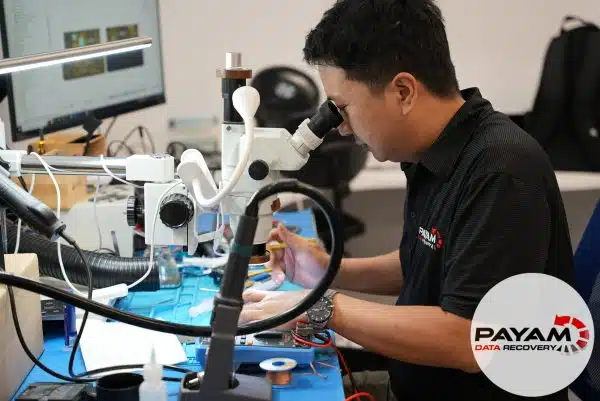
Samsung S10 water damage case study overview
A phone that will not turn on can still be recoverable, depending on what failed on the logic board. In this case, the symptoms included no screen response, no charging indicator, and no sign of life.
- No screen response when pressing the power button
- No charging indicator when plugged in
- Phone appeared completely dead
- No backup available
Diagnosis: corrosion stopping the phone from booting
The data recovery engineer identified water damage and corrosion affecting critical components. One of the main power relays connected to the Wi-Fi IC had a short circuit due to corrosion, which prevented the power line from working correctly for boot.
For device background information, see the
Samsung Galaxy S10 overview.
Repair process used to access the data
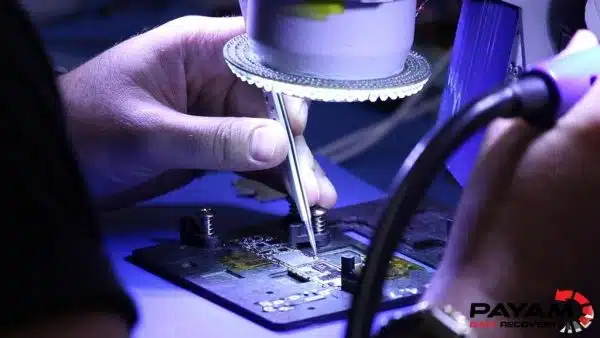
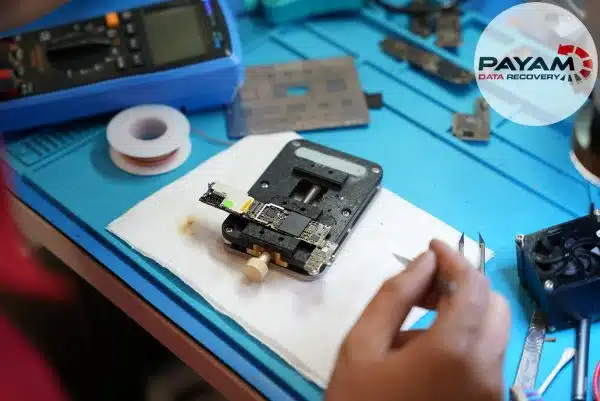
The recovery approach focused on restoring the phone’s ability to boot so a full backup could be created. This required component-level work performed under a microscope.
- Removing the faulty DC to DC IC (power conversion chip)
- Replacing small capacitors affected by water damage
- Testing until the Samsung logo appeared and the phone booted
Recovery outcome
Once the phone booted, a complete backup of the data was created. This Samsung S10 water damage case study resulted in recovery of all 3,500 photos and 400 videos.
Why People Choose Payam Data Recovery
When an Android phone will not start, its data is locked to its own chips, so those chips have to be working again before anything can be copied. That is the work we do every day.
- We are a specialist data recovery lab, not a phone repair shop. We have been recovering data since 1998, from over 300,000 devices.
- 500 mobile phone repair shops and over 2,000 IT companies and computer shops across Australia send us their customers’ complex cases every year.
- Board level repair under the microscope by our own data recovery engineers, here in Australia and never outsourced overseas.
- Your data stays private. Our data recovery engineers open only a few random, non-sensitive files to check the recovery worked, and we can sign an NDA on request.
- Rated 4.9 from over 2,400 Google reviews.
We are not the cheapest. We are the best in Australia at this work. We know what to do, how to do it, and we will do our very best for you. Your best chance of getting your data back is with us.
Mobile phone and tablet data recovery service
Mobile phones and tablets, including iPhone and iPad, are a fixed price service. Phones and tablets are a fixed price. Most recoveries are no fix, no fee. Some complex cases have an attempt fee, then a completion fee only if the recovery is successful. You see your files before you pay. We are successful in 99 percent of cases. Contact us for a free quote and we will confirm the price, the turnaround options and the next step. You will need to know the passcode. Pay by Visa, Mastercard, American Express, Apple Pay, Google Pay, Link or PayPal, split the cost with Afterpay, Zip, Klarna or PayPal Pay in 4, or pay by bank deposit (EFT).
Frequently asked questions
My Samsung got wet and now shows no sign of life at all. Is it worth trying?
Yes. This S10 had no screen response, no charging indicator and appeared completely dead, and 3,500 photos and 400 videos came back. A phone that will not turn on has not necessarily lost anything.
What does water actually damage inside the phone?
Corrosion on the logic board rather than the storage. Here one of the main power relays connected to the Wi-Fi IC had shorted through corrosion, which stopped the power line working properly and prevented the phone booting.
Do you have to repair the phone to recover the data?
In a case like this, yes. The aim was to restore enough of the phone for it to boot so a full backup could be taken. That meant component level work under a microscope: removing the failed DC to DC power conversion chip and replacing capacitors damaged by the water.
I have no backup at all. Does that change anything?
It raises what is at stake rather than the difficulty. This customer had no backup, so everything depended on the recovery.
What should I do straight after a phone gets wet?
Stop using it and do not try to charge it. Corrosion continues after the phone looks dry, and charging a wet phone accelerates the damage considerably.
What does mobile phone data recovery cost, and when do I pay?
Phones and tablets are a fixed price. Most recoveries are no fix, no fee. Some complex cases have an attempt fee, then a completion fee only if the recovery is successful. You see your files before you pay. The service is a fixed price. Contact us for a free quote and we will confirm the price and the turnaround options.
Related case studies
- Water damaged iPhone 17 Pro, motherboard transplant
- iPhone salt water data recovery case study
- iPhone fell in swimming pool data recovery
- Smashed and bent iPhone data recovery solutions
About Payam Data Recovery
Payam Data Recovery works with individuals, students, families, small and medium businesses, IT companies, and organisations that need their data recovered safely and professionally. Some customers come to us with a single damaged device containing personal memories, while others rely on us for complex technical recoveries that require specialist tools and experience.
We are based in Australia and have been recovering data since 1998. Our clients also include governments, law enforcement agencies, corporations, and public figures. Every job is handled with 100 percent confidentiality and privacy.
Get a free quote
Read more about our Mobile Phone Data Recovery Service
Email: help@payam.com.au
Phone: 1300 444 800
International customers are always welcome. The easiest way to reach us from overseas is by email at help@payam.com.au, which works in every time zone.
Video transcript
Click to expand full transcript
When Marcus’s phone would not turn on, he suddenly lost access to over 3,500 photos and 400 videos that he had never backed up. Hey, it’s Mike visiting Payam Data Recovery to give you a behind-the-scenes look in this case study about a Samsung Galaxy S10 from one of their clients in Brisbane, Australia.
The data recovery engineer began by carefully examining the phone. The first thing he told me was that this was a classic case of water damage, something that can happen over time. The phone may keep working and sometime in the future suddenly die.
When the data recovery engineer opened up the phone, he spotted the problem. Water had gotten inside and caused corrosion on some critical components. Specifically, one of the main power relays connected to the Wi-Fi IC had a short circuit due to this corrosion.
The power line doesn’t work for booting, he explained to me as he pointed to the damaged area. Essentially, the power line is like the phone’s electrical highway. It carries power from the battery to all the critical components that need to wake up when you press the power button.
I watched him methodically remove the faulty DC to DC IC, which is a power conversion chip. He carefully removed several small capacitors that had been affected by the water damage. Using specialised tools and working under a microscope, he removed each damaged component.
He tested the phone again. The Samsung logo appeared on the screen and the phone was booting up. A full backup of all the data on the phone would then be saved to an external hard drive. Another team member would email Marcus a file listing, a video preview, and a request for payment. Once payment was received, it would be shipped to him.


