


Case Study Summary: 16 Drive RAID Recovery, 10TB Recovered in 5 Days
- Client: Matthew, IT Manager, major mining company data centre in Western Australia
- Device: 16 Dell 2TB SAS hard drives across three separate RAID arrays (one RAID 6, two RAID 5)
- Problem: Server logs showed three failed drives. Critical business documents inaccessible across three arrays.
- Solution: All 16 drives tested, cloned, two stiction drives repaired in laminar flow cabinet, RAID arrays rebuilt using UFS Explorer.
- Outcome: Approximately 10TB of data recovered from a 12TB Linux volume in just 5 days. Original drives destroyed on site at customer’s request.
- Service: RAID and NAS Data Recovery Australia
16 Drive RAID Recovery Case Study: 3 Arrays, 10TB Recovered in 5 Days
On Christmas Eve, a suitcase appeared outside the office door at Payam Data Recovery in Sydney. No courier, no customer, just a suitcase. Inside were 16 Dell 2TB SAS hard drives from a server rack, plus documentation from Matthew, the IT manager of one of the biggest data centres in Western Australia. His documentation explained the drives came from three servers running a RAID 6 and two separate RAID 5 arrays, containing critical business documents for a major mining company. This 16 drive RAID recovery case study shows how our team rebuilt three separate arrays, repaired two drives with stiction, and recovered approximately 10TB of data in just 5 days. If you are dealing with a similar RAID or NAS failure, we can help.
The Problem: 16 Drives Across Three Separate RAID Arrays
Matthew’s server logs showed three failed drives, but with 16 drives spread across three different RAID configurations, the challenge was significant. As this 16 drive RAID recovery case study reveals, the team needed to work out which drives belonged to which RAID array and recover the critical business documents that the mining company depended on.
The three arrays consisted of one RAID 6 configuration and two separate RAID 5 arrays. RAID 6 provides double parity, meaning it can tolerate two simultaneous drive failures, while RAID 5 can tolerate only one drive failure per array. With three confirmed failed drives across the three arrays, the data was at serious risk. Without professional RAID recovery, the business documents would have been permanently lost.
How We Recovered 10TB from 16 Drives in 5 Days
After 28 years in the business, Payam has worked on thousands of RAID recoveries. For this 16 drive RAID recovery case study, he explained that the key is patience: think logically, step by step, until you work it out.
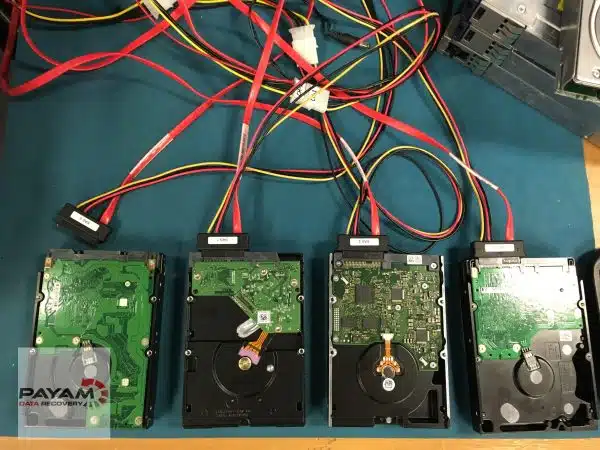
First, each of the 16 Dell 2TB SAS drives was tested using the Atola Insight Forensic with SAS extension. Good drives were cloned to fresh drives immediately. Drives with bad sectors were imaged using the Ace Labs PC-3000 SAS, which provides more control over the imaging process for drives with read errors.
Two of the drives presented an additional challenge: damaged heads stuck to the platters, a condition known as stiction. Stiction occurs when hard drive read/write heads become stuck to the platter surface, typically after unexpected power loss or extended idle periods. These two drives were opened in a dust-free laminar flow cabinet, where the heads were carefully freed. The drives were then cloned sector by sector.
With all 16 clones ready, they were connected to a 32-drive SAS rack, providing a fast and stable environment for the multi-drive RAID rebuild. Using UFS Explorer, the RAID arrays rebuilt automatically, revealing a 12TB Linux volume containing approximately 10TB of data.
The Results: 10TB Recovered, All Files Verified
All of Matthew’s critical business documents were recovered successfully. The files were saved to a 20TB external hard drive, verified for integrity, and shipped overnight to the customer. At Matthew’s request, the original 16 drives were destroyed on site using a physical shredder. This 16 drive RAID recovery case study was completed in just 5 days from start to finish.
Several factors contributed to the speed of this recovery. Matthew labelled every drive clearly, provided full documentation including server logs and RAID configuration details, approved the quote quickly, and was clear about exactly what he needed recovered. He also made the right decision not to attempt to rebuild the arrays himself, which can often cause further data loss. This is the ideal approach for any business facing a RAID failure.
Why This 16 Drive RAID Recovery Required a Specialist Lab
Understanding RAID 6: Why Matthew’s Mining Company Used It
RAID 6 is a way of combining multiple hard drives into one logical storage pool that can keep working even if any two drives fail at the same time. Like RAID 5, it stripes data across all the disks for speed, but unlike simpler RAID levels it stores two separate sets of parity information instead of one. That dual parity means the system can mathematically reconstruct missing data even if two drives are offline or completely dead, which massively reduces the risk of catastrophic data loss on large arrays.
IT teams choose RAID 6 for mission-critical systems that use large capacity drives (such as Matthew’s 2TB SAS disks) because rebuilds can take many hours or even days, and the chance of a second drive failing during a rebuild is much higher than it used to be. RAID 6 trades some usable capacity and write speed for much better fault tolerance, which is why it is common in data centres, backups, archives, media storage, and mining or engineering workloads where downtime and data loss are unacceptable.
Compared to RAID 5 (which can only tolerate one drive failure), RAID 6 provides significantly more protection for the exact scenario Matthew faced: multiple drives failing across a busy production environment. This is why Matthew’s data centre ran RAID 6 alongside the two RAID 5 arrays for their most critical business documents. This 16 drive RAID recovery case study is a real-world example of how that decision played out when multiple drives failed.
Why the Clone-First Approach Saves Data
Professional RAID recovery may look slow and careful from the outside, but that methodical approach is exactly what saves data. Best practice is to test every drive individually, then clone or image each one, and perform all RAID reconstruction from those clones, never from the originals.
This matters because every extra rebuild attempt or parity check on a failing disk can push it over the edge. A drive with bad sectors or stiction is already degraded, and running RAID rebuild operations directly on it risks further damage that could make the data unrecoverable. By creating clean clones first, the recovery team protects the original evidence and can attempt the RAID rebuild as many times as needed without risk.
Specialist tools such as the Atola Insight Forensic, Ace Labs PC-3000, and UFS Explorer are purpose-built for this workflow. They can read around bad sectors, keep track of which blocks are damaged, and feed clean, consistent images into the RAID rebuilding software so the parity mathematics still works correctly. That is the behind-the-scenes engineering that the average IT manager does not see, and it is exactly what made this 16 drive RAID recovery case study a success, with 10TB recovered in just 5 days.
RAID arrays are designed for redundancy, but when multiple drives fail simultaneously or an array is misconfigured, the data can become inaccessible. Attempting to rebuild a degraded RAID without the right tools and expertise risks overwriting the very data you are trying to recover. In this case, three drives had failed across three separate arrays, and two of those drives had stiction, which required physical intervention in a dust-free environment.
Professional RAID recovery requires specialised equipment that is not available to IT teams or general repair shops. This includes the Atola Insight Forensic with SAS extension for drive diagnostics, the Ace Labs PC-3000 SAS for imaging drives with bad sectors, a 32-drive SAS rack for connecting and rebuilding large arrays simultaneously, dust-free laminar flow cabinets for drives requiring physical repair, and software such as UFS Explorer for RAID array reconstruction.
Without these tools and the experience to use them correctly, a recovery of this complexity would not have been possible. This is why multi-drive RAID recovery should only be attempted by a specialist data recovery laboratory.
Tips for IT Managers: How to Prepare for RAID Data Recovery
Matthew’s preparation was a major reason this recovery was completed so quickly and successfully. His case is also a good reminder of a critical point: RAID is not a backup. RAID buys you time and uptime, not immunity from data loss. Once multiple disks are in trouble, the safest move is to power the system down, label and document everything, and hand it to a specialist rather than experimenting.
Good labelling, clear RAID documentation (levels, stripe size, controller settings), and sending all the drives together, not just the ones you think are bad, can turn a multi-week forensic puzzle into a five-day success like Matthew’s case. If your RAID or server has failed, here is what you can do to help your data recovery company achieve the best possible outcome:
- Power down the system immediately to prevent further degradation of failing drives
- Label every drive clearly with its position number, slot, and array membership
- Document your RAID configurations, including RAID levels, stripe sizes, controller model, and drive order
- Send all drives together, both faulty and healthy, as every drive contains data needed for the rebuild
- Provide server logs showing when and how the failure occurred
- Do not attempt to rebuild the array yourself, as this can overwrite critical parity data
- Do not initialise, format, or replace failed drives before sending them for recovery
- Do not run consistency checks or parity rebuilds on a degraded array
- Approve the quote promptly to minimise further degradation of failing drives
The more information you provide, the faster and more cost-effective the RAID data recovery will be. This 16 drive RAID recovery case study is proof that good preparation from the customer can make all the difference.
What Types of RAID Does Payam Data Recovery Handle?
Matthew’s job involved RAID 6 and RAID 5, but this is just one example of the RAID configurations we work with. For a full overview of the RAID levels, NAS devices, and server types we recover, visit our RAID and NAS data recovery service page. We handle SAS, SATA, and SSD server drives from Dell, HP, Lenovo, Supermicro, and other manufacturers, as well as NAS devices from Synology, QNAP, Western Digital, Drobo, and Netgear.
Why People Choose Payam Data Recovery
When a RAID, NAS or server fails, the array has to be rebuilt correctly the first time, without putting the original drives at further risk. That is the work we do every day.
- We are a specialist data recovery lab, not an IT support company. We have been recovering data since 1998, from over 300,000 devices.
- Over 2,000 IT companies and computer shops across Australia send us their customers’ complex cases, and data recovery labs and IT companies in more than 50 countries have sent us their difficult cases over the past ten years.
- Every drive is tested and cloned first on professional tools such as Atola Insight Forensic, the PC-3000 and the DeepSpar Disk Imager, and the RAID is rebuilt from the clones. A drive that needs a head swap is opened in our ISO 5 certified laminar flow cabinet, with over 30,000 donor parts in-house, including around 20,000 donor hard drives.
- Emergency service for businesses. Many of our business and IT customers choose it, because every day a server is offline usually costs more than the difference in price. 24/7 emergency service is available as a premium option on 0404 872 926.
- Your data stays private. Our data recovery engineers open only a few random, non-sensitive files to check the recovery worked, and we will sign your NDA on request.
- See your files before you pay. You tell us which files matter most. Before you pay for the recovery, we’ll send you a list of your recovered files so you can check them. If any of the files you listed are missing, tell us and we’ll search again.
- There is no card surcharge. Pay by Visa, Mastercard, American Express, Afterpay, Zip or bank deposit (EFT).
- Rated 4.9 from more than 2,300 Google reviews.
We are not the cheapest. We are the best in Australia at this work. We know what to do, how to do it, and we will do our very best for you. Your best chance of getting your data back is with us.
How Much Does RAID Recovery Cost?
Every RAID job is different, so pricing depends on the number of failed drives, the RAID level, and the complexity of the recovery. A job like this 16 drive RAID recovery case study sits at the higher end of the scale due to the number of drives and multiple arrays involved. Complex multi-drive cases are quoted individually. Priority and Emergency services are available for faster turnaround. We always start with a free assessment and quote with no obligation, so you will know the exact cost before any work begins. For full pricing details, visit our RAID data recovery service page.
International customers worldwide are welcome to ship their drives to our Sydney laboratory using an international courier or postal service such as DHL, FedEx, or UPS. We provide the same free assessment, detailed quoting, and secure return shipping for international clients. The easiest way for an international customer to reach us is by email at help@payam.com.au, which works in every time zone.
Frequently Asked Questions About This RAID Recovery Case Study
Can data be recovered from multiple failed drives in a RAID array?
Yes. In this 16 drive RAID recovery case study, three drives had failed across three separate RAID arrays, and two of those drives also had stiction requiring physical repair. All 10TB of data was recovered successfully. The outcome depends on the RAID level, the number of failed drives, and the type of failure. RAID 6 can tolerate two drive failures, while RAID 5 can tolerate one. Even if more drives have failed than the RAID level can handle, professional recovery may still be possible depending on the extent of the damage.
What is stiction and can data still be recovered?
Stiction occurs when hard drive read/write heads become physically stuck to the platter surface. This typically happens after unexpected power loss or when a drive sits idle for an extended period. Data can still be recovered by carefully freeing the heads in a dust free laminar flow cabinet, then cloning the drive sector by sector. In this 16 drive RAID recovery case study, two drives with stiction were successfully repaired and cloned as part of the recovery.
How long does RAID recovery take?
Turnaround depends on the number of drives, the complexity of the array, and the service tier chosen. In this 16 drive RAID recovery case study, three arrays were fully recovered in just 5 days. Economy service has the longest turnaround, while Priority and Emergency services offer faster completion. Contact us for a free assessment and we will provide an estimated turnaround with your quote.
How much does RAID recovery cost in Australia?
The exact price depends on the number of failed drives and the complexity of the array. Priority and Emergency services are available at higher price points for faster turnaround. Payam Data Recovery offers a free assessment and quote with no obligation. Visit our RAID data recovery service page for more details.
Should I try to rebuild the RAID myself before sending it for recovery?
No. Attempting to rebuild a degraded RAID array without proper tools and expertise can overwrite critical parity data and make recovery significantly harder or impossible. As this 16 drive RAID recovery case study demonstrates, Matthew made the right decision not to attempt a rebuild himself. The best approach is to power down the system, label all drives, document the RAID configuration, and send all drives to a professional recovery laboratory.
Do I need to send all the drives, including healthy ones?
Yes. Every drive in a RAID array contains data needed for the rebuild, including parity information. Even healthy drives are essential for reconstructing the array. In this 16 drive RAID recovery case study, all 16 drives were sent together, which allowed the team to rebuild all three arrays and recover the full 10TB of data.
What RAID levels can you recover?
Payam Data Recovery recovers data from all RAID configurations including RAID 0, RAID 1, RAID 5, RAID 6, RAID 10, and custom or proprietary configurations used by NAS manufacturers. We handle SAS, SATA, and SSD server drives from all major manufacturers. For full details, visit our RAID and NAS data recovery service page.
Can you destroy the original drives after recovery?
Yes. Secure on-site drive destruction is available upon request. In this 16 drive RAID recovery case study, all 16 original drives were physically shredded on site at the customer’s request. This is a common requirement for businesses handling sensitive data, particularly in mining, government, and financial services.
Do you accept RAID recovery jobs from international customers?
Yes. International customers worldwide are welcome to ship their drives to our Sydney laboratory using an international courier or postal service. We provide the same free assessment, detailed quoting, and secure return shipping for international clients as we do for Australian customers.
About Payam Data Recovery
Payam Data Recovery is Australia’s oldest data recovery company, established in 1998. With over 300,000 devices recovered and 28 years of experience, the team operates from laboratories in Sydney, Melbourne, and Brisbane, with secure drop-off offices in Perth and Adelaide. The Rhodes, NSW facility has an ISO 5 certified laminar flow cabinet and houses over 30,000 donor parts, including around 20,000 donor hard drives.
Trusted by over 2,000 IT professionals and computer repair businesses across Australia, Payam Data Recovery serves Australian Government agencies, police services, top 100 companies, universities, and major mining companies. The team uses industry-leading equipment including the Atola Insight Forensic, Ace Labs PC-3000, and a 32-drive SAS rack purpose-built for large-scale RAID recovery. All work is performed in Australia and is never outsourced overseas.
International customers worldwide are welcome to ship their drives using an international courier or postal service such as DHL, FedEx, UPS, or their national postal service.
For more information about RAID and NAS data recovery services, including all supported RAID levels, NAS devices, and server types, visit our service page or contact us for a free assessment. If you are facing a situation similar to this 16 drive RAID recovery case study, our team is ready to help.
Your RAID or Server Has Failed? We Can Recover Your Data.
RAID recovery pricing depends on the number of drives and the complexity of the failure. Priority and Emergency services are available for faster turnaround. We offer a free assessment and quote with no obligation.
We recover data from all RAID configurations including RAID 0, 1, 5, 6, and 10. Visit our RAID data recovery service page for full details on supported devices, NAS brands, and server types.
International customers worldwide are welcome to ship their drives to our Sydney laboratory using an international courier or postal service.
All work is performed in Australia. We never outsource overseas. Secure on-site drive destruction is available upon request.
Submit a Job Online
Phone: 1300 444 800
Related Data Recovery Case Studies
- Western Digital Hard Drive Data Recovery Case Study
- DVR Surveillance Hard Drive Data Recovery Case Study
- How to Fix a Clicking Hard Drive
- VMware ESXi Dell SAS RAID recovery case study
- Windows Server RAID with ReFS deduplication case study
View Full Video Transcript: 16 Drive RAID Recovery Case Study
Picture this. It’s Christmas Eve at Payam Data Recovery and Payam finds a suitcase sitting outside his office door. No courier, no customer, just a suitcase. Inside were 16 Dell 2TB SAS hard drives from a server rack, plus documentation from Matthew, the IT manager of one of the biggest data centres in Western Australia.
Hi, I’m Mike and I’m here at Payam Data Recovery to show you what goes on behind the scenes, the work customers never see.
Matthew’s documentation explained the drives came from three servers running a RAID 6 and two separate RAID 5 arrays. His server logs showed three failed drives. The challenge, work out which drives belong to which RAID and recover critical business documents for a major mining company.
After 28 years in the business, Payam has hired many talented engineers. But when it comes to RAID recovery, he’s still the king of the jungle. He told me that the key is patience. Think logically, step by step, until you work it out.
First, each drive was tested using an Atola Insight Forensic with SAS extension. Good drives were cloned. Drives with bad sectors were imaged using an Ace Labs PC-3000 SAS. Two drives had damaged heads stuck to the platters, a problem they call stiction. These were opened in their dust-free laminar flow cabinet. The heads carefully freed then cloned sector by sector.
With all 16 clones ready, Payam connected them to his 32-drive SAS rack for fast, stable RAID recovery. Using UFS Explorer, the RAID rebuilt automatically, revealing a 12TB Linux volume with about 10 terabytes of data.
The files were saved to a 20TB external hard drive, verified for integrity, and shipped overnight to Matthew. At his request, the original drives were destroyed on site using Payam’s physical shredder.
This job took 5 days from start to finish. Matthew made it easy. He labelled everything, provided documentation, approved the quote quickly, and was clear about what he needed. That’s how you get data back fast.
Payam Data Recovery specialises in RAID recovery for hard drives and SSDs, and they offer a free assessment and quote.
One of Payam’s favourite expressions stuck with me. Impossible is a word that others use when they cannot do something. Nothing is impossible.