


This MacBook A1707 coffee spill case study documents how our data recovery engineers accessed and cloned data from a MacBook Pro that was completely dead after liquid damage. The device would not power on, and the data included important work files and personal content.
Quick Answer
A MacBook Pro A1707 suffered a coffee spill and would not power on. Our data recovery engineers connected a Lifeboat device to bypass damaged circuitry and access the onboard storage. After the correct FileVault password was entered, data cloning began to copy the files to safety.
Case Study Summary
- Device: MacBook Pro A1707 (15-inch)
- Failure type: Liquid damage from a coffee spill
- Condition: Completely dead, not powering on
- Recovery method: Lifeboat connection to access onboard storage
- Outcome: Data access achieved and cloning began after authentication
- Location: Australia
MacBook A1707 coffee spill case study overview
This case study explains how data was recovered from a MacBook Pro A1707 after liquid spread across the keyboard. Although the laptop was completely unresponsive, the onboard storage could still be accessed using a controlled method with specialist equipment.
The MacBook was brought to Payam Data Recovery for assessment. The key question was whether liquid damage had created a short circuit that would block safe access to the stored data.
The problem: MacBook Pro A1707 not powering on after liquid damage
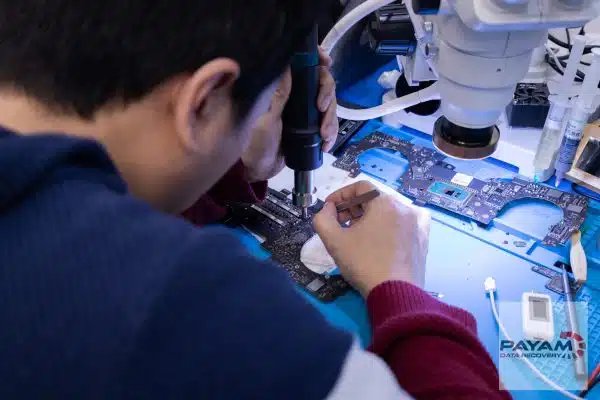
A technician opened the MacBook and began testing. The main power rail was measured for 12 volts with a multimeter, since liquid damage can create shorts that prevent normal operation and complicate recovery.
In this case, there was no short. That meant the team could proceed with an advanced method to bypass damaged areas and connect directly to the onboard storage.
A MacBook that will not power on does not automatically mean the data is lost. In some liquid damage cases, the storage can still be accessed even when the system cannot boot normally.
How we performed the MacBook A1707 coffee spill case study recovery
Because the MacBook could not boot, a Lifeboat device was used to bypass damaged circuitry and connect directly to the onboard storage.
Step 1: Lifeboat connection
A Lifeboat device was connected to access the onboard storage without relying on the MacBook booting normally.
Step 2: Host Mac connection
The Lifeboat device was connected to a working Mac so the damaged MacBook storage could be detected.
Step 3: FileVault authentication
A password prompt appeared. After the correct password was entered, the encrypted data became accessible. For background, see
Apple FileVault encryption documentation.
Step 4: Data cloning
Cloning began to copy the accessible data to a safe destination.
Recovery outcome
This MacBook A1707 coffee spill case study resulted in successful access to the client’s data and the start of cloning after authentication. The Lifeboat method is used on supported models and requires specialist tools and experience.
What this case demonstrates
- A dead MacBook does not automatically mean data loss
- Testing for shorts can determine the safest recovery path
- A Lifeboat device can bypass damaged circuitry to access onboard storage
- FileVault encrypted data requires the correct password
- Specialist tools and controlled processes matter for liquid damage cases
Why People Choose Payam Data Recovery
When a MacBook will not start, its data is usually locked to its own chips, so those chips have to be working again before anything can be copied. That is the work we do every day.
- We are a specialist data recovery lab, not a computer repair shop. We have been recovering data since 1998, from over 300,000 devices.
- We are listed on Apple’s data recovery provider page, one of three recommended data recovery providers.
- Board level repair under the microscope by our own data recovery engineers, here in Australia and never outsourced overseas.
- Over 2,000 IT companies and computer shops across Australia send us their customers’ complex cases, and data recovery labs and IT companies in more than 50 countries have sent us their difficult cases over the past ten years.
- Your data stays private. Our data recovery engineers open only a few random, non-sensitive files to check the recovery worked, and we can sign an NDA on request.
- Rated 4.9 from more than 2,300 Google reviews.
- See your files before you pay. You tell us which files matter most. Before you pay for the recovery, we’ll send you a list of your recovered files so you can check them. If any of the files you listed are missing, tell us and we’ll search again.
- There is no card surcharge. Pay by Visa, Mastercard, American Express, Afterpay, Zip or bank deposit (EFT).
We are not the cheapest. We are the best in Australia at this work. We know what to do, how to do it, and we will do our very best for you. Your best chance of getting your data back is with us.
MacBook data recovery process
For MacBooks, we provide a free assessment and quote. Quotes are typically provided within 1 to 2 business days. Work starts only after approval.
Video Transcript
Click to expand full transcript
We have all had that sinking feeling, watching liquid spread across a laptop keyboard, knowing everything might be lost in an instant. This laptop had suffered serious liquid damage from what looked like a coffee spill. The device was completely dead, but inside was years of work, files, and memories the owner could not afford to lose.
The MacBook was brought to Payam Data Recovery. A technician carefully opened the MacBook and began the assessment. The main power rail was measured for 12 volts with a multimeter. The critical question was whether the power line was shorting, as liquid damage often creates short circuits that block recovery.
This time there was no short. That meant the team could proceed with an advanced recovery method. A Lifeboat device was connected to bypass damaged circuitry and connect directly to the onboard NAND storage where the data was stored. The Lifeboat was then connected to a working Mac, allowing access to the damaged machine’s storage.
A password prompt appeared. After the correct password was entered, the data was accessible and cloning began to copy the data to safety. This method requires specialised tools and experience.
Payam Data Recovery serves customers across Australia, with secure drop-off offices plus mail and courier options for international customers.
Frequently asked questions
I spilled coffee on my MacBook and now it is completely dead. Is the data still there?
Usually. A MacBook that will not power on has not lost its storage. This A1707 was completely unresponsive and the files were still reachable.
What is the first thing you check?
Whether liquid has caused a short circuit. The main power rail was measured for 12 volts with a multimeter, because a short changes what can safely be done next. On this machine there was no short, which opened up a direct route to the storage.
What is a Lifeboat device?
Specialist equipment that bypasses damaged circuitry and connects directly to the onboard storage. It means the MacBook does not have to boot for the data to be read, which matters when the board is too damaged to start.
My drive is protected by FileVault. Can you still recover it?
Yes, with your password. FileVault encrypts the storage, so the correct password has to be entered before cloning can begin. That is what happened here.
Do you have to repair the MacBook to get my files?
Not always. Here nothing was repaired. The storage was accessed around the damage and cloned, which is faster and lower risk than rebuilding a liquid damaged board.
What does MacBook data recovery cost, and when do I pay?
Every MacBook starts with a free assessment, then a written quote with Economy, Priority and Emergency service levels. For MacBook SSD recovery there is no attempt fee: you pay nothing up front and pay only if the recovery succeeds. Before that final payment we send you a complete file list and a video preview so you can check the quality first.
Related MacBook data recovery case studies
- MacBook liquid damage data recovery case study
- Dead MacBook Pro data recovery case study Australia
- MacBook data recovery Australia dead logic board
About Payam Data Recovery
Payam Data Recovery works with individuals, students, families, small and medium businesses, IT companies, and organisations that need their data recovered safely and professionally. Some customers come to us with a single damaged device containing personal memories, while others rely on us for complex technical recoveries that require specialist tools and experience.
We are based in Australia and have been recovering data since 1998. Our clients also include governments, law enforcement agencies, corporations, and public figures. Every job is handled with 100 percent confidentiality and privacy.
We have labs in Sydney CBD, Rhodes NSW, Melbourne CBD, and Brisbane CBD, with secure drop-off offices in Adelaide CBD and Perth CBD. International customers are welcome, with regular clients in the USA, Europe, the Middle East, and Asia. The easiest way for an international customer to reach us is by email at help@payam.com.au, which works in every time zone.
Request a free MacBook data recovery quote
Read more about our MacBook Data Recovery Service
Email: help@payam.com.au
Phone: 1300 444 800