

Published 27 August 2025. Updated 25 October 2026.
2019 16-inch MacBook Pro no power case study explains how data was recovered from an unresponsive MacBook Pro after a logic board power fault. The laptop would not turn on or respond to charging, and the issue was traced to a short circuit affecting the NAND power line.
Case Study Summary
- Device: 2019 16-inch MacBook Pro (A2141)
- Problem: No power and no response
- Fault found: Short circuit on the NAND power line, with corrosion under a component
- Recovery result: Over 800,000 files recovered, including 50,000 photos and videos and 25,000 documents
2019 16-inch MacBook Pro no power case study technical overview
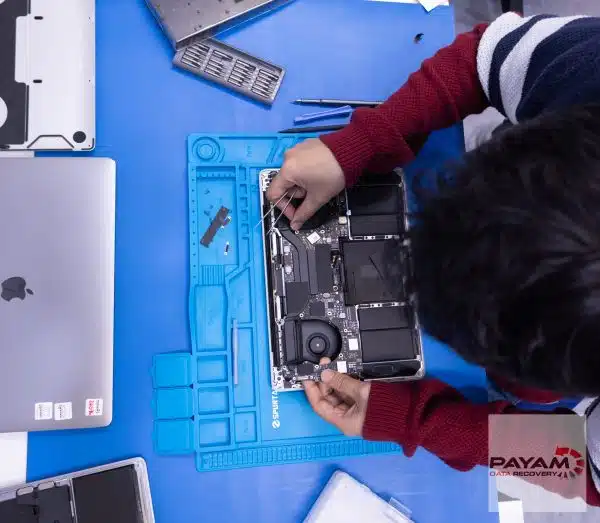
This MacBook Pro arrived completely unresponsive. In the video, the data recovery engineer used a multimeter to confirm abnormal readings and then narrowed the fault to a short circuit on the NAND power line. Because the NAND chips store the data, a power supply failure at this point can stop the entire system.
Corrosion was found under an original component on the logic board. The recovery required component-level work to restore stable power to the NAND area so the data could be accessed safely.
Logic board repair steps used to access the data
Based on the video, the data recovery engineer completed the following repair work as part of the recovery process:
- Identified the short circuit on the NAND power line using a multimeter
- Found corrosion under an affected component
- Replaced the NAND power IC
- Removed a damaged capacitor
- Reballed the power chip to rebuild the connections
For general background on Apple security and how modern Macs protect storage access, see Apple’s documentation on platform security: Apple Platform Security.
Data recovery results
After the repair work restored stable power conditions, the data was recovered successfully. The video states that over 800,000 files were saved, including:
- 50,000 photos and videos
- 25,000 documents
- Applications and other user data stored on the onboard SSD
Why People Choose Payam Data Recovery
When a MacBook will not start, its data is usually locked to its own chips, so those chips have to be working again before anything can be copied. That is the work we do every day.
- We are a specialist data recovery lab, not a computer repair shop. We have been recovering data since 1998, from over 300,000 devices.
- We are listed on Apple’s data recovery provider page, one of three recommended data recovery providers.
- Board level repair under the microscope by our own data recovery engineers, here in Australia and never outsourced overseas.
- Over 2,000 IT companies and computer shops across Australia send us their customers’ complex cases, and data recovery labs and IT companies in more than 50 countries have sent us their difficult cases over the past ten years.
- Your data stays private. Our data recovery engineers open only a few random, non-sensitive files to check the recovery worked, and we can sign an NDA on request.
- Rated 4.9 from over 2,400 Google reviews.
- See your files before you pay. You tell us which files matter most. Before you pay for the recovery, we’ll send you a list of your recovered files so you can check them. If any of the files you listed are missing, tell us and we’ll search again.
- Pay by Visa, Mastercard, American Express, Apple Pay, Google Pay, Link or PayPal, split the cost with Afterpay, Zip, Klarna or PayPal Pay in 4, or pay by bank deposit (EFT).
We are not the cheapest. We are the best in Australia at this work. We know what to do, how to do it, and we will do our very best for you. Your best chance of getting your data back is with us.
Service process
For MacBook and other non-mobile devices, we provide a free assessment and quote. Quotes are typically provided within 1 to 2 business days. Work starts only after approval.
Payam Data Recovery has laboratories in Sydney CBD, Rhodes NSW, Melbourne CBD, and Brisbane CBD. Secure drop-off offices are available in Adelaide CBD and Perth CBD. International customers are welcome and we have regular clients in the USA, Europe, the Middle East, and Asia. The easiest way for an international customer to reach us is by email at help@payam.com.au, which works in every time zone.
Payam Data Recovery works with individuals, students, families, small and medium businesses, IT companies, and organisations that need their data recovered safely and professionally. Some customers come to us with a single damaged device containing personal memories, while others rely on us for complex technical recoveries that require specialist tools and experience.
We are based in Australia and have been recovering data since 1998. Our clients also include governments, law enforcement agencies, corporations, and public figures. Every job is handled with 100 percent confidentiality and privacy.
Read more about our MacBook Data Recovery Service
Email: help@payam.com.au
Phone: 1300 444 800
Frequently asked questions
My MacBook will not turn on and does not respond to the charger. Where do you start?
With a multimeter on the logic board. Abnormal readings narrow down where the fault is before anything is touched. On this A2141 the trail led to a short circuit on the NAND power line.
What is the NAND power line and why does it stop the whole machine?
The NAND chips are the storage. If the power supply to that area fails, the machine cannot start and the data cannot be reached, even though the chips themselves are undamaged.
What caused it here?
Corrosion underneath an original component on the logic board. It was not visible from the surface, which is why the fault had to be traced electrically rather than found by eye.
Does the MacBook have to be repaired for the data to come back?
On Apple machines with soldered storage, usually yes. Stable power has to be restored to the NAND area before anything can be read, which is component level work rather than a parts swap.
How much came back?
Over 800,000 files, including 50,000 photos and videos and 25,000 documents.
What does MacBook data recovery cost, and when do I pay?
Every MacBook starts with a free assessment, then a written quote with Economy, Priority and Emergency service levels. Most MacBook SSD recoveries are no fix, no fee. If a job carries an extra cost, we quote it first, and you choose whether to go ahead. You pay at the end. Before that final payment we send you a complete file list and a video preview so you can check the quality first.
Related MacBook data recovery case studies
- iMac A1311 won’t turn on data recovery case study
- MacBook Pro power management IC recovery case study
- MacBook liquid damage data recovery case study
- MacBook Air M2 data recovery case study


